X Trend dashboard PRO
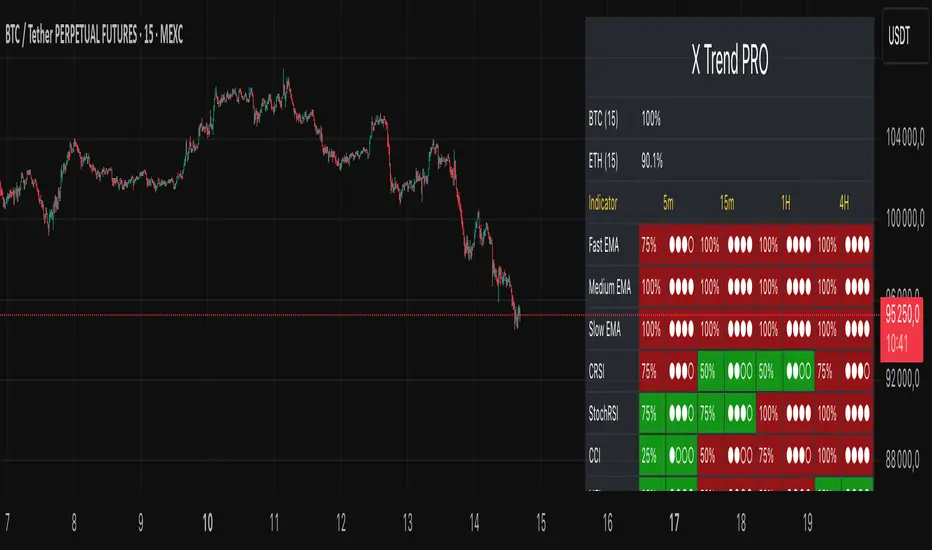
The key difference in the PRO version is Multi-Timeframe (MTF) analysis.
Instead of a single timeframe, the PRO version displays market "pressure" across four timeframes simultaneously, which you can customize:
Lower
Current
Higher 1
Higher 2
What does this do for you?
Save Time: Forget constantly switching charts. X Trend PRO does the work for you, displaying the complete market picture on a single screen.
Clean Chart: You no longer need 10 indicators. One dashboard is enough, freeing up your workspace.
Fast Trend Identification: One glance is all it takes to spot the beginning of a new trend—this happens when the pressure across all timeframes aligns to the same color.
High-Confidence Analysis: Instantly distinguish short-term "noise" (when L and C are red, but H1 and H2 are still green) from a strong, confirmed trend (when all TFs are aligned).
The panel also displays the asset's correlation with BTC and ETH for additional market context.
Settings:
DASHBOARD SETTINGS: Customize the panel's appearance, position, size, and whether to show percentages.
TIMEFRAMES (MTF): Select your desired timeframes for "Lower", "Higher 1", and "Higher 2". The "Current" timeframe is always taken from your active chart.
CORRELATION SETTINGS: Configure the sources and period for BTC and ETH correlation.
INDICATOR COMPONENTS: For simplicity and a cleaner menu, this version only allows customization of the three main EMAs (Fast, Medium, Slow). The other 8 indicators (CRSI, MFI, Schaff, etc.) are built into the core and are always active to ensure the most accurate and stable pressure calculation.
Skrip jemputan sahaja
Hanya pengguna disahkan oleh penulis boleh mengakses skrip ini. Anda perlu memohon dan mendapatkan kebenaran untuk menggunakannya. Keizinan selalunya diberikan selepas pembayaran. Untuk lebih butiran, ikuti arahan penulis di bawah atau hubungi Dev0880 secara terus.
TradingView TIDAK menyarankan pembayaran atau penggunaan skrip kecuali anda mempercayai sepenuhnya penulis dan memahami bagaimana ia berfungsi. Anda juga boleh menjumpai alternatif sumber terbuka dan percuma yang lain di dalam skrip komuniti kami.
Arahan penulis

Penafian
Skrip jemputan sahaja
Hanya pengguna disahkan oleh penulis boleh mengakses skrip ini. Anda perlu memohon dan mendapatkan kebenaran untuk menggunakannya. Keizinan selalunya diberikan selepas pembayaran. Untuk lebih butiran, ikuti arahan penulis di bawah atau hubungi Dev0880 secara terus.
TradingView TIDAK menyarankan pembayaran atau penggunaan skrip kecuali anda mempercayai sepenuhnya penulis dan memahami bagaimana ia berfungsi. Anda juga boleh menjumpai alternatif sumber terbuka dan percuma yang lain di dalam skrip komuniti kami.