Triple EMA// Triple EMA indicator designed for TradingView free users.
// Displays 3 standard EMAs in one indicator slot.
Moving Averages

Techno Signals Pro ⚡ QUICK SETUP
FOR BEGINNERS:
Keep all defaults
Trade only A+ signals
Use provided TP/SL levels
Wait for volume confirmation
FOR ADVANCED:
Adjust confluence threshold (higher = fewer but better signals)
Toggle divergence optional for more flexibility
Use MTF alignment for higher timeframes
Enable slippage buffer for realistic risk
🚀 GETTING STARTED
Add indicator to your chart
Check table for current signal
Verify conditions match your timeframe
Set orders at TP/SL levels
Manage trade according to grade
Remember: No indicator is perfect. Always use proper risk management and combine with price action confirmation. Start with paper trading to understand the system before real money.

llama fixed-length moving averages [SMA, WMA]Llama Moving Averages
I needed moving averages on my charts, but I wanted them hardcoded based on the following values:
timframe --- MA length
Daily --- 20D (==1 trading month)
Weekly --- 30W (30W moving averages for assessing long term trends)
15m --- 1W (or 5 days)
Two averages:
EMA and WMA: fast moving and slow moving based on closes.
In addition to this, I needed the following things:
1. MAs ONLY on 15m, 1D and 1W timeframes.
2. Consistent colors.
3. for 15m chart, we want a 5D SMA, so 1D = 15m * 25(±1); times 5; 25*5 = 125
4. Option to configure different values for the daily chart, since I trade the daily chart. Defaults: 20.
If you were looking for something similar, enjoy!

3MA Alignment Ribbon [AlgoTraderPro]3MA Alignment Ribbon is a clean, visual trend-structure indicator based on the alignment of three moving averages.
Instead of focusing on crossovers, it highlights trend quality and direction by dynamically coloring the moving averages and the ribbon between them.
The goal is simple : See at a glance whether the market structure is bullish, bearish, or neutral.
⸻
How It Works
The indicator plots three moving averages (Fast, Medium, Slow) and evaluates their alignment:
Bullish → Fast > Medium > Slow
Bearish → Fast < Medium < Slow
Neutral → Any other configuration
The moving averages and the filled ribbon between them are automatically colored based on this alignment, making trend conditions immediately visible.
⸻
Key Features
✅Multi-MA Support
Choose between:
EMA (default)
SMA
WMA
VWMA
RMA
HMA
✅ Alignment Modes
Strict: classic Fast > Medium > Slow logic
Tolerant: requires a minimum percentage separation between averages to reduce noise in ranging markets
✅ Optional Slope Filter
Filter signals by requiring the slow MA to be rising or falling, helping avoid false trend states during flat conditions.
✅ Higher Timeframe (HTF) Ribbon
Overlay the same 3MA alignment logic from a higher timeframe on your current chart:
Fully optional
Correctly calculated on the HTF itself
Option to use confirmed HTF bars only (reduces repaint confusion)
✅ Alerts & Visual Signals
Alerts when alignment turns Bullish, Bearish, or Neutral
Optional on-chart markers when the alignment flips
✅ Custom Styling
Fully customizable colors and transparency
Designed to remain readable without cluttering the chart
⸻
How to Use It
This indicator works best as:
A trend filter for discretionary trading
A context tool for entries using other setups
A market structure overlay for scalping, swing trading, or position trading
It does not generate buy/sell signals by itself — instead, it helps you trade aligned with market structure.
⸻
Default Settings
The default lengths (50 / 100 / 200 EMA) are suitable for most markets and timeframes, including crypto, forex, indices, and equities.

A+ / A- Radar + BUY/SELL (VWAP & EMA9 & M2/T3)simple script with vwap and m9 and displacement create by m2/t3 code.
best timeframe to use 5m

Best Algo (SIIT) By Nagaraj HiremathBest Algo (SIIT) By Nagaraj Hiremath is Based on Ema,Pivot,Renko Candle

Besho SetupThe Moving Averages (The Colored Lines) These three lines are the backbone of this system. They are perfectly aligned for a bullish trend (Yellow > Green > Red) and act as protective shields for the price:
The Red Line (at the bottom): This is the "General Trend Line," typically the EMA 200 (200-period Exponential Moving Average).
Function: It separates the uptrend from the downtrend. As long as the price remains well above it, the trend is strongly "bullish." Notice that the price is very far from it, indicating strong momentum.
The Green Line (in the middle): This is the "Intermediate Support Line," typically the EMA 50 or EMA 100.
Function: It acts as a bounce zone (Dynamic Support) during deep corrections. The price is shown to respect this level well in the image.
The Yellow Line (closest to the price): This is the "Fast Momentum Line," typically the EMA 20 or EMA 21.
Function: It is used for quick entries and exits. As long as the candles are closing above it, the bullish wave is sharp and continuous.

Forex Sniper @24 Support is based on Asia high and low , plus shows New York sessions and London
Background with out cuts only shows volativity times

RSI with 3 Separate Smoothing AveragesRSI has 3 moving averages, to help trade better
RSI period can be adjusted
Moving average has multiple selections (SMA, EMA, HMA)
moving average cross over can be used as signal for trades
Trade at your own risk

EHMA 28EHMA 28 — Adaptive Hull Moving Average
EHMA 28 is a precision-tuned Hull Moving Average designed to deliver fast trend recognition with minimal lag, while maintaining a clean, uncluttered charting experience.
This indicator enhances the traditional HMA by introducing adaptive speed control, flexible price sourcing, and multiple moving-average calculation modes, allowing traders to fine-tune responsiveness based on market conditions and personal trading style.
🔹 Key Features
Adaptive Hull Moving Average (HMA)
Smooths price action while reacting quickly to trend shifts
Reduces lag commonly found in traditional moving averages
Speed Control
Adjust the internal responsiveness of the HMA to suit ranging or trending markets
Multiple Price Sources
Close, Open, High, Low, HL2, HLC3, OHLC4
Selectable MA Engine
SMA, EMA, WMA, or TEMA-style behavior for internal calculations
Dynamic Trend Coloring
Automatically changes color based on directional slope
Bullish and bearish conditions are visually distinct at a glance
Clean Overlay Design
Plots directly on price with customizable line width and colors
Designed for discretionary trading and system integration
🔹 How to Use
EHMA 28 is best used as:
A trend bias filter
A dynamic support/resistance guide
A confirmation layer within multi-timeframe or rule-based strategies
Rising slope indicates bullish pressure, while a falling slope reflects bearish pressure. Color changes help identify momentum shifts without relying on lagging crossover signals.
🔹 Intended Audience
This indicator is designed for:
Traders who value clarity over clutter
Users building rule-based or discretionary systems
Traders looking for a reliable trend structure tool rather than a signal generator

Ai Kavach by Pooja v16✅ Fakeout Kavach by Pooja — Smart Fake Breakout Protector
Fakeout Kavach is designed to help traders understand when a breakout is strong and when it is likely to be a trap.
It works as a confirmation and filtering system, giving you a clear view of market strength, momentum, volume pressure, and potential reversal signs — without providing buy/sell recommendations.
This is a support tool for traders who want cleaner entries, fewer trap trades, and better clarity in fast-moving markets.This tool adds an intelligent multi-layer confirmation system on your chart so you can quickly understand:
✔ When the breakout is real
✔ When the market has strength
✔ When momentum is fading
✔ And when you should simply avoid the move
It doesn’t give buy/sell calls.
Instead, it helps you decide “Should I trust this move or not?”
⭐ Core Features (Explained in Simple Language)
🔹 1. Fake Breakout Filter (RSI + MA Logic)
Fakeouts often happen when price shows strength but momentum does not.
This module checks:
RSI strength
RSI–MA crossover behaviour
Momentum direction
Push/rejection zones
📌 Benefit:
Quickly see if the breakout has real strength behind it or it’s just a trap candle.
🔹 2. Trend Strength Filter (ADX Protection)
Most traders lose money in sideways markets.
ADX Filter helps you understand whether the market actually has trend strength or not.
📌 Benefit:
Avoid taking trades when the market is weak, choppy, or directionless.
Only focus on moves backed by strength.
🔹 3. SB/SS Smart Confirmation
SB (Strong Break) and SS (Strong Slide) confirmations highlight alignment between:
Momentum
Trend
Strength
RSI structure
📌 Benefit:
Cleaner entries, fewer false triggers, and more confidence in the move you take.
🔹 4. Divergence Detection (RSI Based)
Catches early signs of:
Bullish reversal
Bearish reversal
Exhaustion at highs/lows
📌 Benefit:
Helps you avoid entering at the worst possible points and improves exit timing.
🔹 5. VAD Module (Volume + ATR + Delta Pressure)
Fake moves usually have weak volume or no volatility.
This module checks:
Volume strength
Volatility (ATR)
Buying/selling pressure (Delta)
📌 Benefit:
Helps you understand whether the breakout is backed by real buyer/seller pressure.
🔹 6. Session Protection
Opening candles can be noisy and unpredictable.
Session block lets you avoid signals during high volatility windows.
📌 Benefit:
No more taking wrong entries during the rush at market open.
🔹 7. Fully Modular – Use Only What YOU Need
Every feature has its own ON/OFF switch.
You can create your perfect setup by enabling only what you prefer.
📌 Benefit:
Suitable for scalpers, intraday traders, swing traders, and even beginners.
🎨 Customization Power — Fully Modular Design
✔ Every section of Fakeout Kavach has its own ON/OFF toggle:
✔ Turn RSI visuals on/off
✔ Enable or disable MA & fills
✔ Activate or hide divergences
✔ Use or ignore ADX trend filter
✔ Show or hide SB/SS signals
✔ Enable or disable session block
✔ Choose label style, shapes, colors, sizes
✔ Keep chart clean or run full analysis mode
✔ You decide what appears.
✔ You control the complexity.
✔ One indicator fits all types of traders.
🌍 Works Across All Markets
✔ Stocks
✔ Crypto
✔ Forex
✔ Commodities
✔ Indices
All timeframes from scalping to swing trading.
⭐ What This Indicator Helps You With
Avoiding trap candles
✔ Understanding when a move is strong or weak
✔ Filtering bad breakouts
✔ Confirming market structure with momentum
✔ Spotting reversal signs early
✔ Building confidence in your entries
✔ Staying out of sideways/no-volume zones
🛠 Support
For indicator-related questions, clarification, or feature suggestions, you can contact the creator through TradingView’s comment section or direct message.
⚠ Disclaimer (TradingView Policy Safe)
This indicator does not provide buy/sell signals, does not predict market movements, and does not guarantee results or profitability.
It is a technical analysis tool intended to assist traders in making their own trading decisions.
Always use proper risk management and follow your own trading plan.

AI Brahmastra with SMC by Pooja V22🚀 AI Brahmastra with SMC by Pooja v22
Invite-Only | Rule-Based Market Structure & Momentum Indicator
📌 What this indicator is (clear definition)
AI Brahmastra with SMC v22 is a closed-source, rule-based technical analysis indicator designed to filter low-quality market conditions and highlight high-probability structural and momentum alignment.
It is not a strategy, does not execute trades, and does not provide fixed targets or stop-losses.
The indicator functions strictly as a decision-support tool, where signals appear only after all predefined rules are satisfied on a confirmed candle close.
The primary objective is signal validation and rejection, not signal frequency.
🎯 Intended Use & Markets
Designed for traders who focus on:
Market structure (SMC)
Trend alignment
Momentum & volatility confirmation
Intraday and positional analysis
Optimised for:
Indian equity markets
Index derivatives (NIFTY, BANKNIFTY, FINNIFTY)
NSE stocks
Futures & commodities
🧠 What “AI” means in this indicator (important clarification)
The term “AI” does NOT refer to machine learning, prediction, or data fitting.
In this script, AI refers to a rule-driven decision engine that:
Evaluates multiple independent conditions simultaneously
Uses state-based logic (past signal state affects future eligibility)
Actively rejects signals unless context, momentum, volatility, and structure align
In short:
👉 The script decides whether a signal is allowed or blocked, instead of blindly triggering on single conditions.
🔗 Why multiple indicators are combined (not a mashup)
Each component has a non-overlapping role.
No indicator is used to “confirm itself”.
EMA (Trend Bias)
Defines directional market bias
Blocks counter-trend signals early
VWAP (Fair-Price Filter)
Ensures entries are aligned with institutional mean price
Prevents chasing overextended moves
Supertrend (Trend Continuation Context)
Confirms directional persistence
Helps avoid premature reversals
RSI + RSI-MA (Momentum Quality)
RSI direction alone is not enough
RSI-MA distance filters weak momentum
RSI-MA slope filters flat / sideways conditions
ADX (Market Energy)
Confirms whether the market has sufficient strength
Blocks signals in low-energy or sideways phases
ATR (Volatility Context)
Confirms whether price movement is meaningful
Helps avoid signals during compressed ranges
👉 No single indicator can generate a signal independently.
Signals are allowed only when these components agree together.
🧱 Market Structure Engine (SMC Logic)
BOS — Break of Structure
Detected using swing-based pivot highs and lows
Confirms continuation of the prevailing structure
Evaluated only after candle close
CHoCH — Change of Character
Detects structural shift against the prior trend
Used as early contextual information
CHoCH remains valid for a limited number of bars
⚠️ BOS and CHoCH are contextual structure references, not standalone trade signals.
⚡ Partial Signal System (Context, not entries)
Instead of showing only final Buy/Sell signals, the indicator provides partial signals that reflect setup development:
B1 / S1 → CHoCH + RSI
B2 / S2 → EMA + VWAP + Supertrend + RSI
B3 / S3 → EMA + VWAP + RSI
B4 / S4 → Breakout alignment (RSI intentionally excluded)
Each partial type:
Represents a specific rule-set
Can be enabled or disabled independently
Does not imply trade execution
🛡 Noise & Fake-Breakout Protection (Core Design Goal)
The script is specifically engineered to avoid false breakouts by using:
Candle-close confirmation (non-repainting)
RSI-MA minimum distance & slope filtering
Optional ADX strength filter with recovery (grace) window
Optional RSI divergence blocking
Optional session-time exclusion
Low-volatility, sideways, or unstable market conditions are intentionally filtered out.
⚙ Trading Modes (Different internal logic)
Intraday Mode
Direction resets at the start of each trading day
Prevents repeated same-side entries
Optional momentum-based reset logic
Positional Mode
Direction remains active until an opposite signal appears
No daily reset
Suitable for swing and higher-timeframe analysis
These modes use different internal state handling, not cosmetic toggles.
📍 Traditional Pivot Points (Support & Resistance Context)
Built-in Traditional Pivot Levels include:
Auto / Daily / Weekly / Monthly anchoring
Multi-year support (Quarterly, Yearly, etc.)
Optional price labels
Historical plotting control
Pivot levels are never used to generate signals.
They serve only as contextual support & resistance references.
📋 Trend Dashboard (Visual Aid)
An optional dashboard displays:
Trend state across multiple timeframes
Bullish / Bearish / Neutral classification
The dashboard is informational only and does not generate signals.
🔔 Alerts
Supports:
Confirmed signal alerts
Partial signal alerts
JSON-formatted webhook alerts
All alerts trigger only on confirmed candle close.
🔐 Why Invite-Only & Closed-Source
This script uses:
Stateful signal control
Multi-stage rule validation
Structure persistence logic
Partial-to-confirmed signal flow
Source access is restricted solely to protect these internal mechanisms, not for promotion.
⚠ Disclaimer
This indicator is provided for educational and analytical purposes only.
It does not constitute financial advice and does not guarantee results.
All trading decisions and risk management remain the user’s responsibility.

Power Bar SMA Directional (Trade Your Edge)GENERAL OVERVIEW:
The Power Bar SMA Directional (Trade Your Edge) indicator identifies high-momentum Power Bars and uses a structured SMA-based breakout model to generate Long and Short trading signals. Once a signal appears, the indicator automatically places a Stop-Loss and three Take-Profit levels, with an optional dynamic trailing stop-loss. Alerts are available for every trade event.
This indicator was developed by Flux Charts in collaboration with Steven Adams (Trade Your Edge).
What is the purpose of the indicator?:
The purpose of the Power Bar SMA Indicator is to turn an unusually strong candle (Power Bar) into a complete, rule-based trade setup. The indicator does three main things, very specifically:
It spots “power bars”. These are candles where the body is both large compared to the candle’s own range and large compared to nearby candles.
It only cares about power bars when they align with the trend’s direction: bullish or bearish.
When that happens, the indicator gives a buy or sell signal with an entry at the signal candle, a stop-loss at the low/high of the power bar, and three take-profit targets placed at fixed multiples of the entry to stop-loss distance. You can also have the stop move up/down after each target is hit with the trailing stop-loss feature.
What’s the theory behind the indicator?:
The theory behind this indicator is that large, one-sided candles often mark the start of directional strength. When a candle’s body takes up most of its total range and exceeds the average size of recent candlesticks, it shows clear control from either buyers or sellers. The indicator combines this concept with a simple moving average to confirm trend direction, ensuring signals only align with the current bias. It then checks if price breaks a recent swing high or low to confirm momentum is continuing rather than consolidating inside a range. By combining three core elements: trend bias, momentum identification, and confirmation that price has room for new discovery beyond prior ranges, the indicator can focus on finding trade setups that have multiple market factors in alignment.
POWER BAR SMA DIRECTIONAL FEATURES:
The Power Bar SMA Directional indicator includes 4 main features:
Power Bars
Trend Bias
Long / Short Signals + Risk Management
Alerts
POWER BARS:
🔹What are Power Bars?:
Power Bars are large, high-momentum candles that show strength in one direction of the market. They form when a candle’s body (the distance between open and close) dominates most of the candle’s total range (the distance between high and low), meaning price moved strongly in one direction with little to no pullback. To qualify, the candle must also be large relative to nearby candles. This size difference confirms that the candle is a burst of momentum.
🔹How to interpret and use Power Bars:
When a Power Bar forms, it signals that price has just made a strong directional move with little to no pullback. Traders can use these bars to identify momentum shifts and potential trade setups.
A bullish Power Bar means buyers controlled the entire candle, marking the start of upward momentum. A bearish Power Bar means sellers were in control of the entire candle, signaling the start of downwards momentum. In the Power Bar SMA Directional indicator, these candles are only used for signals when they align with the market trend and satisfy other entry requirements, mentioned later on.
Bullish Power Bars forming above the Simple Moving Average (SMA) can signal potential long opportunities.
Bullish Power Bars forming below the SMA can signal potential short opportunities.
🔹How are Power Bars identified:
Power Bars are detected and confirmed only after the candle closes, ensuring that the full candlestick body and range can be measured. The indicator does not repaint or change past bars. Once a Power Bar is confirmed, it stays fixed on the chart. Power Bars can be detected on any timeframe or symbol that produces standard candlestick data.
The indicator identifies Power Bars using two user-defined inputs: Sensitivity and Body %.
◇ Sensitivity:
The Sensitivity setting determines how large a candle’s body must be relative to nearby candles. It uses the Average True Range (ATR) to compare the current candle’s size with recent candles, and the Sensitivity value acts as a multiplier of that ATR. A higher Sensitivity value means the candle must be much larger than recent candles to qualify, so fewer Power Bars will form. A lower value makes the filter less strict, allowing more candles to qualify.
◇ Body %:
The Body % setting controls what percentage of the candle’s total range must be body rather than Wick. A higher value requires the body to take up more of the candle’s total range, so fewer candles pass the filter. A lower value allows candles with more wick to qualify, so more Power Bars will form.
Body % Example:
If Body % is set to 50, the candle body must cover at least half of the candle’s total range. For example, if a candle’s high is $11, its low is $10, its open is $10.20, and its close is $10.80, then the total range is $1 ($11 - $10) and the body is $0.60 ($10.80 - $10.20). Body % = (Body / Total Range) * 100 = (0.60 ÷ 1.00 × 100) = 60%. Since 60% is greater than the input of 50%, this candle passes the Body % criteria.
Once a candlestick closes and it meets both the Sensitivity and Body % requirements, it will be plotted in a different color, using barcolor() function. Users can adjust the bullish/bearish colors of Power Bars by adjusting the ‘Candle Coloring’ setting. The Power Bar candle coloring is purely visual and does not affect signal logic or strategy calculations.
TREND BIAS:
The indicator uses a Simple Moving Average (SMA) to determine overall trend direction and ensure that long/short signals align with the market bias.
When the SMA is sloping upward and price is trading above it, the market is considered to be in a bullish trend. In this case, only long setups are allowed. When the SMA is sloping downward and price is below it, the market is considered bearish, and only short setups are valid. This filtering ensures that every signal follows the current trend rather than fighting it.
Within the settings, the SMA length can be customized to match different trading styles. A shorter SMA period reacts more quickly to price changes, making it better suited for scalping or lower timeframes where traders want faster entries and exits. A longer SMA period responds more slowly, which smooths out smaller fluctuations and is more useful for day traders or swing traders who focus on larger trends. By default, the SMA length is set to 20.
Signals on SEED_ALEXDRAYM_SHORTINTEREST2:NQ 5-minute timeframe with a 10 SMA vs. 100 SMA:
🔹Why does the indicator include a trend filter?:
This indicator is built around the assumption that markets tend to continue moving in their current direction. Thus, if the trend is bullish, it’s assumed that price will continue moving higher. If the trend is bearish, it’s assumed that price will continue moving lower. By combining the SMA filter with the momentum logic of the power bars, the indicator avoids countertrend setups. This keeps signals focused on continuation setups where both the trend and short-term strength (momentum) are in agreement.
LONG/SHORT SIGNALS:
This indicator identifies potential trade setups by combining momentum, trend alignment, and structural confirmation. It detects when a Power Bar candle appears, and then looks for confirmation that the move is valid through trend alignment and a structure break.
There are three long setups and three short setups:
Momentum Breakout
Proximity Breakout
Delayed Breakout
All setups require:
A valid Power Bar forming in the correct context relative to the SMA.
A break of nearby structure (defined by the Swing Length setting).
🔹Signal Settings:
◇ SMA Distance:
This setting defines how close a Power Bar must be to the SMA to qualify for the proximity breakout setup type. It measures the maximum allowed distance between the Power Bar’s open price and the SMA, expressed as a multiple of the Average True Range (ATR).
This setting only affects Setup #2 (Proximity Breakout) and sometimes Setup #3 (Delayed Breakout). Setup #1 does not use this filter because its logic depends on price crossing the SMA or confirming later. In proximity setups, the power bar candle must both open and close on the same side of the SMA (bullish or bearish) while still being within the allowed SMA Distance range. This condition prevents signals when price is stretched too far away from the SMA, which could indicate exhaustion or a potential pullback rather than continuation.
A lower SMA Distance value tightens this filter, allowing only Power Bars that form very close to the SMA, resulting in fewer but more conservative signals. A higher SMA Distance value gives wiggle room and allows setups that form farther from the SMA, generating more frequent signals.
In the example below, when the SMA Distance is set to 0.5 (left chart), the bullish Power Bar does not trigger a long signal because its opening price is too far from the SMA. When the SMA Distance is increased to 1.0 (right chart), the same candle now falls within the allowed range, making the setup valid and displaying a long signal label.
◇ Swing Length:
The Swing Length setting defines how the indicator identifies recent structure levels used for breakout confirmation. These structure levels are swing highs and swing lows, which represent points where price reversed direction over a specified number of bars. The indicator uses these high/low levels to determine whether price has broken past a meaningful area of prior support or resistance before confirming a trade setup.
The Swing Length value determines how far back the indicator looks when calculating these points. Internally, it uses the Highest/Lowest method, scanning the last N bars (where N is the Swing Length input) to find the highest high and lowest low within that range.
The highest high becomes the immediate resistance level for potential long setups.
The lowest low becomes the immediate support level for potential short setups.
A lower Swing Length value makes the indicator reference closer levels. This increases the number of potential signals because nearby highs and lows are easier for price to reach.
A higher Swing Length value references farther structure levels, typically major swing points, which reduces signal frequency.
Every setup requires a structure break for confirmation. The Swing Length setting directly affects how strict or lenient the entire indicator behaves for each setup type.
In Setup #1 (Baseline Momentum Breakout) and Setup #2 (Trend-Aligned Proximity Breakout), the Power Bar must break the structure level during or immediately after its formation.
In Setup #3 (Delayed Breakout Confirmation), the same Swing Length level is referenced for a limited number of candles defined by the Candles Between Confirmation setting.
◇ Candles Between Confirmation:
The Candles Between Confirmation setting defines how long the indicator will wait for price to confirm a breakout after a qualifying Power Bar forms. It represents the maximum number of bars allowed between the Power Bar’s close and the moment when price breaks the nearby structure level, which is derived from the Swing Length setting. The structure level is defined as the most recent swing high (for long setups) or swing low (for short setups).
If a structure break occurs within the specified window, a valid signal is triggered, and the Long or Short label is plotted at the close of the breakout candle. If price fails to break through the level within a certain number of candles, the setup is invalidated. This ensures that signals only appear when momentum follows through promptly, and not when price stalls or consolidates for an extended period.
Lower values make confirmations stricter, capturing only quick momentum breakouts. Higher values allow more time for slower markets or higher timeframes to complete structure breaks. Adjust this setting based on market volatility and trading style.
In the example below, when Candles Between Confirmation is set to 10, no signal appears because price breaks the swing high after 15 bars, which is greater than the allowed limit. When the setting is increased to 15, the same move qualifies, and a long signal is triggered as price breaks the swing high 15 candles after the initial bullish Power Bar that crossed the SMA.
🔹Long Setups:
Long Setup #1: Momentum Breakout
A bullish Power Bar opens below the SMA, and closes above it, showing buyer strength.
A breakout must occur during this bullish Power Bar candle through a nearby resistance level derived from the Swing Length setting.
When this breakout occurs, a Long Signal appears at bar close.
After a signal appears, three take-profit levels and one stop-loss level are also plotted.
Stop-Loss: Placed at the Power Bar’s low.
Take-Profit 1: Set using a 1:1 risk distance from the Stop-Loss to entry.
Take-Profit 2: Extends to 1:1.5 risk-to-reward.
Take-Profit 3: Extends to 1:2 risk-to-reward.
(Power Bars are white in this image)
Long Setup #2: Proximity Breakout
A bullish Power Bar opens and closes above the SMA, but is still close enough to it to show price hasn’t extended too far. (Refer to SMA Distance setting). As long as the opening of that candle is within the SMA Distance threshold, the setup remains valid.
The bullish Power Bar candle must break through the recent swing high (refer to Swing Length setting).
A Long Signal triggers when that breakout is confirmed.
After a signal appears, three take-profit levels and one stop-loss level are also plotted, similar to Long Setup #1.
(Power Bars are white in this image)
Long Setup #3: Delayed Breakout
A bullish Power Bar appears in a valid location (Refer to Long Setup #1 or Long Setup #2), but structure is not broken immediately.
The indicator waits for confirmation within the maximum Candles Between Confirmation window. If price breaks structure within that time, a Long Signal appears. If price fails to break structure in time, the setup is discarded.
Risk Management:
Same Stop-Loss, TP 1, TP 2, and TP 3 logic as Long Setup #1
(Power Bars are white in this image)
🔹Short Setups:
Short Setup #1: Momentum Breakout
A bearish Power Bar opens above the SMA, and closes below it, showing seller strength.
A breakout must occur during this bearish Power Bar candle through a nearby support level derived from the Swing Length setting.
When this breakout occurs, a Short Signal appears at bar close.
After a signal appears, three take-profit levels and one stop-loss level are also plotted.
Stop-Loss: Placed at the Power Bar’s high.
Take-Profit 1: Set using a 1:1 risk distance from the Stop-Loss to entry.
Take-Profit 2: Extends to 1:1.5 risk-to-reward.
Take-Profit 3: Extends to 1:2 risk-to-reward.
(Power Bars are white in this image)
Short Setup #2: Proximity Breakout
A bearish Power Bar opens and closes below the SMA, but is still close enough to it to show price hasn’t extended too far. (Refer to SMA Distance setting). As long as the opening of that candle is within the SMA Distance threshold, the setup remains valid.
The bearish Power Bar candle must break through the recent swing low (refer to Swing Length setting).
A Short Signal triggers when that breakout is confirmed.
After a signal appears, three take-profit levels and one stop-loss level are also plotted, similar to Short Setup #1.
(Power Bars are white in this image)
Short Setup #3: Delayed Breakout
A bearish Power Bar appears in a valid location (Refer to Short Setup #1 or Short Setup #2), but structure is not broken immediately.
The indicator waits for confirmation within the maximum Candles Between Confirmation window. If price breaks structure within that time, a Short Signal appears. If price fails to break structure in time, the setup is discarded.
Risk Management:
Same Stop-Loss, TP 1, TP 2, and TP 3 logic as Long Setup #1
(Power Bars are white in this image)
🔹Trailing Stop-Loss Feature:
When the Trailing Stop-Loss setting is enabled, the Stop-Loss (SL) automatically adjusts as price reaches take-profit levels. This feature helps secure profits while keeping the trade logic completely rule-based and non-discretionary.
Here’s exactly how it works step-by-step:
Initial Stop-Loss placement:
For a Long trade, the initial SL is set at the low of the bullish Power Bar that triggered the setup.
For a Short trade, the initial SL is set at the high of the bearish Power Bar that triggered the setup.
This level stays fixed until one of the Take-Profit targets is reached.
After TP 1 is hit:
The SL automatically moves to the entry price (breakeven).
After TP2 is hit:
The SL automatically moves to TP 1
Final exit condition:
The trade is considered complete once either the trailing Stop-Loss or TP 3 is reached.
🔹Visualization:
Users can enable or disable:
Long Signals
Short Signals
Take-Profit Lines
Take-Profit Labels
Stop-Loss Lines
Stop-Loss Labels
Signal Line
SMA
◇ Signal Line:
The Signal Line is an optional visual feature that helps users see exactly which structure level the indicator is using to confirm a breakout. It does not change how signals are generated. It only displays the reference point on the chart.
Users can customize the Signal Line style (Dashed, Dotted, Solid) and choose different colors for bullish and bearish signal lines. The Signal Line can also be turned off completely. When disabled, signals will not be affected.
ALERTS:
The indicator supports alerts, so you never miss a key market move. You can choose to receive alerts for each of the following conditions:
Long Signal
Short Signal
TP 1 (Take-Profit 1)
TP 2 (Take-Profit 2)
TP 3 (Take-Profit 3)
SL (Stop-Loss)
UNIQUENESS:
This indicator automates a strategy that is normally managed manually using multiple steps: identifying large momentum candles, validating trend direction, confirming breakout strength through structure, and then projecting clean risk-based targets. The SMA Distance filter, confirmation window, and swing structure rules work together to ensure signals only trigger when momentum (Power Bars) aligns with technical levels. This indicator turns Power Bars into complete trade ideas with real-time SL/TP management and alerts.

AI Intraday Astra by Pooja v27📘 AI Intraday Astra v27
Invite-Only Intraday Indicator for Option Traders
🔍 What this indicator does (Purpose)
AI Intraday Astra v27 is a rule-based intraday signal-filtering indicator designed to reduce false breakouts, repeated entries, and low-energy trades commonly faced by option traders.
Unlike traditional indicators that generate frequent signals, this script focuses on signal validation and rejection, producing trades only when multiple market conditions align on the same confirmed candle.
⭐ What makes this indicator ORIGINAL
This script is not a simple combination of indicators.
It uses a state-based decision architecture, where signals are allowed only after passing multiple sequential checks and internal reset rules.
Key originality points:
Independent BUY and SELL engines (no shared oscillator state)
State tracking to control signal eligibility
Reset-based logic after every signal
Multi-layer filtering instead of single-condition triggers
This design differentiates it from standard RSI, EMA, or Supertrend-based scripts.
⚙️ Core Features (Explained Clearly)
🔹 Auto BUY / SELL Signals (Confirmed Only)
Signals trigger only after candle close and only when all filters align.
No intrabar repainting or blinking signals.
🔹 Dual RSI Engine (Buy & Sell Separation)
Separate RSI + RSI-MA logic for Buy and Sell
Minimum RSI-MA distance filter
Directional slope validation
Signal gap control
➡️ Prevents mixed or weak momentum signals.
🔹 ADX + ATR Volatility Filter
ADX confirms directional strength
ATR confirms sufficient intraday volatility
➡️ Blocks signals during sideways or low-energy markets.
🔹 EMA + VWAP Trend Alignment
BUY only above EMA & VWAP
SELL only below EMA & VWAP
➡️ Avoids counter-trend option entries.
🔹 Trendline-Based Structure Filter
Dynamic trendlines derived from swing highs/lows
Optional slope modes (ATR / Stdev / Linear Regression)
Signals allowed only near relevant structure
➡️ Prevents chasing overextended prices.
🔹 Pivot Points (Support & Resistance Context)
Traditional pivot levels
Multi-timeframe calculation
Optional price labels
➡️ Used for context, not direct signal generation.
🔹 Reset & Anti-Overtrading Logic
After a signal:
Price must break and re-accept across EMA
Minimum bars enforced between same-side signals
➡️ Controls over-trading in strong trends.
🔹 Session Filter
Optional disabling of signals during selected intraday time windows
(e.g. noisy market open).
🧠 About “AI”
This script does not use machine learning or prediction models.
“AI” refers to a rule-based decision system that evaluates multiple market conditions together and allows a signal only when all rules remain valid until candle close.
🔔 Alerts
BUY / SELL alerts on confirmed signals only
Webhook-compatible
No repaint behavior
👤 Who this is for
Intraday option traders
Traders who prefer quality over quantity
Rule-based and confirmation-driven setups
🔒 Why Invite-Only
The script contains internal state management, reset logic, and independent signal engines that go beyond standard indicator combinations.
Source access is restricted to protect this implementation.
⚠️ Disclaimer
This indicator is for educational and analytical purposes only.
It does not provide financial advice or profit guarantees.
Users are responsible for their own risk management.

Whale Trading Network Technical Indicator
Whale Trading Network — Technical Indicator (WTN)
What it does — signal families
WTN produces three signal types across three user‑selected timeframes: (1) Green : bottom setup candidates, (2) Gold : continuation confirmations, and (3) Red : early top warnings. It blends momentum with trend/structure context and suppresses prints during sustained downtrends or late‑stage rallies. Defaults target 4h, 1d, and 5d workflows.
Preamble — originality and invite‑only context
WTN is a controller‑driven, regime‑aware indicator that coordinates classic elements (RSI, MACD, Stochastic RSI, MAs, BBs) into a governed signal layer rather than a simple overlay. A latched Down‑Channel regime, a Top‑Zone swing gate, cross‑asset/timeframe normalization, confluence‑based dot permissions, and multi‑timeframe orchestration (gold‑only on the highest frame) work together to actively manage when signals are allowed. The sections below explain why this is not a mashup and why the closed‑source / vendor value resides in WTN’s state‑machine logic, interlock rules, normalization framework, and cross‑frame roles—presented at the concept level so traders and moderators can understand how it operates without exposing proprietary thresholds.
Why it’s not a simple mashup (originality & usefulness)
WTN is not a bundle of classic tools; it is a controller‑driven indicator with regime awareness, gating, and normalization that coordinates otherwise independent signals into a single, coherent decision layer. Instead of overlaying RSI + MACD + BB + MAs, WTN governs when those tools matter, how long their states persist, and when prints must be blocked—using rules a basic mashup does not provide.
What the controller actually governs
Identifies and latches regimes (e.g., sustained down‑channel) so print permissions change with context—not just oscillator ticks.
Applies gates (e.g., Top‑Zone) when swing positioning suggests late‑stage risk.
Normalizes and weights evidence so MACD, RSI, Stoch RSI, histogram behavior, and price context contribute coherently.
Coordinates timeframes so dots form a workflow (tactical → swing → continuation) rather than three unrelated overlays.
Regime awareness & hysteresis (stability by design)
A core source of originality is hysteresis : once WTN recognizes a down‑channel, it latches that regime and suppresses prints until persistent breakout evidence plus momentum stabilization appear. This prevents flip‑flopping during chop, “first‑bounce” head fakes, and lower‑high rallies that a simple overlay will often misclassify. The regime state is visible (tinted panel), so users know why signals are paused.
Context gates that actively refuse bad timing
Two key context gates reduce “chase‑the‑top” and “bottom‑fish” problems:
Down‑Channel Latch: Blocks bottom candidates while momentum/structure remain impaired, then re‑enables only after sustained improvement.
Top‑Zone Gate: Detects upper‑swing positioning with momentum decay and blocks prints until positioning resets, avoiding confirmations into exhaustion.
Normalization that makes confluence real
Classic indicators have incompatible scales that vary across assets and timeframes. WTN normalizes them:
MACD line/signal/histogram, RSI, and Stoch RSI are mapped to consistent ranges so slope tests and region checks are comparable.
This lets confluence be meaningful : no single tool dominates due to scale; each contributes proportionally to permissions.
Multi‑timeframe orchestration (coordinated, not duplicated)
WTN assigns roles across the three selected timeframes:
Shorter timeframe: Tactical green setups (higher risk), ideally validated by gold .
Middle timeframe: Swing validation with more selective gold .
Highest timeframe: Gold‑only continuation, prioritizing higher‑confidence confirmation.
On lower frames, gold requires a prior green ; on the highest frame, green never prints . This structure turns dots into a sequence rather than three independent overlays.
Permission lattice & precedence (how conflicts are resolved)
Signals must pass a permission lattice where evidence sources interlock:
Momentum alignment: MACD slope and histogram behavior must agree; a single crossover is not enough.
Oscillator state: RSI/Stoch RSI must be supportive (e.g., stabilization from weak zones for a bottom candidate).
Structure & volatility context: MA stack, BB basis/width, and ATR‑aware checks help confirm or veto timing.
Regime/gate status: Down‑Channel or Top‑Zone states can override otherwise bullish micro‑signals.
Precedence rules mean a strong veto (e.g., active latch) can inhibit a print even if oscillators briefly improve.
Debounce, persistence & resumption (time matters)
WTN emphasizes persistence windows and debounce behavior:
Breakouts must persist (not one‑bar spikes) before the latch releases.
Oscillator stabilization must sustain before green candidates are permitted.
Continuations ( gold ) require maintained alignment , not transient ticks, so you avoid prints on single‑bar noise.
Failure modes addressed by the controller
RSI oversold during falling MACD: Basic mashups flag “bottom”; WTN keeps the latch until histogram and RSI recover together .
Momentum crossover inside the Top‑Zone: Overlays confirm continuation; WTN blocks until price resets out of the upper swing.
Event‑driven spikes (gap/volatility bursts): Transient improvements are debounced ; permissions wait for sustained evidence.
Indicator scale drift across assets/timeframes: Normalization ensures confluence rules remain consistent when you switch symbols.
Interpretability: see the “why,” not just the “what”
WTN’s pane is structured for auditability :
Tinted background exposes regime state (e.g., down‑channel latch).
Histogram anchored at 0 , RSI in the upper sub‑pane (0–100), Stoch RSI in the lower sub‑pane (−100–0) with clear overbought/oversold coloring.
Traders can visually trace the permission path: regime → positioning → momentum → oscillator → dot allowed/blocked.
Bottom line: WTN’s originality lives in the controller, regime latch, context gates, normalization, permission lattice, and timeframe orchestration that actively manage when a print is allowed. It is a coordinated decision system—not a simple overlay of classic indicators—and that governance is the reason it adds practical value for traders.
Why closed‑source / vendor value
WTN is powered by a proprietary engine written from the ground up in Pine v6; the source does not reuse any third‑party open‑source code. Its originality lies in the controller architecture and interlock logic that govern regime detection, context gates, normalization, and cross‑frame coordination. While it reads familiar elements (RSI, MACD, Stochastic RSI, MAs, BBs), the value comes from how those elements are orchestrated—state‑machine gating with hysteresis, context‑aware suppression and resumption, normalized confluence tests, and gold‑only continuation on the highest timeframe—yielding behavior that is not achievable by simply overlaying built‑ins.
What is original (and protected)
State‑machine gating: Rules define regimes, transitions, hysteresis, and re‑enable conditions across evidence sources (momentum slope, histogram decay/recovery, oscillator zones, MA/BB context).
Permission graph & interlocks: RSI, MACD (line/signal/histogram), Stoch RSI, price‑structure gates, and MA/BB context vote together through precedence rules—this coordination is proprietary.
Normalization framework: Mapping and using normalized ranges for momentum/oscillators to make confluence tests stable across assets/timeframes is a deliberate design central to WTN’s consistency.
Multi‑timeframe controller roles: Gold‑only behavior on the highest timeframe and the green‑precedence rule on lower frames are coordinated workflows specific to WTN.
Context‑aware suppression/resumption: Suppressing dots during down‑channels and top‑zones, then resuming only on verified persistence, reduces “false‑print drift” common to naive mashups.
Why protection is appropriate
Not reproducible through overlays: While anyone can overlay RSI, MACD, and BBs, WTN’s controller decisions (state transitions, permission checks, persistence windows, evidence requirements) are not trivially inferred from outputs and are central to its behavior.
Integrity of the workflow: Protection preserves a single, tested implementation so users do not encounter fragmented clones with altered rules that undermine the controller’s intent.
Ongoing calibration: Profiles for Crypto vs. Stocks (across three timeframes each) are curated to typical volatility traits. Maintaining these calibrations and the permission graph is part of the product’s vendor value.
What traders get (concept level, not black‑box hype)
Regime‑aware signals: Fewer prints into multi‑leg downtrends or late‑stage tops because the system explicitly refuses to signal in those contexts.
Consistent confluence: Normalization makes cross‑asset/timeframe confluence checks meaningful; users aren’t whipsawed by indicator scale differences.
Coherent workflow: Green → Gold on tactical frames, Gold‑only on the highest frame for continuation—an interpretable sequence that is easy to audit on the pane.
Transparent context: Tinted backgrounds and sub‑pane organization show why a dot was allowed or blocked (regime, swing position, oscillator state), letting traders understand how the script does what it claims—without exposing proprietary thresholds.
How it works — components & flow (concept level)
1) Normalized momentum & context
WTN reads RSI , MACD (line, signal, histogram), Stochastic RSI , ATR‑aware volatility , moving averages , Bollinger Bands , and price‑structure gates . Internals normalize oscillator values to a common pane so slopes, threshold checks, and histogram behavior are comparable across assets and timeframes. The histogram remains centered on 0, RSI uses 0–100 in the upper sub‑pane, and Stoch RSI maps to the lower sub‑pane.
Conceptual effect:
Normalization mitigates asset‑specific amplitude differences (e.g., MACD’s variable scale) so confluence tests don’t break when you switch symbols/timeframes.
Visual cues (line colors for overbought/oversold) make state changes obvious.
2) Regime detection — Down‑Channel Latch
Synchronized evidence (weak MA stack, negative momentum slope, fading histogram, RSI/Stoch RSI weak zones, price‑structure traits) latches the down‑channel regime. When latched, green prints are suppressed . The latch releases only after breakout persistence and improvements in RSI/histogram confirm trend resumption. The panel tints red while latched.
Design intent: Cut bottom‑fishing noise during multi‑leg downtrends, then resume prints only after sustained recovery.
3) Swing‑positioning — Top‑Zone Gate
A “top‑zone” derived from recent swing bounds with BB/Fibonacci context and momentum checks blocks new prints when price is in the upper swing and momentum decays, reducing confirmations into exhaustion.
4) Dot permissions (confluence gating)
WTN coordinates RSI, MACD, Stoch RSI, histogram behavior, SMA/BB context , and regime gates to determine whether a dot is allowed:
Green (bottom setup): Requires momentum deceleration with histogram improvement, RSI stabilizing upward, and price firming vs recent closes. Suppressed in Down‑Channel latch or Top‑Zone gate.
Gold (continuation): On lower two timeframes, prints only after a prior green and requires aligned momentum/oscillator states and supportive price context; on the highest timeframe, gold‑only prints emphasize higher‑confidence continuation cues.
Red (early top warning): Requires synchronized local peaks/roll‑downs across oscillators with slowing histogram; blocked in specific exhaustion conditions to avoid warnings into capitulation.
5) Multi‑timeframe controller
A controller aligns permissions across the three selected timeframes . Shorter frames provide tactical entries; the middle frame favors swing setups; the highest frame prints gold‑only for major continuation confirmation. Signals are coordinated, not independent overlays.
How to use it
Choose timeframes: Defaults target 4h / 1d / 5d . Use the shorter frame to spot tactical green ; wait for gold on the same or higher frame to confirm. Use the middle frame for swing validation. The highest frame is gold‑only , helping avoid early greens during broader trends.
Watch the tint: A red background band denotes the Down‑Channel latch ; expect suppressed greens until breakout persistence and momentum improvement.
Read the panel: The pane shows normalized momentum (MACD, histogram) with RSI up top and Stoch RSI below, including clear overbought/oversold coloring.
Confirm, then manage exposure: Treat green → gold as the preferred sequence. MA/BB context helps gauge trend strength (e.g., price vs 50/100/200 SMA and BB basis). Greens are higher‑risk; favor gold confirmations.
Crypto vs Stocks — calibrated profiles
Profiles are tuned for typical volatility patterns in each asset class. Each timeframe has its own calibration, yielding six independent tuning sections (3 per asset class).
Screenshots — captions
Screenshot 1 — Down‑Channel latch & release
The red‑tinted band shows the Down‑Channel latch regime on the indicator pane. While latched, green prints are suppressed . The latch only releases after breakout persistence and momentum improvement are visible (MACD/histogram strengthening with RSI and Stochastic RSI stabilizing). Once released, if the Top‑Zone gate is open and price context is supportive, the controller may permit a green dot on the lower timeframes, followed by a gold confirmation when conditions remain aligned.
Screenshot 2 — Pane layout & normalization
The indicator pane is organized for quick audit: the histogram is centered on 0 ; RSI plots in the upper sub‑pane on a 0–100 range; Stochastic RSI plots in the lower sub‑pane on a −100 to 0 normalized range. MACD line/signal/histogram and oscillators are normalized so slope checks, region tests, and confluence are comparable across symbols/timeframes. Line colors reflect overbought/oversold states to make regime/context changes easy to read.
Screenshot 3 — Adaptive dot permissions (sequence example)
This sequence shows adaptive dot permissions at work. After breakout persistence from a latched down‑channel, the controller permits a gold dot on the 5‑day view to confirm continuation (the highest timeframe uses gold‑only ). Soon after, the Top‑Zone gate engages, momentum slows (RSI/Stochastic RSI roll down, histogram decays), and a red dot warns of an early top. If deterioration persists, the Down‑Channel re‑latches and prints remain suppressed until the next verified recovery.
Limits & notes
100% original work: The WTN engine and controller logic are programmed from the ground up. No third‑party open‑source code, educational snippets, or auto‑generated code are reused.
No external libraries: Built in Pine v6 using standard language features only; no external libraries or ports of community scripts are used.
Chart type: Designed for standard time‑based candles only; non‑standard charts (Heikin Ashi, Renko, Kagi, P&F, Range) can produce unrealistic results.
Data handling: No lookahead and no future offsets.
Risk disclosure & legal notice
This tool is provided for educational purposes only and does not constitute financial or investment advice or recommendations.
Trading and investing involve risk, including possible loss of principal.
No guarantees or warranties of performance are expressed or implied. Past results do not predict future outcomes.
This publication does not include solicitation, pricing, or promotional offers; it provides information on the indicator’s design and use.
Use at your own risk. Test settings on paper and consult a qualified investment professional familiar with your risk tolerance before any live use.

AI Reversal Signals Custom [wjdtks255]📊 Indicator Overview: AI Reversal Signals Custom
This indicator is a comprehensive trend-following and reversal detection tool. It combines the long-term trend bias of a 200 EMA with highly sensitive RSI-based reversal signals and momentum visualization. It is designed to capture market bottoms and tops by identifying exhaustion points in price action.
Key Features
200 EMA (Trend Filter): A gold line representing the long-term institutional trend. It helps traders distinguish between "buying the dip" and "catching a falling knife."
Reversal Buy/Sell Labels: Real-time signals that appear when the market recovers from extreme overbought or oversold conditions.
Dynamic Background Clouds: Visual indicators of trend strength changes, highlighting potential entry zones.
Momentum Histogram: Internal calculations mimic the "Bottom Bars" seen in professional suites to track the velocity of price movement.
📈 Trading Strategy (How to Trade)
1. High-Probability Long Setup (Buy)
Trend Confirmation: Price should ideally be trading above the 200 EMA for the highest success rate.
Signal: Wait for the "BUY" label to appear below the candle.
Momentum: Confirm with the Light Green background or histogram shift indicating recovery.
Entry: Enter on the close of the signal candle.
2. High-Probability Short Setup (Sell)
Trend Confirmation: Price should ideally be trading below the 200 EMA.
Signal: Wait for the "SELL" label to appear above the candle.
Momentum: Confirm with the Red background or histogram fading from green to red.
Entry: Enter on the close of the signal candle.
3. Risk Management
Stop Loss: Place your Stop Loss slightly below the recent swing low for Buy orders, or above the recent swing high for Sell orders.
Take Profit: Exit when the price reaches a major support/resistance level or when an opposing signal appears.
💡 Professional Tip
For the best results, use this indicator on the 15-minute or 1-hour timeframes. The most powerful "Ultimate Reversal" signals occur when there is a Bullish Divergence (Price making lower lows while the RSI makes higher lows) followed by a confirmed "BUY" label.


NTA MTF Context Pro🔹 NTA – MTF Context Pro
Multi-Timeframe Market Context & Institutional Bias Panel
📌 Overview
NTA – MTF Context Pro is a public, closed-source multi-timeframe market context indicator designed to help traders objectively evaluate directional bias, trend quality, and market conditions across multiple higher and lower timeframes from a single panel.
This indicator does not generate trade entries or signals.
Its purpose is to provide context, confirmation, and environmental filtering prior to executing trades with an external strategy or execution model.
🧠 Methodology & Conceptual Logic
The indicator follows a top-down institutional analysis framework, combining multiple analytical dimensions to describe market conditions rather than predict price.
For each timeframe (Monthly, Weekly, Daily, 4H, and 1H), the indicator performs the following conceptual evaluations:
1️⃣ Trend Structure Classification
Trend direction is determined through moving-average structure analysis, comparing medium-term and long-term averages to classify each timeframe as:
Bullish
Bearish
Neutral
This step defines structural market bias, not trade timing.
2️⃣ Trend Strength & Quality Assessment
To avoid low-quality or transitional environments, the indicator applies:
Directional strength measurement
ADX-based trend validation
This helps filter:
Weak momentum phases
Ranging or choppy conditions
Incomplete trend development
3️⃣ Volatility & Price Expansion Analysis
The indicator evaluates volatility normalization using ATR-based measurements to confirm that price movement is supported by sufficient expansion.
This step helps distinguish:
Active institutional participation
Compressed or inefficient price conditions
4️⃣ Multi-Timeframe Weighting
Higher timeframes are assigned greater influence in the final assessment to reflect institutional prioritization of macro structure over lower-timeframe noise.
This weighting framework reduces bias from isolated lower-timeframe movements.
🔢 Global Market Score (0–100)
All evaluated components are aggregated into a Global Market Score, summarizing the overall market environment:
65–100 → Bullish Bias
35–64 → Neutral / Range Environment
0–34 → Bearish Bias
The score is designed as a context filter, not a trading signal.
📊 Panel Output & Interpretation
For each timeframe, the panel displays:
TF → Timeframe analyzed
Trend → Bullish / Bearish / Neutral
Strength → Relative directional intensity
ADX → Trend validity
ATR % → Volatility expansion level
The top section displays:
Global Score
Dominant Market Bias
Confirmation status (Confirmed / Weak)
Visual elements dynamically adapt to market state for clarity and readability.
🎯 Intended Use
This indicator is intended for:
Advanced discretionary traders
Smart Money & market structure approaches
Swing and intraday analysis
Trade filtering and directional bias confirmation
Manual or algorithmic trading systems requiring contextual validation
Best used in conjunction with a separate execution model.
⚠️ Disclaimer
❌ Not a buy/sell signal generator
❌ No entry or exit logic
✅ Context and confirmation tool only
Always apply proper risk management.
🏷️ Credits
Developed by NexTrade Academy
Educational and analytical tool
Use at your own risk.

Bollinger Bands + MA 50/100/200📊 Bollinger Bands + MA 50 / 100 / 200 Indicator
This indicator combines Bollinger Bands with key Moving Averages (50, 100, 200) to help you spot trend direction, volatility, and potential reversal zones in one clean view.
🔹 Bollinger Bands
* Customizable length & MA type (SMA, EMA, RMA, WMA, VWMA)
* Visualizes market volatility
* Upper & lower bands help identify overbought / oversold conditions
🔹 Moving Averages
* MA 50 → Short-term trend
* MA 100 → Medium-term trend
* MA 200 → Long-term trend & major support/resistance
* Easy toggle on/off for clean charting
💡 How to use
* Price near upper band + strong MA trend → possible continuation
* Price near lower band → watch for bounce or breakdown
* MA alignment (50 > 100 > 200) → bullish trend
* MA cross & BB squeeze → potential breakout incoming
⚠️ Best used with price action & risk management
📌 Works on stocks, crypto, forex, indices

ATR Daily & Weekly With Stop Buffer this script shows Daily & Weekly ATR and also add 10% Stop buffer calculation so you can add stop loss.

Pyramid EnterPyramid Enter — Structured Add-On Entry Framework
Pyramid Enter is an analytical add-on framework designed to highlight structured continuation entry zones within an already-established directional move. It is intentionally not a standalone signal tool and is not designed to initiate positions on its own. Instead, it focuses on scaling logic once a directional bias is already defined.
The indicator is minimal, disciplined, and role-specific:
it answers the question “Where might additional entries make structural sense if I am already aligned?”
Core Philosophy
Most indicators attempt to do too much:
Identify trend
Call tops and bottoms
Time entries
Manage exits
Pyramid Enter does none of that.
Its sole purpose is to identify continuation alignment — moments where price structure and momentum re-synchronize after a pause or reset, potentially allowing for incremental exposure rather than a single all-in decision.
This makes it especially useful for studying trend persistence, not prediction.
How Pyramid Enter Works
At its core, Pyramid Enter evaluates the relationship between:
A fast EMA (price responsiveness)
A smoothed reference line (structure stabilization)
An ENTER event is generated when:
The fast EMA crosses above the selected smoothed line
Optional EMA 8/21 trend filter confirms directional alignment
Per-bar locking ensures only one event per bar
Adaptive logic allows alignment immediately when trend conditions flip
The indicator includes:
Real-time detection
Bar-close backup logic
Single-event locking per bar
This design ensures clean behavior in both live and historical environments without signal duplication.
What Pyramid Enter Is Not
It is important to be explicit:
Pyramid Enter does not determine trend direction
It does not mark exits
It does not replace a primary entry tool
It does not predict future price movement
It simply highlights structural continuation conditions.
Clean Pairing with Rasta
Rasta defines the market regime and structural rhythm.
It answers:
Is the market trending or transitioning?
What side is structurally favored?
Has the state flipped?
Pyramid Enter is designed to be used only after Rasta has already established context.
A common analytical workflow:
Use Rasta to identify structural alignment
Ignore Pyramid Enter entirely until Rasta confirms direction
Once aligned, Pyramid Enter highlights where continuation alignment re-appears
This keeps responsibilities separated:
Rasta = context
Pyramid Enter = continuation opportunity
Clean Pairing with RSI Extremes
RSI Extremes focuses on pressure exhaustion, not continuation.
It highlights:
Oversold exhaustion (ENTER conditions)
Overbought exhaustion (EXIT conditions)
Statistically rare stress points
When combined:
RSI Extremes highlights where pressure may reset
Pyramid Enter highlights when structure realigns after that reset
This pairing allows users to study:
Exhaustion → stabilization → continuation
without relying on a single indicator to do everything.
Three-Tool System Architecture
When used together, each tool has a clearly defined role:
Rasta
→ Structural regime & directional bias
RSI Extremes
→ Momentum exhaustion & pressure extremes
Pyramid Enter
→ Continuation alignment & scaling logic
Each tool is independent, but complementary.
None replaces the others.
Design Principles
Pyramid Enter is built around:
Role clarity
Minimalism
State discipline
No prediction
No guarantees
It is intended for educational, analytical, and research use only. All interpretation, risk management, and decision-making remain the responsibility of the user.
Summary
Pyramid Enter is a focused continuation framework that:
Highlights structural add-on alignment
Avoids prediction or exit logic
Pairs cleanly with Rasta and RSI Extremes
Encourages disciplined scaling rather than impulsive entries
Its value comes from what it refuses to do, not from over-complexity.

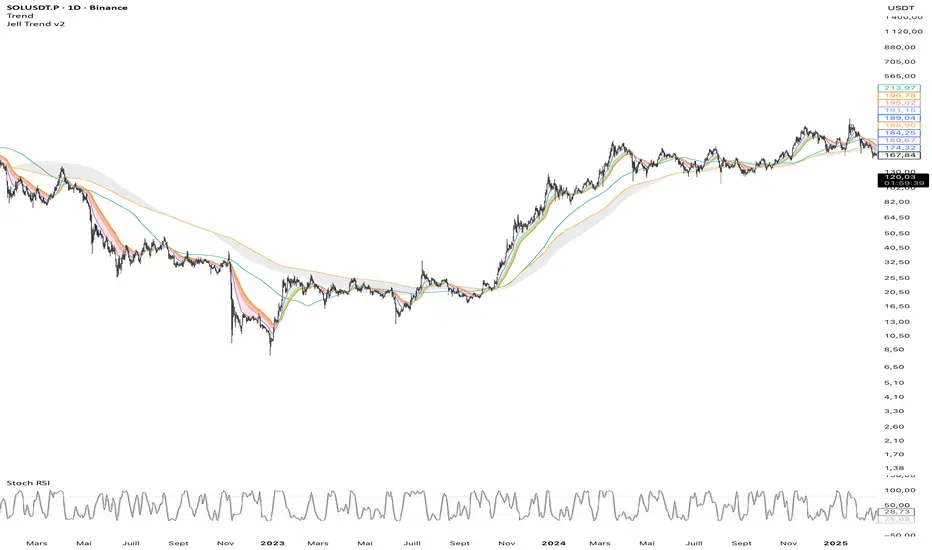
Jell TrendThe Jell Trend is a comprehensive tool designed for Trend Following and Pullback traders. It combines Short-Term Momentum, Long-Term Structure, and Multi-Timeframe (MTF) analysis into a single, clean indicator.
Key Features:
1. Momentum Ribbon (Short Term) Composed of EMA 13, 25, and 32.
Visual Aid: Dynamic clouds color the space between EMAs to show immediate trend strength.
2. Market Structure (Long Term) Displays classic institutional moving averages (SMA 100, EMA 200, SMA 200, SMA 300).
The "200 Zone": A specific cloud fills the gap between the EMA 200 and SMA 200, highlighting major institutional support/resistance areas.
3. Built-in Multi-Timeframe (MTF)
Fixed H4 EMA 200: Displays the 4-Hour EMA 200 on any timeframe (M5, M15, H1).
Benefit: Allows intraday traders to see major key levels without switching charts.
Customization:
Every line and cloud can be toggled on/off and colored to fit your specific charting needs.
Double Cross Strategy - directional color plus golden crossCandle color changes to dark green when opening below 9/20 SMAs when 9 is below the 20 and closes above.
Candle color changes to dark red when opening above the 9/20 SMAs when the 9 is above the 20 and closes below.
Candle color changes to yellow when either of the above occurs plus crosses the vwap.
