OPEN-SOURCE SCRIPT
Thygoo Countdown Timer
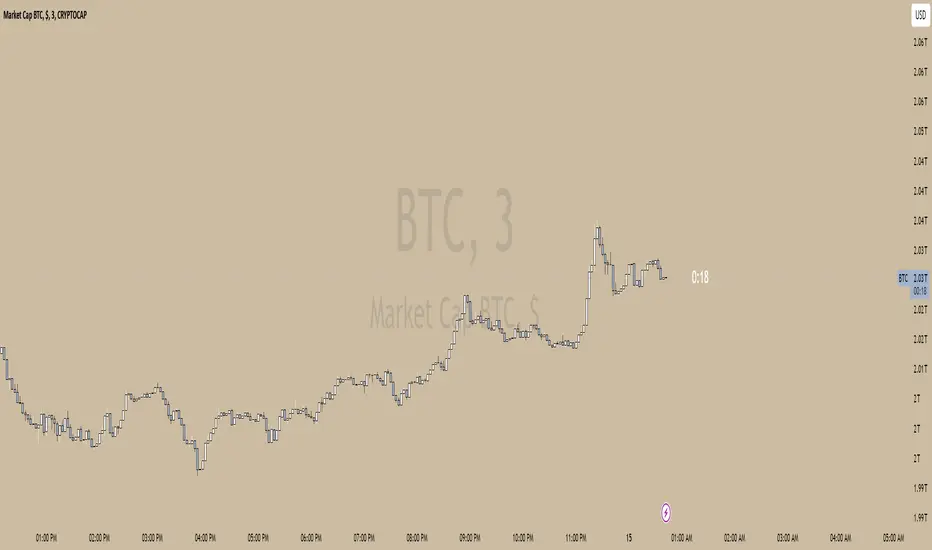
This custom Pine Script indicator displays a real-time countdown timer on your chart, showing the remaining time until the current candle closes based on the active timeframe. The timer is updated dynamically, providing a clear and easy-to-read countdown directly on the chart.
Features:
Real-Time Countdown: The indicator automatically calculates the time remaining for the current candle to close, updating in real-time.
Multiple Timeframes: It works with any active timeframe, including minute-based and multi-minute intervals, such as 3m, 5m, 15m, 1h, etc.
Dynamic Box Position: The countdown is displayed inside a resizable and repositionable box on the chart, placed above the current price action.
Visibility: The box and text are clearly visible, with customizable font sizes for better readability.
No Extra Clutter: The countdown text appears without any unnecessary border lines, keeping the display clean and unobtrusive.
How to Use:
Add this indicator to your chart to monitor the countdown of the current timeframe.
The timer will update automatically, showing the time left (minutes:seconds) until the next bar closes.
Adjust the chart's zoom level to ensure the timer box remains clearly visible in the right-hand section of your chart.
Ideal for:
Traders who want a quick and efficient way to track the time remaining on their current chart timeframe.
Anyone looking to add a countdown timer to their TradingView chart without the clutter of additional indicators.
Features:
Real-Time Countdown: The indicator automatically calculates the time remaining for the current candle to close, updating in real-time.
Multiple Timeframes: It works with any active timeframe, including minute-based and multi-minute intervals, such as 3m, 5m, 15m, 1h, etc.
Dynamic Box Position: The countdown is displayed inside a resizable and repositionable box on the chart, placed above the current price action.
Visibility: The box and text are clearly visible, with customizable font sizes for better readability.
No Extra Clutter: The countdown text appears without any unnecessary border lines, keeping the display clean and unobtrusive.
How to Use:
Add this indicator to your chart to monitor the countdown of the current timeframe.
The timer will update automatically, showing the time left (minutes:seconds) until the next bar closes.
Adjust the chart's zoom level to ensure the timer box remains clearly visible in the right-hand section of your chart.
Ideal for:
Traders who want a quick and efficient way to track the time remaining on their current chart timeframe.
Anyone looking to add a countdown timer to their TradingView chart without the clutter of additional indicators.
Skrip sumber terbuka
Dalam semangat TradingView sebenar, pencipta skrip ini telah menjadikannya sumber terbuka, jadi pedagang boleh menilai dan mengesahkan kefungsiannya. Terima kasih kepada penulis! Walaupuan anda boleh menggunakan secara percuma, ingat bahawa penerbitan semula kod ini tertakluk kepada Peraturan Dalaman.

Penafian
Maklumat dan penerbitan adalah tidak bertujuan, dan tidak membentuk, nasihat atau cadangan kewangan, pelaburan, dagangan atau jenis lain yang diberikan atau disahkan oleh TradingView. Baca lebih dalam Terma Penggunaan.
Skrip sumber terbuka
Dalam semangat TradingView sebenar, pencipta skrip ini telah menjadikannya sumber terbuka, jadi pedagang boleh menilai dan mengesahkan kefungsiannya. Terima kasih kepada penulis! Walaupuan anda boleh menggunakan secara percuma, ingat bahawa penerbitan semula kod ini tertakluk kepada Peraturan Dalaman.
Penafian
Maklumat dan penerbitan adalah tidak bertujuan, dan tidak membentuk, nasihat atau cadangan kewangan, pelaburan, dagangan atau jenis lain yang diberikan atau disahkan oleh TradingView. Baca lebih dalam Terma Penggunaan.