Market Internals SPY[TP]# Market Internals SPY Dashboard - TradingView Publication
## 📊 Overview
**Market Internals SPY ** is a comprehensive multi-factor market sentiment dashboard designed specifically for SPY (S&P 500 ETF) traders. This indicator combines four powerful market breadth signals into one easy-to-read interface, helping traders identify high-probability setups and avoid false breakouts.
---
## 🎯 What Makes This Indicator Unique?
Unlike single-indicator tools, this dashboard synthesizes **multiple market internals** to provide confluence-based trading signals:
- **CPR (Central Pivot Range)** - Institutional pivot levels
- **VIX (Volatility Index)** - Fear gauge
- **Put/Call Ratio** - Options sentiment with dynamic crossover alerts
- ** USI:ADD (Advance/Decline Line)** - Market breadth strength
All presented in a clean, real-time dashboard with visual alerts directly on your chart.
---
## 📈 Key Features
### 1. **Static Daily CPR Levels**
- Automatically plots Top CPR, Pivot, and Bottom CPR
- Levels remain fixed throughout the trading day (no repainting)
- **Trend Bias Indicator**: Green = Current Pivot > Previous Pivot (Bullish structure)
### 2. **Put/Call Ratio Crossover System**
- 10-period SMA smoothing for cleaner signals
- **Bullish Signal** (Green background): Put/Call crosses below SMA
- Indicates decreasing hedging activity (bullish)
- **Bearish Signal** (Red background): Put/Call crosses above SMA
- Indicates increasing hedging activity (bearish)
### 3. **Price/Breadth Divergence Detection**
- **Yellow Candles**: Highlight when price and USI:ADD diverge
- Price rising but USI:ADD falling = Potential reversal
- Price falling but USI:ADD rising = Possible bottom
### 4. **Comprehensive Real-Time Dashboard**
A top-right table displaying:
- **CPR Trend Bias**: Bullish/Bearish structure
- **VIX Level**: Current value + directional bias
- **Put/Call Ratio**: Live value + trend arrows
- **AD Line**: Breadth strength with directional indicators
### 5. **Intelligent Bar Coloring**
- **Green bars**: USI:ADD rising (breadth improving)
- **Red bars**: USI:ADD falling (breadth deteriorating)
- **Yellow bars**: Divergence warning (potential reversal)
---
## 🔧 How to Use
### Setup Instructions
1. **Add to Chart**: Apply to SPY on your preferred intraday timeframe (5m, 15m, 30m, 1H)
2. **Configure Symbols** (if needed):
- Default settings work for most platforms
- If "PCC" doesn't load, try: `PCCR`, `INDEX:PCC`, `USI:PCC`, or `CBOE:PCC`
- Ensure you have market internals data access ( USI:ADD , VIX)
### Trading Signals
#### 🟢 **Bullish Confluence** (High-Probability Long Setup)
- CPR Trend = BULLISH
- VIX falling or low (<20)
- Put/Call below SMA (or green background crossover)
- USI:ADD rising (green bars)
- **Entry**: Look for bullish price action at support levels
#### 🔴 **Bearish Confluence** (High-Probability Short Setup)
- CPR Trend = BEARISH
- VIX rising or elevated (>25)
- Put/Call above SMA (or red background crossover)
- USI:ADD falling (red bars)
- **Entry**: Look for bearish rejection at resistance
#### ⚠️ **Divergence Warning**
- Yellow candles indicate mismatch between price and breadth
- Consider profit-taking or reversals when divergence appears at extremes
### Best Practices
- **Multi-Timeframe Confirmation**: Check higher timeframes (4H, Daily) for trend alignment
- **Volume Confirmation**: Combine with volume analysis for stronger signals
- **Risk Management**: Always use stop losses; no indicator is 100% accurate
- **News Awareness**: Be cautious around major economic releases
---
## 📚 Understanding the Components
### CPR (Central Pivot Range)
Traditional floor trader pivot levels calculated from previous day's High, Low, Close:
- **Pivot (PP)** = (High + Low + Close) / 3
- **Top CPR (TC)** = (PP - BC) + PP
- **Bottom CPR (BC)** = (High + Low) / 2
### VIX (Volatility Index)
- **< 15**: Complacency, potential for sudden moves
- **15-20**: Normal conditions
- **20-30**: Elevated uncertainty
- **> 30**: High fear, potential bottoming process
### Put/Call Ratio
- **< 0.7**: Excessive optimism (contrarian bearish)
- **0.7-1.0**: Balanced sentiment
- **> 1.0**: Defensive positioning (contrarian bullish potential)
### USI:ADD (NYSE Advance/Decline)
- **> 0**: More stocks advancing than declining (bullish breadth)
- **< 0**: More stocks declining than advancing (bearish breadth)
- **Extreme readings** (±2000+): Potential exhaustion
---
## ⚙️ Customization Options
### Input Parameters
- **AD Line Symbol**: Default "ADD" (try "ADVN" or "NYSE:ADD" if needed)
- **VIX Symbol**: Default "VIX" (try "CBOE:VIX" if needed)
- **Put/Call Symbol**: Default "PCC" (alternatives listed above)
### Color Scheme
- Blue: CPR levels
- Purple: Pivot point
- Green: Bullish signals/backgrounds
- Red: Bearish signals/backgrounds
- Yellow: Divergence warnings
---
## 💡 Pro Tips
1. **Wait for Confluence**: Don't trade on a single indicator - wait for 3+ signals to align
2. **Use CPR as Dynamic S/R**: Price tends to react at TC and BC levels
3. **Watch the Crossovers**: Put/Call crossovers often precede significant moves
4. **Monitor Divergences**: Yellow candles at key levels are high-value signals
5. **Combine with Price Action**: This tool confirms direction - you still need entry triggers
---
## ⚠️ Limitations & Disclaimers
- Requires **premium data** for USI:ADD and VIX on most platforms
- Best suited for **intraday SPY trading** (may adapt to other indices)
- **Not a standalone system** - use with proper risk management
- Past performance does not guarantee future results
- Always backtest before live trading
---
## 🎓 Example Scenario
**Bullish Setup**:
- 9:45 AM EST: Price pulls back to Bottom CPR
- Dashboard shows: ✅ Bullish CPR Bias, ✅ VIX 16.5 (falling), ✅ Put/Call 0.68 ⬇️ Bull, ✅ USI:ADD +850 ⬆️
- Green background flashes (Put/Call crossunder)
- **Action**: Enter long at BC with stop below TC of previous day
---
## 📊 Ideal Timeframes
- **Primary**: 5-minute, 15-minute (day trading)
- **Secondary**: 30-minute, 1-hour (swing entries)
- **Confirmation**: Daily chart for trend context
---
## 🔄 Updates & Support
This indicator is actively maintained. If you encounter symbol loading issues:
1. Check your data provider includes market internals
2. Try alternative symbols in inputs
3. Ensure you're using a premium TradingView plan (if required)
---
## 📝 Version Information
- **Version**: 5 (Pine Script v5)
- **Type**: Overlay Indicator
- **Author**: tapaspattanaik
- **Category**: Market Internals / Breadth Analysis
---
## 🏆 Final Thoughts
This indicator is designed for **serious traders** who understand that edge comes from confluence, not single signals. By combining institutional pivot levels with real-time market internals, you gain a significant advantage in reading market sentiment and timing entries with precision.
**Remember**: The best trades happen when multiple independent factors align. Use this dashboard to find those moments.
---
## 📌 How to Add This Indicator
1. Open TradingView and navigate to Pine Editor
2. Copy the complete script code
3. Click "Add to Chart"
4. Configure symbols if needed (see Setup Instructions above)
5. Adjust position/colors to your preference
---
**Happy Trading! 📈**
*This indicator is for educational purposes. Always manage risk appropriately and never risk more than you can afford to lose.*
---
### Tags
`#SPY` `#MarketInternals` `#CPR` `#VIX` `#PutCallRatio` `#BreadthAnalysis` `#DayTrading` `#SwingTrading` `#TechnicalAnalysis` `#PivotPoints`
Sejarah Ketidakstabilan

CapitalFlowsResearch: Returns Regime MapCapitalFlowsResearch: Returns Regime Map — Two-Asset Behaviour & Correlation Lens
CapitalFlowsResearch: Returns Regime Map is a two-asset regime overlay that shows how a primary market and a linked macro series are really moving together over short rolling windows. Instead of just eyeballing two separate charts, the tool classifies each bar into one of four states based on the combined direction of recent returns:
Up / Up
Up / Down
Down / Up
Down / Down
These states are calculated from aggregated, windowed returns (using configurable return definitions for each asset), then painted directly onto the price chart as background regimes. On top of that, the indicator monitors the correlation of the same return streams and can optionally tint periods where correlation sits within a user-defined “low-correlation” band—highlighting moments when the usual relationship between the two series is weak, unstable, or breaking down.
In practice, this turns the chart into a compact co-movement map: you can see at a glance whether price and rates (or any two chosen markets) are trending together, diverging in a meaningful way, or moving in choppy, low-conviction fashion. It’s especially powerful for macro traders who need to frame trades in terms of “risk asset vs. rates,” “index vs. volatility,” or similar pairs—while keeping the actual construction details of the regime logic abstracted.

Ultimate ORB ArchitectThe Ultimate ORB Architect is a high-precision volatility and range-expansion tool designed for intraday traders. It specializes in the Initial Balance (IB)—the high and low established during the first session of the trading day—and projects mathematically significant expansion levels for price discovery.
Unlike standard opening range indicators, this script utilizes a Smart-Swap Calculation Engine, allowing traders to toggle between Standard Deviation and Fibonacci sequences instantly while maintaining a clean, professional chart aesthetic.
Key Features
1. Dual Calculation Engines
- Standard Deviation Mode: Projects targets based on whole-unit range expansions ($1.0, 2.0, 3.0, 4.0$). Ideal for Mean Reversion and classic IB breakout trading.
- Fibonacci Sequence Mode: Projects targets based on the Golden Ratio and its extensions ($0.618, 1.618, 2.618, 4.236$). Perfect for trend exhaustion and harmonic target setting.
2. "Smart-Swap" Internal Levels
The script intelligently adapts its internal support and resistance lines based on your selected mode:
-In SD Mode: Displays 25% and 75% (Quarters)—the standard institutional "Fair Value" levels within a range.
-In Fibonacci Mode: Displays 38.2% and 61.8% (Golden Retracements)—the primary zones for range-bound reversals.
3. Institutional Timing & Projection
Time-Locked Execution: Custom sessions allow you to define the ORB window (e.g., the first 30 or 60 minutes).
5:00 PM EST Hard Cutoff: To prevent "infinite lines" that clutter your chart, all projections are hard-coded to terminate at the NYSE close (17:00 EST), providing a clear visual end to the trading day.
4. Professional Visual Suite
Adaptive Lookback: Choose to view only today’s action for a "clean" chart or look back up to 5 days to analyze historical range behavior.
Customizable Hierarchy: Every level—from the 50% Midpoint to the Level 4 "Runner"—features independent color, style (Solid/Dashed/Dotted), and label size controls.
How to Use
Define the Session: Set your ORB Session (default is 09:30–10:30).
Select Your Mode: Use the Calculation Mode dropdown to switch between Fibonacci or Standard Deviation targets depending on the day’s volatility.
Monitor the Midpoint: The 50% line (Mid) acts as the "Pivot of Power." Price holding above the Mid indicates bullish bias; below indicates bearish bias.
Target the Runner: Use the Level 4 Runner as your ultimate take-profit on high-momentum trend days.
Technical Specifications
Language: Pine Script® V6
Compatibility: Works on all intraday timeframes (1m, 5m, 15m).
Timezone: Optimized for America/New_York (EST) but adaptable to global sessions via inputs.

EEQI [Environment Quality Index] PyraTime The Problem: Why Good Strategies Fail
The number one reason traders lose capital is not a lack of strategy—it is forced execution in poor environments.
Most indicators (RSI, MACD, Stochastic) are continuously active, generating signals even when the market is dead, choppy, or chaotic. A breakout strategy that prints money in a trend will destroy your account in a consolidation range. A mean-reversion system that works in chop will fail during a parabolic expansion.
The Solution: PyraTime EEQI The Execution Environment Quality Index (EEQI) is a "Gatekeeper" layer for your trading. It does not tell you what to buy or sell; it tells you if you should be trading at all.
By aggregating Volatility, Price Structure, and Efficiency into a single composite score, the EEQI answers the most critical question in discretionary trading: "Is the market efficient enough to deploy capital right now?"
How It Works: The 3 Core Engines
The EEQI calculates a raw "Environment Score" (from -2 to +4) by analyzing three distinct dimensions of price action.
1. Volatility Engine (Usability)
The Logic: Measures the "Alive-ness" of the market using ATR Percentiles.
The Filter: It detects "Dead Zones" (where price is too flat to hit targets) and "Chaos Zones" (where volatility is too dangerous).
Smart Feature (Parabolic Override): If price moves significantly (>2x ATR) in a single candle, the engine recognizes this as "High Momentum" rather than chaos, unlocking Green signals during breakouts.
2. Structure Engine (Bar Quality)
The Logic: Analyzes the relationship between candle bodies, wicks, and overlap.
The Filter: It penalizes "Barbed Wire" price action—candles with long wicks and high overlap—which indicate indecision and algo-chop.
The Goal: We want to trade during "Clean Flow," where candle bodies are large and overlap is low.
3. Efficiency Engine (Directional Flow)
The Logic: Compares Net Displacement (start-to-finish distance) vs. Total Distance Traveled.
The Filter: Identifies "Whipsaw" conditions where price moves a lot but goes nowhere.
Smart Feature (Velocity Lock): If price travels a massive distance quickly, the efficiency requirement is relaxed to catch explosive moves that might otherwise look "messy."
The "Smart Gatekeepers"
Even if the Core Engines look good, the EEQI applies three final safety checks before granting a PRIME status.
Regime Persistence (Stability Check): The market must hold a high score for a set number of bars (default: 1) before the signal turns Green. This prevents "fake-outs" where a single anomaly candle tricks you into entering a bad trend.
Volume Validation (Liquidity Check): Price movement without participation is a trap. The EEQI checks Relative Volume (RVOL). If volume is below average (e.g., lunch hour, holidays, or late-night sessions), the score is capped at "Fair" or "Low Vol," preventing execution in thin liquidity.
Macro Context (HTF Filter): You cannot trade against the higher timeframe. The EEQI checks the trend and volatility of the Higher Timeframe (default: Weekly). If the macro view is compressed or dead, the local signal is vetoed.
How to Read the HUD
The Dashboard (Bottom Right) gives you an instant read on the market state.
🟢 PRIME (+4): Execution Optimal. The market is trending, efficient, and backed by volume. This is the "Green Light" for your strategy.
🔵 FAIR (+1 to +3): Tradeable. Conditions are decent, but one factor (e.g., volume or structure) is imperfect. Exercise caution.
⚪ NEUTRAL (0): Indecision. The market is transitioning. Stand aside.
🟡 BUILDING: Wait. The market is good, but hasn't proven itself yet (Persistence Check).
🟠 POOR / LOW VOL: Chop. Price is messy or lacking participation.
🔴 AVOID (-2): Danger Zone. The market is either dead flat or violently chaotic. Do not trade.
Settings & Customization
The indicator comes with calibrated presets for different asset classes:
Crypto: Tolerates higher volatility and requires stronger efficiency confirmation.
Forex: Stricter dead-zone filters to handle ranging sessions.
Indices: Balanced settings for standard equity hours.
Disclaimer
This tool is designed for environment analysis only. It does not provide buy or sell signals, entry prices, or stop-losses. It is intended to be used as a filter to improve the performance of your own discretionary strategies.

Trump Tariff Event StudyThis script plots vertical lines on the days when Trump announced tariff threats
and displays a table showing the 1, 3, and 5 day performance after each event.
Use it on any ticker to see whether the instrument reacts to macro-political news.
Best used on the daily timeframe.

IcebergCryptoX - Week Data Gap📊 BTC WEEKEND DATA COLLECTION
This indicator analyzes Bitcoin movements during weekends when traditional US markets are closed.
🎯 DATA COLLECTED:
- Gap from Friday close → Monday open (%)
- Maximum upward/downward movements during the weekend
- Total weekend range
- Mean reversion rate (return to Friday closing price)
- Movement direction (positive/negative/neutral)
- Historical records (biggest gaps and ranges)
📈 FEATURES:
✓ Colored zones to visually identify weekends
✓ Detailed labels on each weekend with key metrics
✓ Real-time statistics table
✓ Tracking of extremes and averages
✓ 100% data collection (no trading signals)
⚙️ PARAMETERS:
- Display weekend zones (on/off)
- Display labels (on/off)
- Statistics table (on/off)
- Significant movement threshold (customizable)
📉 USAGE:
Ideal for analyzing BTC volatility patterns outside US trading hours and identifying recurring opportunities.
Recommended timeframe: 15min to 1H

Yang-Zhang Stop Lines Yang-Zhang Stop Lines - Advanced Volatility Indicator
📊 Description
The Yang-Zhang Stop Lines is an advanced technical indicator that uses the Yang-Zhang volatility estimator to calculate dynamic stop loss and take profit levels. Unlike traditional methods such as ATR or Bollinger Bands, Yang-Zhang considers multiple components of market volatility, offering a more accurate and robust measurement.
🎯 Key Features
Superior Volatility Calculation:
Implements the complete Yang-Zhang estimator, considering overnight volatility, open-close, and Rogers-Satchell components
More accurate than traditional ATR for markets with gaps and distinct sessions
Automatically adapts to market conditions
Intelligent Levels:
Buy Stop (Green): Lower level calculated for long position protection
Sell Stop (Red): Upper level calculated for short position protection
Mirrored Levels: Additional projections based on daily amplitude
Continuous Bands: Real-time visualization of intraday volatility
Daily Anchoring:
Fixed levels calculated at the beginning of each day
Facilitates trade planning with stable references
Horizontal lines extending throughout the trading session
⚙️ Configurable Parameters
Calculation Timeframe: Defines the period for volatility analysis (default: 60min)
Period: Lookback window for statistical calculations (default: 20)
Multiplier: Adjusts level sensitivity (default: 1.0)
Base Price: Reference for stop calculations (default: close)
Visual Options: Bands, fixed lines, labels, fill, and customizable colors
💡 How to Use
For Day Traders:
Use daily fixed levels as reference for stop loss and targets
Watch for price crossovers at levels for reversal signals
Mirrored levels serve as extended targets
For Swing Traders:
Configure higher timeframes (4h, daily) for medium-term analysis
Use the multiplier to adjust to your risk/reward objectives
Combine with trend analysis and support/resistance
Risk Management:
Position stops just below/above calculated levels
Adjust position size based on amplitude
Monitor the info table to check current volatility
📈 Information Table
The indicator displays in the top-right corner:
Current Yang-Zhang Volatility (in %)
Buy Stop Level
Sell Stop Level
Calculated Amplitude
🔔 Included Alerts
Alert when price crosses Buy Stop
Alert when price crosses Sell Stop
🎨 Visual Customization
Independent colors for each element
Adjustable line width
Optional fill between bands
Optional informative labels
📝 Technical Notes
This indicator correctly implements the complete Yang-Zhang estimator formula, including:
Overnight variance
Open-close variance
Rogers-Satchell component
Optimized k weighting
Ideal for traders seeking a scientific and statistically robust approach to stop definition and volatility analysis.
Compatible with all assets and timeframes. Recommended for liquid markets.

Toby Crabel's HisVolAs in Linda Raschke's Street smarts..... . This indicator shows the signals of Toby Crabel's Historical Volatility 6/100 strategy. The strategy assumes, that volatility contraction measured by two measures would give better results.
There is one other script that is a strategy , but it assumes that the signal requires both inside bar and narrowest range, what is not as in Linda Raschke's.
The strategy and what does the script do:
1) measures short-term unannualized volatility (by default six), long term uannualized volatility (by default 100), and measures the ratio of short volatility / long volatility.
2) checks if the current bar is an inside bar or has narrowest range out of last X bar (by default 4), or both,
3) puts an etiquette if short volatility / long volatility is equal to or smaller than 0,5 AND the day is inside bar, has narrowest range, or both.
Next day both buy-stop and sell-stop should be set. Buy-stop at the high and sell-stop at the low of the bar with etiquette.
This is by no means any financial advice, nor the historical results guarantee future gain.

Allyhshn - OrderFlowAllyhshn – OrderFlow
Dynamic Order Flow, Volume Delta & Price-Based Flow visualization
Is an advanced order flow and volume-by-price visualization indicator designed to work on any TradingView account, using public volume data and lower-timeframe aggregation to approximate professional order-flow behavior.
The script combines delta analysis, dynamic volume (bubbles), price-region (snapshot ladders), real-time flow tracking, delivering a comprehensive snapshot of buyer and seller activity directly on the chart.
1) Core Concept
The indicator estimates order flow by:
* Aggregating volume from lower timeframes.
* Classifying volume as buying or selling pressure.
* Distributing volume into price bins.
* Rendering this information as visual bubbles, ladder tables, and real-time labels.
This approach allows traders to identify:
* Aggressive buying or selling.
* Absorption and institutional participation.
* Acceptance or rejection of price levels.
* High-interest price zones (POC and volume clusters).
2) Order Flow & Delta Calculation
Delta Estimation
* Delta is calculated as the difference between buying and selling volume.
* On second-based charts, delta is computed directly from candle behavior.
* On higher timeframes, delta is reconstructed from lower timeframes
Wick-Based Classification (Optional)
* When enabled, volume classification uses **wick and candle position** rather than only
open/close.
This improves detection of:
* Absorptions;
* Rejections;
* True control of the candle (buyers vs sellers).
3) Delta Normalization & Thresholds
To maintain consistency across different market regimes:
* Absolute delta is normalized using an EMA-based baseline.
* A configurable threshold factor filters out weak or irrelevant volume.
* Only significant aggressions generate visual signals.
This makes signals comparable across:
* Low-volume sessions.
* High volatility.
* News events.
* Consolidation phases.
4) Dynamic Volume Bubbles (Order Flow Visualization)
Bubble Logic
* Buy and sell aggressions are rendered as bubbles on the chart.
* Bubble size dynamically reflects the relative strength of delta.
* Sizes adapt automatically to market conditions.
Real-Time Behavior:
* During the active candle, bubbles:
* Expand as volume accumulates.
* Update continuously.
* Reflect real-time changes in order flow.
* Buy and sell bubbles are mutually exclusive unless both sides are active.
Historical Bubbles:
* Confirmed candles store bubbles in history.
* The total number of displayed bubbles is limited to avoid clutter.
* Optional **institutional-only mode** displays only extreme or absorbed events.
5) Absorption & Institutional Event Detection
The script can isolate high-impact volume events by:
* Requiring delta to exceed a dynamic threshold;
* Filtering only extreme or abnormal volume behavior;
* Highlighting potential institutional absorption zones.
Bubble sizing becomes more aggressive in this mode, emphasizing:
* Large participants.
* Defended price levels.
* Failed auctions.
6) Vertical & Horizontal Positioning
* Bubble placement is offset vertically using ATR-based padding, ensuring clarity.
* Labels and bubbles never overlap candles.
* Horizontal offsets are configurable for right-side labels.
7) Ladder – Order Flow by Price (Flow Snapshot)
Purpose:
The Ladder provides a price-based snapshot of order flow,
similar to a volume profile combined with delta.
Features:
* Aggregates buy, sell, and total volume by price regions (bins).
* Uses fixed tick-based bins for accurate price granularity.
* Automatically adapts to the visible range or fallback lookback.
Range Modes:
*ATR Mode: Ladder range adapts dynamically to volatility.
*ABS Mode: Ladder uses a fixed price range defined by scale and units.
Display Options
* Price level.
* Bought volume.
* Sold volume.
* Total volume.
* Compact number formatting (K/M).
8) Point of Control (POC)
* The ladder automatically identifies the Point of Control.
* The price region with the highest total volume.
* The POC row can be visually highlighted.
This helps identify:
* Acceptance zones.
* Fair value areas.
* High-interest liquidity levels.
9) Real-Time Overlay on Ladder
* The current candle’s live delta is overlayed on the ladder in real time.
* This ensures the ladder always reflects the most current order flow state.
* Traders can see developing volume before candle close.
10) Right Mini Labels – Last Candle Snapshot
A compact label panel on the right side displays:
* Buyers volume.
* Sellers volume.
* Optional total volume.
These values:
* Update in real time.
* Reset at each new candle.
* Reflect only the current bar’s order flow.
This provides a quick, readable snapshot without scanning the entire ladder.
11) Data Management & Performance
* Uses rolling arrays to maintain performance.
* Automatically removes outdated price bins.
* Prevents memory growth with fixed limits.
* Designed to remain stable even on fast markets and low timeframes.
12) Intended Use Cases
This script is suitable for:
* Scalping and intraday trading.
* Identifying absorption and manipulation.
* Confirming breakouts and failures.
* Reading auction behavior.
* Enhancing entries and exits with order flow context.
13) Account Compatibility
* Does not require proprietary order book or footprint data.
* Works on all TradingView accounts.
* Uses only publicly available volume information.

Precious Matrix Index Follow-PRO📈 Precious Matrix – Index Follow PRO
Smart Alignment Engine for Stocks, Index & Sector
Precious Matrix – Index Follow PRO is a professional alignment indicator that tells you—at a glance—whether a stock is following, diverging, or staying neutral against its reference index and sector.
Built for intraday and positional traders, this tool converts complex market relationships into a single, clear decision panel.
🚀 What This Indicator Does
It checks real-time alignment between:
📊 Stock
📉 Index (default: NIFTY)
🏭 Sector Index
…and tells you whether the stock is:
FOLL0WING the broader market
DIVERGING (potential opportunity or warning)
NEUTRAL (no clear edge)
🔥 Core Features
🔹 Dual Calculation Modes
Choose how momentum is measured:
Since Open – perfect for intraday trend bias
Last N Minutes – great for scalping & momentum bursts
🔹 Automatic Sector Intelligence
Built-in auto sector mapping for Indian stocks
Works with BANK, IT, FMCG, METAL, AUTO, PHARMA, REALTY
Or switch to manual mode anytime
🔹 Adaptive Threshold Engine
Decide how sensitive the system should be:
Manual % threshold
ATR-based dynamic threshold
Automatically adjusts for volatility & timeframe
🔹 Professional Filters (Optional)
Turn on only what you need:
Relative Strength – stock stronger/weaker than index
MTF Agreement – higher timeframe trend validation
VWAP Acceptance – price position filter
ATR Regime – trend vs range environment
Volume Confirmation – activity validation
Each enabled filter is clearly shown on the label.
🧠 Smart Signal Logic
The system classifies every moment into:
✅ FOLLOWS INDEX – high-probability alignment
❌ DIVERGES – early warning / opportunity zone
⏸️ NEUTRAL – stay patient
With extra intelligence like:
Stronger / Weaker relative strength tags
Direction arrows
Live % change readings
🏷️ Dynamic Floating Label
A clean, non-intrusive label that:
Auto-positions near the latest candle
Updates in real time
Scales with Small / Medium / Large text options
Changes color based on:
Green → Following
Red → Diverging
Grey → Neutral
📊 Sector Snapshot Table (Optional)
Turn on the Sector Table to see:
Live % change of:
BANK
IT
REALTY
FMCG
METAL
AUTO
PHARMA
Instantly compare which sector is leading or lagging
Perfect for sector rotation and relative strength trading.
🎯 Best Use Cases
This indicator is ideal for:
Index traders
Option sellers & buyers
Intraday equity traders
Sector rotation strategies
Anyone who trades alignment, divergence & momentum
⚙️ Highlights
Designed for Indian markets
Works on all timeframes
No repainting logic
Highly optimized for live trading
Clean UI – no clutter, only decisions
📌 Trading Tip
Use Index Follow PRO before taking any trade:
If the stock is not aligned with:
Index
Sector
Higher timeframe
…it’s usually better to wait.
When all three line up, you trade with market force, not against it.

Asset Volatility Heatmap [SeerQuant]Asset Volatility Heatmap (AVH)
AVH is a cross-sectional volatility dashboard that ranks up to 30 assets and visualizes regime shifts as a time-series heatmap.
It computes annualized historical volatility (%) on a fixed 1D basis, then maps each asset’s volatility into a configurable color spectrum for fast, intuitive scanning of risk conditions across cryptocurrencies.
⚙️ How It Works
1. Daily, Annualized Historical Volatility
Each asset is measured on a fixed 1D timeframe (independent of your chart timeframe). Volatility is annualized and expressed in percentage terms. The user can choose between 1 of 4 volatility estimators: Close-Close (log returns stdev), Parkinson (H/L), Garman-Klass or Rogers-Satchell.
2. Heatmap
A heatmap is plotted on the lower window (sorting is turned on by default). Each row represents a rank position. (Rank #1 highest vol ... Rank #30 lowest vol). This means that tokens will move between rows over time as their volatility changes. The asset labels show the current token sitting in each rank bucket. This setting can be turned off for more of a "random" look.
3. Color Scaling
The user can select how the color range is normalized for visualization.
n = (v - scaleMin) / (scaleMax - scaleMin)
Cross-Section: Scales colors using the current bar’s cross-sectional min/max across the asset list.
Rolling: Scales colors using a lookback window of cross-sectional ranges, so today’s values are judged relative to recent volatility history.
Fixed: Uses your chosen Fixed Scale Min / Max for consistent benchmarking across time.
4. Contrast Control
The Color Contrast control option changes how aggressively the palette emphasizes extremes (useful for making “risk spikes” pop vs keeping gradients smooth).
5. Summary Table + Composite Read
The table highlights the highest vol / lowest vol token, along with average / median volatility, and a simple regime read (low / medium / high cross-sectional volatility).
✨ How to Use (Practical Reads)
Spot risk-on / risk-off transitions: When the heatmap “heats up” broadly (more hot colors across ranks), cross-sectional volatility is expanding (higher dispersion / risk).
Identify which names are driving the narrative: With sorting ON, the top ranks show which assets are currently the volatility leaders — often where attention, liquidity, and positioning stress is concentrated.
Use it as a regime overlay: Low/steady colors across most ranks tends to align with calmer conditions; sharp bright bursts signal volatility events.
✨ Customizable Settings
1. Assets
30 symbol inputs (defaults to crypto, but works across markets)
2. Calculation Settings
Length (lookback)
Volatility Estimator (Close-Close / Parkinson / GK / RS)
3. Style Settings
Color Scheme (SeerQuant / Viridis / Plasma / Magma / Turbo / Red-Blue)
Color Scaling (Cross-Section / Rolling / Fixed)
Scaling Lookback (for Rolling)
Fixed Scale Min / Max (for Fixed)
Color Contrast (emphasize extremes vs smooth gradients)
Sort Heatmap (High → Low)
Gradient Legend toggle
Focus Mode (highlights the chart symbol if included)
Ticker Label Right Padding
🚀 Features & Benefits
Cross-sectional volatility at a glance (dispersion/risk conditions)
Sortable rank heatmap for tracking “who’s hot” in volatility
Multiple estimators for different volatility philosophies
Flexible normalization (current cross-section, rolling context, or fixed benchmarks)
Clean legend + summary stats for quick context
📌 Notes
Sorting changes which token appears in each row over time (rows are rank buckets).
Volatility is computed on 1D even if your chart is lower/higher timeframe.
📜 Disclaimer
This indicator is for educational purposes only and does not constitute financial advice. Past performance does not guarantee future results. Always consult a licensed financial advisor before making trading decisions. Use at your own risk.

[GYTS] Volatility Toolkit Volatility Toolkit
🌸 Part of GoemonYae Trading System (GYTS) 🌸
🌸 --------- INTRODUCTION --------- 🌸
💮 What is Volatility Toolkit?
Volatility Toolkit is a comprehensive volatility analysis indicator featuring academically-grounded range-based estimators. Unlike simplistic measures like ATR, these estimators extract maximum information from OHLC data — resulting in estimates that are 5-14× more statistically efficient than traditional close-to-close methods.
The indicator provides two configurable estimator slots, weighted aggregation, adaptive threshold detection, and regime identification — all with flexible smoothing options via
GYTS FiltersToolkit integration.
💮 Why Use This Indicator?
Standard volatility measures (like simple standard deviation) are highly inefficient, requiring large amounts of data to produce stable estimates. Academic research has shown that range-based estimators extract far more information from the same price data:
• Statistical Efficiency — Yang-Zhang achieves up to 14× the efficiency of close-to-close variance, meaning you can achieve the same estimation accuracy with far fewer bars
• Drift Independence — Rogers-Satchell and Yang-Zhang correctly isolate variance even in strongly trending markets where simpler estimators become biased
• Gap Handling — Yang-Zhang properly accounts for overnight gaps, critical for equity markets
• Regime Detection — Built-in threshold modes identify when volatility enters elevated or suppressed states
↑ Overview showing Yang-Zhang volatility with dynamic threshold bands and regime background colouring
🌸 --------- HOW IT WORKS --------- 🌸
💮 Core Concept
The toolkit groups volatility estimators by their output scale to ensure valid comparisons and aggregations:
• Log-Return Scale (σ) — Close-to-Close, Parkinson, Garman-Klass, Rogers-Satchell, Yang-Zhang. These are comparable and can be aggregated. Annualisable via √(periods_per_year) scaling.
• Price Unit Scale ($) — ATR. Measures volatility in absolute price terms, directly usable for stop-loss placement.
• Percentage Scale (%) — Chaikin Volatility. Measures the rate of change of the trading range — whether volatility is expanding or contracting.
Only estimators with the same scale can be meaningfully compared or aggregated. The indicator enforces this and warns when mixing incompatible scales.
💮 Range-Based Estimator Overview
Range-based estimators utilise High, Low, Open, and Close prices to extract significantly more information about the underlying diffusion process than close-only methods:
• Parkinson (1980) — Uses High-Low range. ~5× more efficient than close-to-close. Assumes zero drift.
• Garman-Klass (1980) — Incorporates Open and Close. ~7.4× more efficient. Assumes zero drift, no gaps.
• Rogers-Satchell (1991) — Drift-independent. Superior in trending markets where Parkinson/GK become biased.
• Yang-Zhang (2000) — Composite estimator handling both drift and overnight gaps. Up to 14× more efficient.
💮 Theoretical Background
• Parkinson, M. (1980). The Extreme Value Method for Estimating the Variance of the Rate of Return. Journal of Business, 53 (1), 61–65. DOI
• Garman, M.B. & Klass, M.J. (1980). On the Estimation of Security Price Volatilities from Historical Data. Journal of Business, 53 (1), 67–78. DOI
• Rogers, L.C.G. & Satchell, S.E. (1991). Estimating Variance from High, Low and Closing Prices. Annals of Applied Probability, 1 (4), 504–512. DOI
• Yang, D. & Zhang, Q. (2000). Drift-Independent Volatility Estimation Based on High, Low, Open, and Close Prices. Journal of Business, 73 (3), 477–491. DOI
🌸 --------- KEY FEATURES --------- 🌸
💮 Feature Reference
Estimators (8 options across 3 scale groups):
• Close-to-Close — Classical benchmark using closing prices only. Least efficient but useful as baseline. Log-return scale.
• Parkinson — Range-based (High-Low), ~5× more efficient than close-to-close. Assumes zero drift. Log-return scale.
• Garman-Klass — OHLC-optimised, ~7.4× more efficient. Assumes zero drift, no gaps. Log-return scale.
• Rogers-Satchell — Drift-independent, handles trending markets where Parkinson/GK become biased. Log-return scale.
• Yang-Zhang — Gap-aware composite, most comprehensive (up to 14× efficient). Uses internal rolling variance (unsmoothed). Log-return scale.
• Std Dev — Standard deviation of log returns. Log-return scale.
• ATR — Average True Range in absolute price units. Useful for stop-loss placement. Price unit scale.
• Chaikin — Rate of change of range. Measures volatility expansion/contraction, not level. Percentage scale.
Smoothing Filters (10 options via FiltersToolkit):
• SMA / EMA — Classical moving averages
• Super Smoother (2-Pole / 3-Pole) — Ehlers IIR filter with excellent noise reduction
• Ultimate Smoother (2-Pole / 3-Pole) — Near-zero lag in passband
• BiQuad — Second-order IIR with configurable Q factor
• ADXvma — Adaptive smoothing, flat during ranging periods
• MAMA — MESA Adaptive Moving Average (cycle-adaptive)
• A2RMA — Adaptive Autonomous Recursive MA
Threshold Modes:
• Static — Fixed threshold values you define (e.g., 0.025 annualised)
• Dynamic — Adaptive bands: baseline ± (standard deviation × multiplier)
• Percentile — Threshold at Nth percentile of recent history (e.g., 80th percentile for high)
Visual Features:
• Level-based colour gradient — Line colour shifts with percentile rank (warm = high vol, cool = low vol)
• Fill to zero — Gradient fill intensity proportional to volatility level
• Threshold fills — Intensity-scaled fills when thresholds are breached
• Regime background — Chart background indicates HIGH/NORMAL/LOW volatility state
• Legend table — Displays estimator names, parameters, current values with percentile ranks (P##)
💮 Dual Estimator Slots
Compare two volatility estimators side-by-side. Each slot independently configures:
• Estimator type (8 options across three scale groups)
• Lookback period and smoothing filter
• Colour palette and visual style
This enables direct comparison between estimators (e.g., Yang-Zhang vs Rogers-Satchell) or between different parameterisations of the same estimator.
↑ Yang-Zhang (reddish) and Rogers-Satchell (greenish)
💮 Flexible Smoothing via FiltersToolkit
All estimators (except Yang-Zhang, which uses internal rolling variance) support configurable smoothing through 10 filter types. Using Infinite Impulse Response (IIR) filters instead of SMA avoids the "drop-off artefact" where volatility readings crash when old spikes exit the window.
Example: Same estimator (Parkinson) with different smoothing filters
Add two instances of Volatility Toolkit to your chart:
• Instance 1: Parkinson with SMA smoothing (lookback 14)
• Instance 2: Parkinson with Super Smoother 2-Pole (lookback 14)
Notice how SMA creates sharp drops when volatile bars exit the window, while Super Smoother maintains a gradual transition.
↑ Two Parkinson estimators — SMA (red mono-colour, showing drop-off artefacts) vs Super Smoother (turquoise mono colour, with smooth transitions)
↑ Garman-Klass with BiQuad (orangy) and 2-pole SuperSmoother filters (greenish)
💮 Weighted Aggregation
Combine multiple estimators into a single weighted average. The indicator automatically:
• Validates scale compatibility (only same-scale estimators can be aggregated)
• Normalises weights (so 2:1 means 67%:33%)
• Displays clear warnings when scales differ
Example: Robust volatility estimate
Combine Yang-Zhang (handles gaps) with Rogers-Satchell (handles drift) using equal weights:
• E1: Yang-Zhang (14)
• E2: Rogers-Satchell (14)
• Aggregation: Enabled, weights 1:1
The aggregated line (with "fill to zero" enabled) provides a more robust estimate by averaging two complementary methodologies.
↑ Yang-Zhang + Rogers-Satchell with aggregation line (thicker) showing combined estimate (notice how opening gaps are handled differently)
Example: Trend-weighted aggregation
In strongly trending markets, weight Rogers-Satchell more heavily since it's drift-independent:
• Estimator 1: Garman-Klass (faster, higher weight in ranging)
• Estimator 2: Rogers-Satchell (drift-independent, higher weight in trends)
• Aggregation: weights 1:2 (favours RS during trends)
💮 Adaptive Threshold Detection
Three threshold modes for identifying volatility regime shifts. Threshold breaches are visualised with intensity-scaled fills that grow stronger the further volatility exceeds the threshold.
Example: Dynamic thresholds for regime detection
Configure dynamic thresholds to automatically adapt to market conditions:
• High Threshold Mode: Dynamic (baseline + 2× std dev)
• Low Threshold Mode: Dynamic (baseline - 2× std dev)
• Show threshold fills: Enabled
This creates adaptive bands that widen during volatile periods and narrow during calm periods.
Example: Percentile-based thresholds
Use percentile mode for context-aware regime detection:
• High Threshold Mode: Percentile (96th)
• Low Threshold Mode: Percentile (4th)
• Percentile Lookback: 500
This identifies when volatility enters the top/bottom 4% of its recent distribution.
↑ Different threshold settings, where the dynamic and percentile methods show adaptive bands that widen during volatile periods, with fill intensity varying by breach magnitude. Regime detection (see next) is enabled too.
💮 Regime Background Colouring
Optional background colouring indicates the current volatility regime:
• High Volatility — Warm/alert background colour
• Normal — No background (neutral)
• Low Volatility — Cool/calm background colour
Select which source (Estimator 1, Estimator 2, or Aggregation) drives the regime display.
Example: Regime filtering for trade decisions
Use regime background to filter trading signals from other indicators:
• Regime Source: Aggregation
• Background Transparency: 90 (subtle)
When the background shows HIGH volatility (warm), consider tighter stops. When LOW (cool), watch for breakout setups.
↑ Regime background emphasis for breakout strategies. Note the interesting A2RMA smoothing for this case.
🌸 --------- USAGE GUIDE --------- 🌸
💮 Getting Started
1. Add the indicator to your chart
2. Estimator 1 defaults to Yang-Zhang (14) — the most comprehensive estimator for gapped markets
3. Keep "Annualise Volatility" enabled to express values in standard annualised form
4. Observe the legend table for current values and percentile ranks (P##). Hover over the table cells to see a little more info in the tooltip.
💮 Choosing an Estimator
• Trending equities with gaps — Yang-Zhang. Handles both drift and overnight gaps optimally.
• Crypto (24/7 trading) — Rogers-Satchell. Drift-independent without Yang-Zhang's multi-period lag.
• Ranging markets — Garman-Klass or Parkinson. Simpler, no drift adjustment needed.
• Price-based stops — ATR. Output in price units, directly usable for stop distances.
• Regime detection — Combine any estimator with threshold modes enabled.
💮 Interpreting Output
• Value (P##) — The volatility reading with percentile rank. "0.1523 (P75)" means 0.1523 annualised volatility at the 75th percentile of recent history.
• Colour gradient — Warmer colours = higher percentile (elevated volatility), cooler colours = lower percentile.
• Threshold fills — Intensity indicates how far beyond the threshold the current reading is.
• ⚠️ HIGH / 🔻 LOW — Table indicators when thresholds are breached.
🌸 --------- ALERTS --------- 🌸
💮 Direction Change Alerts
• Estimator 1/2 direction change — Triggers when volatility inflects (rising to falling or vice versa)
💮 Cross Alerts
• E1 crossed E2 — Triggers when the two estimator lines cross
💮 Threshold Alerts
• E1/E2/Aggr High Volatility — Triggers when volatility breaches the high threshold
• E1/E2/Aggr Low Volatility — Triggers when volatility falls below the low threshold
💮 Regime Change Alerts
• E1/E2/Aggr Regime Change — Triggers when the volatility regime transitions (High ↔ Normal ↔ Low)
🌸 --------- LIMITATIONS --------- 🌸
• Drift bias in Parkinson/GK — These estimators overestimate variance in trending conditions. Switch to Rogers-Satchell or Yang-Zhang for trending markets.
• Yang-Zhang minimum lookback — Requires at least 2 bars (enforced internally). Cannot produce instantaneous readings like other estimators.
• Flat candles — Single-tick bars produce near-zero variance readings. Use higher timeframes for illiquid assets.
• Discretisation bias — Estimates degrade when ticks-per-bar is very small. Consider higher timeframes for thinly traded instruments.
• Scale mixing — Different scale groups (log-return, price unit, percentage) cannot be meaningfully compared or aggregated. The indicator warns but does not prevent display.
🌸 --------- CREDITS --------- 🌸
💮 Academic Sources
• Parkinson, M. (1980). The Extreme Value Method for Estimating the Variance of the Rate of Return. Journal of Business, 53 (1), 61–65. DOI
• Garman, M.B. & Klass, M.J. (1980). On the Estimation of Security Price Volatilities from Historical Data. Journal of Business, 53 (1), 67–78. DOI
• Rogers, L.C.G. & Satchell, S.E. (1991). Estimating Variance from High, Low and Closing Prices. Annals of Applied Probability, 1 (4), 504–512. DOI
• Yang, D. & Zhang, Q. (2000). Drift-Independent Volatility Estimation Based on High, Low, Open, and Close Prices. Journal of Business, 73 (3), 477–491. DOI
• Wilder, J.W. (1978). New Concepts in Technical Trading Systems . Trend Research.
💮 Libraries Used
• VolatilityToolkit Library — Range-based estimators, smoothing, and aggregation functions
• FiltersToolkit Library — Advanced smoothing filters (Super Smoother, Ultimate Smoother, BiQuad, etc.)
• ColourUtilities Library — Colour palette management and gradient calculations

End Of MooveINDICATOR: END OF MOOVE (EOM)
1. Overview
The EndOfMoove (EOM) is a specialized volatility analysis tool designed to detect market exhaustion and potential price reversals. By utilizing a modified Williams Vix Fix (WVF) logic, it identifies when fear or selling pressure has reached a statistical extreme relative to recent history.
---
2. Core Logic & Calculation
The script functions by measuring the "synthetic" volatility created during sharp price drops and momentum shifts.
* Williams Vix Fix (WVF) Logic: It calculates the distance between the current low and the highest close over a specific lookback period ( 20 bars by default ). This creates a volatility spike during market bottoms or rapid corrections.
* Dynamic Normalization: The indicator continuously tracks the Historical Maximum of this volatility over a long window ( 250 bars ).
* Statistical Thresholding: It sets a "Danger Zone" at a specific percentage ( 75% ) of that historical maximum to filter out noise and isolate significant exhaustion events.
---
3. Adaptive Intelligence (Detection & Smoothing)
The EOM adapts to different market conditions through its detection engine:
1. Spike Confirmation: To avoid premature entries, the script uses a confirmation window ( 3 bars ). A signal is only "confirmed" if the current volatility spike is the highest within this local window.
2. Variable Smoothing: Traders can apply an internal SMA smoothing to the raw volatility data to filter out erratic price action on lower timeframes.
---
4. Visual Anatomy
The interface uses a high-contrast design to highlight institutional exhaustion:
* The Histogram:
* Faded Gray: Represents standard market volatility. The transparency is dynamic ; it darkens as volatility rises, signaling a buildup in pressure.
* Bright White: Activates when the volatility crosses the Dynamic Threshold , marking a high-probability exhaustion zone.
* The Threshold Line: A continuous horizontal boundary that represents the 75% of historical max , acting as the "Trigger Line."
* Signal Triangles: A small white triangle appears at the top of the indicator when a Volatility Spike is statistically confirmed.
---
5. How to Trade with EndOfMoove
* Spotting Bottoms: Large white columns often coincide with "capitulation" phases. When the histogram reaches these levels, the current downward move is likely overextended.
* Divergence Watch: If price makes a new low but the EOM histogram shows a lower spike than the previous one, it indicates that selling pressure is drying up.
* Volatility Breakouts: A sudden transition from faded gray to bright white suggests an impulse move that is reaching its peak velocity.
---
6. Technical Parameters
* WVF Period: Controls the sensitivity of the raw volatility calculation.
* Historical Max Period: Determines the depth of the statistical database (50 to 500 bars).
* Threshold %: Allows the trader to tighten or loosen the "Extreme" zone (set to 75% for balanced results).

Stock School IRL & ERLThis indicator is designed to help traders clearly identify liquidity levels on the chart using IRL (Internal Range Liquidity) and ERL (External Range Liquidity).
Liquidity is where the market is attracted.
Price does not move randomly — it moves from one liquidity pool to another.
With this indicator, you can:
• Visually mark IRL (internal liquidity resting inside the range)
• Identify ERL (external liquidity above highs & below lows)
• Understand where Smart Money targets stops
• Anticipate liquidity sweeps, fake breakouts, and reversals
• Improve entries, exits, and trade patience
This tool helps you stop guessing and start reading market intent.
Best used with:
Price Action
Market Structure
Smart Money Concepts (SMC)
Works across:
Stocks • Indices • Forex • Crypto
⚠️ This indicator does not give buy/sell signals.
It provides context, so you trade with logic, not emotions.
If you understand liquidity,
you understand where the market is going next.

Weighted ATRWeighted ATR is a volatility indicator that computes True Range and smooths it using a selectable kernel (native Wilder ATR, SMA, EMA, WMA, VWMA, or HMA). It outputs a single volatility line in price units for risk sizing, stop distances, and regime filtering.

IV Rank as a Label (Top Right)IV Rank (HV Proxy) – Label
Displays an IV Rank–style metric using Historical Volatility (HV) as a proxy, since TradingView Pine Script does not provide access to true per-strike implied volatility or IV Rank.
The script:
Calculates annualized Historical Volatility (HV) from price returns
Ranks current HV relative to its lookback range (default 252 bars)
Displays the result as a clean, color-coded label in the top-right corner
Color logic:
🟢 Green: Low volatility regime (IV Rank < 20)
🟡 Yellow: Neutral volatility regime (20–50)
🔴 Red: High volatility regime (> 50)
This tool is intended for options context awareness, risk framing, and volatility regime identification, not as a substitute for broker-provided IV Rank.
Best used alongside:
Options chain implied volatility
Delta / extrinsic value
Time-to-expiration analysis
Note: This indicator does not use true implied volatility data.

IV vs Realised Volatility (VIX/HV Comparator)VIX / HV Comparator – Implied vs Realised Volatility
This indicator compares Implied Volatility (IV) from a volatility index (VIX, India VIX, etc.) with the Realised / Historical Volatility (HV) of the current chart symbol.
It helps you see whether options are pricing volatility as rich or cheap relative to what the underlying is actually doing.
What it does
Pulls IV from any user-selected vol index symbol (e.g. CBOE:VIX for SPX, NSEINDIA:INDIAVIX for Nifty).
Calculates realised volatility from the chart’s price data using returns over a user-defined lookback.
Annualises HV so IV and HV are displayed on the same percentage scale, on any timeframe (intraday or higher).
Optionally shows an IV/HV ratio in a separate pane to highlight when options are rich or cheap relative to realised volatility.
How to read it
Main panel:
Orange line – Implied Volatility (IV) from your chosen vol index.
Aqua line – Realised / Historical Volatility (HV) of the current chart symbol.
Fill between lines:
Green shading -> IV > HV -> options are priced richer than what the underlying is currently realising.
Red shading -> HV > IV -> realised vol is higher than the options market is implying.
Sub-panel (optional):
IV / HV ratio
- Above 1 -> IV > HV (vol rich).
- Below 1 -> IV < HV (vol cheap).
- Horizontal guides (for example 1.2 / 0.8) help frame “significantly rich/cheap” zones.
A small label on the latest bar displays the current IV, HV and their difference in vol points.
Inputs (key ones)
IV Index Symbol – choose the volatility index that corresponds to your underlying (VIX, India VIX, etc.).
Realised Vol Lookback – number of bars used to compute HV (for example 20).
Trading Days per Year and Active Hours per Day – used for annualising HV so it stays consistent across timeframes.
IV Scale Factor – adjust if your IV index is quoted in decimals (0.15) instead of points (15).
Practical uses
Context for options trades – Quickly see if current IV is high or low relative to realised volatility when deciding on strategies (premium selling vs buying, spreads, hedges).
Vol regime analysis – Track shifts where HV starts to rise above IV (real stress building) or IV spikes far above HV (fear premium / insurance bid).
Cross-timeframe checks – Use on intraday charts for short-term trading context, or on daily/weekly charts for bigger picture vol regimes.
This tool is not a stand-alone signal generator. It is meant to be a volatility dashboard you combine with your usual price action, trend, and options strategy rules to understand how the options market is pricing risk vs what the underlying is actually delivering.

Volatility-Dynamic Risk Manager MNQ [HERMAN]Title: Volatility-Dynamic Risk Manager MNQ
Description:
The Volatility-Dynamic Risk Manager is a dedicated risk management utility designed specifically for traders of Micro Nasdaq 100 Futures (MNQ).
Many traders struggle with position sizing because they use a fixed Stop Loss size regardless of market conditions. A 10-point stop might be safe in a slow market but easily stopped out in a high-volatility environment. This indicator solves that problem by monitoring real-time volatility (using ATR) and automatically suggesting the appropriate Stop Loss size and Position Size (Contracts) to keep your dollar risk constant.
Note: This tool is hardcoded for MNQ (Micro Nasdaq) with a tick value calculation of $2 per point.
📈 How It Works
-This script operates on a logical flow that adapts to market behavior:
-Volatility Measurement: It calculates the Average True Range (ATR) over a user-defined length (Default: 14) to gauge the current "speed" of the market.
-State Detection: Based on the current ATR, the script classifies the market into one of three states:
Low Volatility: The market is chopping or moving slowly.
Normal Volatility: Standard trading conditions.
High Volatility: The market is moving aggressively.
Dynamic Stop Loss Selection: Depending on the detected state, the script selects a pre-defined Stop Loss (in points) that you have configured for that specific environment.
Position Sizing Calculation: Finally, it calculates how many MNQ contracts you can trade so that if your Stop Loss is hit, you do not lose more than your defined "Max Risk per Trade."
🧮 Methodology & Calculations
Since this script handles risk management, transparency in calculation is vital.
Here is the exact math used:
ATR Calculation: Contracts = Max Risk / Risk Per Contract
⚙️ Settings
You can fully customize the behavior of the risk manager via the settings panel:
Risk Management
-Max Risk per Trade ($): The maximum amount of USD you are willing to lose on a single trade.
Volatility Thresholds (ATR)
-ATR Length: The lookback period for volatility calculation.
-Upper Limit for LOW Volatility: If ATR is below this number, the market is "Low Volatility."
-Lower Limit for HIGH Volatility: If ATR is above this number, the market is "High Volatility." (Anything between Low and High is considered "Normal").
Stop Loss Settings (Points)
-SL for Low/Normal/High: Define how wide your stop loss should be in points for each of the three market states.
Visual Settings
-Color Theme: Switch between Light and Dark modes.
-Panel Position: Move the dashboard to any corner or center of your chart.
-Panel Size: Adjust the scale (Tiny to Large) to fit your screen resolution.
📊 Dashboard Overview
-The on-screen panel provides a quick-glance summary for live execution:
-Market State: Color-coded status (Green = Low Vol, Orange = Normal, Red = High Vol).
-Current ATR: The live volatility reading.
-Suggested SL: The Stop Loss size you should enter in your execution platform.
-CONTRACTS: The calculated position size.
-Est. Loss: The actual dollar amount you will lose if the stop is hit (usually slightly less than your Max Risk due to rounding down).
Who is this for?
-Discretionary and systematic futures traders on MNQ (/MNQ or MES also works with small adjustments)
-Anyone who wants perfect risk consistency regardless of whether the market is asleep or exploding
-Traders who hate manual position-size calculations on every trade
No repainting
Works on any timeframe
Real-time updates on every bar
Overlay indicator (no signals, pure risk-management tool)
⚠️ Disclaimer
This tool is for informational and educational purposes only. It calculates mathematical position sizes based on user inputs. It does not execute trades, nor does it guarantee profits. Past performance (volatility) is not indicative of future results. Always manually verify your order size before executing trades on your broker platform.

Volatility Risk PremiumTHE INSURANCE PREMIUM OF THE STOCK MARKET
Every day, millions of investors face a fundamental question that has puzzled economists for decades: how much should protection against market crashes cost? The answer lies in a phenomenon called the Volatility Risk Premium, and understanding it may fundamentally change how you interpret market conditions.
Think of the stock market like a neighborhood where homeowners buy insurance against fire. The insurance company charges premiums based on their estimates of fire risk. But here is the interesting part: insurance companies systematically charge more than the actual expected losses. This difference between what people pay and what actually happens is the insurance premium. The same principle operates in financial markets, but instead of fire insurance, investors buy protection against market volatility through options contracts.
The Volatility Risk Premium, or VRP, measures exactly this difference. It represents the gap between what the market expects volatility to be (implied volatility, as reflected in options prices) and what volatility actually turns out to be (realized volatility, calculated from actual price movements). This indicator quantifies that gap and transforms it into actionable intelligence.
THE FOUNDATION
The academic study of volatility risk premiums began gaining serious traction in the early 2000s, though the phenomenon itself had been observed by practitioners for much longer. Three research papers form the backbone of this indicator's methodology.
Peter Carr and Liuren Wu published their seminal work "Variance Risk Premiums" in the Review of Financial Studies in 2009. Their research established that variance risk premiums exist across virtually all asset classes and persist over time. They documented that on average, implied volatility exceeds realized volatility by approximately three to four percentage points annualized. This is not a small number. It means that sellers of volatility insurance have historically collected a substantial premium for bearing this risk.
Tim Bollerslev, George Tauchen, and Hao Zhou extended this research in their 2009 paper "Expected Stock Returns and Variance Risk Premia," also published in the Review of Financial Studies. Their critical contribution was demonstrating that the VRP is a statistically significant predictor of future equity returns. When the VRP is high, meaning investors are paying substantial premiums for protection, future stock returns tend to be positive. When the VRP collapses or turns negative, it often signals that realized volatility has spiked above expectations, typically during market stress periods.
Gurdip Bakshi and Nikunj Kapadia provided additional theoretical grounding in their 2003 paper "Delta-Hedged Gains and the Negative Market Volatility Risk Premium." They demonstrated through careful empirical analysis why volatility sellers are compensated: the risk is not diversifiable and tends to materialize precisely when investors can least afford losses.
HOW THE INDICATOR CALCULATES VOLATILITY
The calculation begins with two separate measurements that must be compared: implied volatility and realized volatility.
For implied volatility, the indicator uses the CBOE Volatility Index, commonly known as the VIX. The VIX represents the market's expectation of 30-day forward volatility on the S&P 500, calculated from a weighted average of out-of-the-money put and call options. It is often called the "fear gauge" because it rises when investors rush to buy protective options.
Realized volatility requires more careful consideration. The indicator offers three distinct calculation methods, each with specific advantages rooted in academic literature.
The Close-to-Close method is the most straightforward approach. It calculates the standard deviation of logarithmic daily returns over a specified lookback period, then annualizes this figure by multiplying by the square root of 252, the approximate number of trading days in a year. This method is intuitive and widely used, but it only captures information from closing prices and ignores intraday price movements.
The Parkinson estimator, developed by Michael Parkinson in 1980, improves efficiency by incorporating high and low prices. The mathematical formula calculates variance as the sum of squared log ratios of daily highs to lows, divided by four times the natural logarithm of two, times the number of observations. This estimator is theoretically about five times more efficient than the close-to-close method because high and low prices contain additional information about the volatility process.
The Garman-Klass estimator, published by Mark Garman and Michael Klass in 1980, goes further by incorporating opening, high, low, and closing prices. The formula combines half the squared log ratio of high to low prices minus a factor involving the log ratio of close to open. This method achieves the minimum variance among estimators using only these four price points, making it particularly valuable for markets where intraday information is meaningful.
THE CORE VRP CALCULATION
Once both volatility measures are obtained, the VRP calculation is straightforward: subtract realized volatility from implied volatility. A positive result means the market is paying a premium for volatility insurance. A negative result means realized volatility has exceeded expectations, typically indicating market stress.
The raw VRP signal receives slight smoothing through an exponential moving average to reduce noise while preserving responsiveness. The default smoothing period of five days balances signal clarity against lag.
INTERPRETING THE REGIMES
The indicator classifies market conditions into five distinct regimes based on VRP levels.
The EXTREME regime occurs when VRP exceeds ten percentage points. This represents an unusual situation where the gap between implied and realized volatility is historically wide. Markets are pricing in significantly more fear than is materializing. Research suggests this often precedes positive equity returns as the premium normalizes.
The HIGH regime, between five and ten percentage points, indicates elevated risk aversion. Investors are paying above-average premiums for protection. This often occurs after market corrections when fear remains elevated but realized volatility has begun subsiding.
The NORMAL regime covers VRP between zero and five percentage points. This represents the long-term average state of markets where implied volatility modestly exceeds realized volatility. The insurance premium is being collected at typical rates.
The LOW regime, between negative two and zero percentage points, suggests either unusual complacency or that realized volatility is catching up to implied volatility. The premium is shrinking, which can precede either calm continuation or increased stress.
The NEGATIVE regime occurs when realized volatility exceeds implied volatility. This is relatively rare and typically indicates active market stress. Options were priced for less volatility than actually occurred, meaning volatility sellers are experiencing losses. Historically, deeply negative VRP readings have often coincided with market bottoms, though timing the reversal remains challenging.
TERM STRUCTURE ANALYSIS
Beyond the basic VRP calculation, sophisticated market participants analyze how volatility behaves across different time horizons. The indicator calculates VRP using both short-term (default ten days) and long-term (default sixty days) realized volatility windows.
Under normal market conditions, short-term realized volatility tends to be lower than long-term realized volatility. This produces what traders call contango in the term structure, analogous to futures markets where later delivery dates trade at premiums. The RV Slope metric quantifies this relationship.
When markets enter stress periods, the term structure often inverts. Short-term realized volatility spikes above long-term realized volatility as markets experience immediate turmoil. This backwardation condition serves as an early warning signal that current volatility is elevated relative to historical norms.
The academic foundation for term structure analysis comes from Scott Mixon's 2007 paper "The Implied Volatility Term Structure" in the Journal of Derivatives, which documented the predictive power of term structure dynamics.
MEAN REVERSION CHARACTERISTICS
One of the most practically useful properties of the VRP is its tendency to mean-revert. Extreme readings, whether high or low, tend to normalize over time. This creates opportunities for systematic trading strategies.
The indicator tracks VRP in statistical terms by calculating its Z-score relative to the trailing one-year distribution. A Z-score above two indicates that current VRP is more than two standard deviations above its mean, a statistically unusual condition. Similarly, a Z-score below negative two indicates VRP is unusually low.
Mean reversion signals trigger when VRP reaches extreme Z-score levels and then shows initial signs of reversal. A buy signal occurs when VRP recovers from oversold conditions (Z-score below negative two and rising), suggesting that the period of elevated realized volatility may be ending. A sell signal occurs when VRP contracts from overbought conditions (Z-score above two and falling), suggesting the fear premium may be excessive and due for normalization.
These signals should not be interpreted as standalone trading recommendations. They indicate probabilistic conditions based on historical patterns. Market context and other factors always matter.
MOMENTUM ANALYSIS
The rate of change in VRP carries its own information content. Rapidly rising VRP suggests fear is building faster than volatility is materializing, often seen in the early stages of corrections before realized volatility catches up. Rapidly falling VRP indicates either calming conditions or rising realized volatility eating into the premium.
The indicator tracks VRP momentum as the difference between current VRP and VRP from a specified number of bars ago. Positive momentum with positive acceleration suggests strengthening risk aversion. Negative momentum with negative acceleration suggests intensifying stress or rapid normalization from elevated levels.
PRACTICAL APPLICATION
For equity investors, the VRP provides context for risk management decisions. High VRP environments historically favor equity exposure because the market is pricing in more pessimism than typically materializes. Low or negative VRP environments suggest either reducing exposure or hedging, as markets may be underpricing risk.
For options traders, understanding VRP is fundamental to strategy selection. Strategies that sell volatility, such as covered calls, cash-secured puts, or iron condors, tend to profit when VRP is elevated and compress toward its mean. Strategies that buy volatility tend to profit when VRP is low and risk materializes.
For systematic traders, VRP provides a regime filter for other strategies. Momentum strategies may benefit from different parameters in high versus low VRP environments. Mean reversion strategies in VRP itself can form the basis of a complete trading system.
LIMITATIONS AND CONSIDERATIONS
No indicator provides perfect foresight, and the VRP is no exception. Several limitations deserve attention.
The VRP measures a relationship between two estimates, each subject to measurement error. The VIX represents expectations that may prove incorrect. Realized volatility calculations depend on the chosen method and lookback period.
Mean reversion tendencies hold over longer time horizons but provide limited guidance for short-term timing. VRP can remain extreme for extended periods, and mean reversion signals can generate losses if the extremity persists or intensifies.
The indicator is calibrated for equity markets, specifically the S&P 500. Application to other asset classes requires recalibration of thresholds and potentially different data sources.
Historical relationships between VRP and subsequent returns, while statistically robust, do not guarantee future performance. Structural changes in markets, options pricing, or investor behavior could alter these dynamics.
STATISTICAL OUTPUTS
The indicator presents comprehensive statistics including current VRP level, implied volatility from VIX, realized volatility from the selected method, current regime classification, number of bars in the current regime, percentile ranking over the lookback period, Z-score relative to recent history, mean VRP over the lookback period, realized volatility term structure slope, VRP momentum, mean reversion signal status, and overall market bias interpretation.
Color coding throughout the indicator provides immediate visual interpretation. Green tones indicate elevated VRP associated with fear and potential opportunity. Red tones indicate compressed or negative VRP associated with complacency or active stress. Neutral tones indicate normal market conditions.
ALERT CONDITIONS
The indicator provides alerts for regime transitions, extreme statistical readings, term structure inversions, mean reversion signals, and momentum shifts. These can be configured through the TradingView alert system for real-time monitoring across multiple timeframes.
REFERENCES
Bakshi, G., and Kapadia, N. (2003). Delta-Hedged Gains and the Negative Market Volatility Risk Premium. Review of Financial Studies, 16(2), 527-566.
Bollerslev, T., Tauchen, G., and Zhou, H. (2009). Expected Stock Returns and Variance Risk Premia. Review of Financial Studies, 22(11), 4463-4492.
Carr, P., and Wu, L. (2009). Variance Risk Premiums. Review of Financial Studies, 22(3), 1311-1341.
Garman, M. B., and Klass, M. J. (1980). On the Estimation of Security Price Volatilities from Historical Data. Journal of Business, 53(1), 67-78.
Mixon, S. (2007). The Implied Volatility Term Structure of Stock Index Options. Journal of Empirical Finance, 14(3), 333-354.
Parkinson, M. (1980). The Extreme Value Method for Estimating the Variance of the Rate of Return. Journal of Business, 53(1), 61-65.


Bubbles + Clusters + SweepsIndicator For Bubbles + Clusters + Sweeps
✔ Volume bubbles
✔ Delta coloring (green/red intensity)
✔ Auto supply/demand zones
✔ Volume-profile style blocks inside zones
✔ Liquidity sweep markers
✔ Box drawings extending until filled
✔ Optional bubble filters (min-volume threshold)

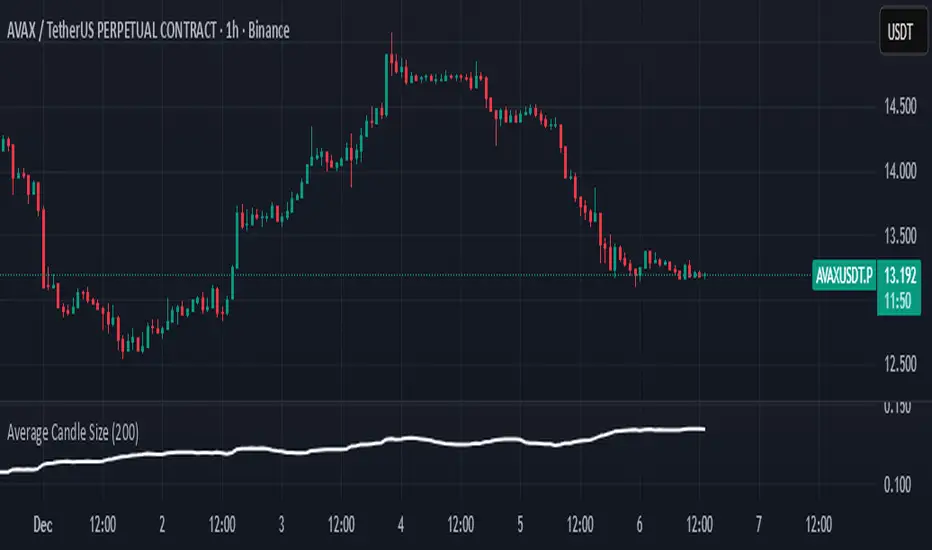
Average Candle SizeI created this indicator because I couldn't find a simple tool that calculates just the average candle size without additional complexity. Built for traders who want a straightforward volatility measure they can fully understand. How it works:
1. Calculate high-low for each candle
2. Sum all results
3. Divide by the total number of candles
Simple math to get the average candle size of the period specified in Length.
CapitalFlowsResearch: Returns Regime MapCapitalFlowsResearch: Returns Regime Map — Two-Asset Behaviour & Correlation Lens
CapitalFlowsResearch: Returns Regime Map is a two-asset regime overlay that shows how a primary market and a linked macro series are really moving together over short rolling windows. Instead of just eyeballing two separate charts, the tool classifies each bar into one of four states based on the combined direction of recent returns:
Up / Up
Up / Down
Down / Up
Down / Down
These states are calculated from aggregated, windowed returns (using configurable return definitions for each asset), then painted directly onto the price chart as background regimes. On top of that, the indicator monitors the correlation of the same return streams and can optionally tint periods where correlation sits within a user-defined “low-correlation” band—highlighting moments when the usual relationship between the two series is weak, unstable, or breaking down.
In practice, this turns the chart into a compact co-movement map: you can see at a glance whether price and rates (or any two chosen markets) are trending together, diverging in a meaningful way, or moving in choppy, low-conviction fashion. It’s especially powerful for macro traders who need to frame trades in terms of “risk asset vs. rates,” “index vs. volatility,” or similar pairs—while keeping the actual construction details of the regime logic abstracted.

Linear Moments█ OVERVIEW
The Linear Moments indicator, also known as L-moments, is a statistical tool used to estimate the properties of a probability distribution. It is an alternative to conventional moments and is more robust to outliers and extreme values.
█ CONCEPTS
█ Four moments of a distribution
We have mentioned the concept of the Moments of a distribution in one of our previous posts. The method of Linear Moments allows us to calculate more robust measures that describe the shape features of a distribution and are anallougous to those of conventional moments. L-moments therefore provide estimates of the location, scale, skewness, and kurtosis of a probability distribution.
The first L-moment, λ₁, is equivalent to the sample mean and represents the location of the distribution. The second L-moment, λ₂, is a measure of the dispersion of the distribution, similar to the sample standard deviation. The third and fourth L-moments, λ₃ and λ₄, respectively, are the measures of skewness and kurtosis of the distribution. Higher order L-moments can also be calculated to provide more detailed information about the shape of the distribution.
One advantage of using L-moments over conventional moments is that they are less affected by outliers and extreme values. This is because L-moments are based on order statistics, which are more resistant to the influence of outliers. By contrast, conventional moments are based on the deviations of each data point from the sample mean, and outliers can have a disproportionate effect on these deviations, leading to skewed or biased estimates of the distribution parameters.
█ Order Statistics
L-moments are statistical measures that are based on linear combinations of order statistics, which are the sorted values in a dataset. This approach makes L-moments more resistant to the influence of outliers and extreme values. However, the computation of L-moments requires sorting the order statistics, which can lead to a higher computational complexity.
To address this issue, we have implemented an Online Sorting Algorithm that efficiently obtains the sorted dataset of order statistics, reducing the time complexity of the indicator. The Online Sorting Algorithm is an efficient method for sorting large datasets that can be updated incrementally, making it well-suited for use in trading applications where data is often streamed in real-time. By using this algorithm to compute L-moments, we can obtain robust estimates of distribution parameters while minimizing the computational resources required.
█ Bias and efficiency of an estimator
One of the key advantages of L-moments over conventional moments is that they approach their asymptotic normal closer than conventional moments. This means that as the sample size increases, the L-moments provide more accurate estimates of the distribution parameters.
Asymptotic normality is a statistical property that describes the behavior of an estimator as the sample size increases. As the sample size gets larger, the distribution of the estimator approaches a normal distribution, which is a bell-shaped curve. The mean and variance of the estimator are also related to the true mean and variance of the population, and these relationships become more accurate as the sample size increases.
The concept of asymptotic normality is important because it allows us to make inferences about the population based on the properties of the sample. If an estimator is asymptotically normal, we can use the properties of the normal distribution to calculate the probability of observing a particular value of the estimator, given the sample size and other relevant parameters.
In the case of L-moments, the fact that they approach their asymptotic normal more closely than conventional moments means that they provide more accurate estimates of the distribution parameters as the sample size increases. This is especially useful in situations where the sample size is small, such as when working with financial data. By using L-moments to estimate the properties of a distribution, traders can make more informed decisions about their investments and manage their risk more effectively.
Below we can see the empirical dsitributions of the Variance and L-scale estimators. We ran 10000 simulations with a sample size of 100. Here we can clearly see how the L-moment estimator approaches the normal distribution more closely and how such an estimator can be more representative of the underlying population.
█ WAYS TO USE THIS INDICATOR
The Linear Moments indicator can be used to estimate the L-moments of a dataset and provide insights into the underlying probability distribution. By analyzing the L-moments, traders can make inferences about the shape of the distribution, such as whether it is symmetric or skewed, and the degree of its spread and peakedness. This information can be useful in predicting future market movements and developing trading strategies.
One can also compare the L-moments of the dataset at hand with the L-moments of certain commonly used probability distributions. Finance is especially known for the use of certain fat tailed distributions such as Laplace or Student-t. We have built in the theoretical values of L-kurtosis for certain common distributions. In this way a person can compare our observed L-kurtosis with the one of the selected theoretical distribution.
█ FEATURES
Source Settings
Source - Select the source you wish the indicator to calculate on
Source Selection - Selec whether you wish to calculate on the source value or its log return
Moments Settings
Moments Selection - Select the L-moment you wish to be displayed
Lookback - Determine the sample size you wish the L-moments to be calculated with
Theoretical Distribution - This setting is only for investingating the kurtosis of our dataset. One can compare our observed kurtosis with the kurtosis of a selected theoretical distribution.
