ZY Return CandlesThe ZY Return Candles indicator detects possible reversal candles and generates trading signals with these candles. Since the TP targets of the transactions are the opposite Bollinger Bands, the indicator should be used together with Bollinger Bands. When the candle that the transaction came from and the candle that closed before it are considered together, the position should be SL when the highest/lowest values of these two candles are violated, and the position should be SL with the opening of the following candle in the opposite direction and the TP target should be 1% more than the loss made with SL.
Ketidakstabilan

Gabriel's Andean Oscillator📈 Gabriel's Andean Oscillator — Enhanced Trend-Momentum Hybrid
Gabriel's Andean Oscillator is a sophisticated trend-momentum indicator inspired by Alex Grover’s original Andean Oscillator concept. This enhanced version integrates multiple envelope types, smoothing options, and the ability to track volatility from both open/close and high/low dynamics—making it more responsive, adaptable, and visually intuitive.
🔍 What It Does
This oscillator measures bullish and bearish "energy" by calculating variance envelopes around price. Instead of traditional momentum formulas, it builds two exponential variance envelopes—one capturing the downside (bullish potential) and the other capturing the upside (bearish pressure). The result is a smoothed oscillator that reflects internal market tension and potential breakouts.
⚙️ Key Features
📐 Envelope Types:
Choose between:
"Regular" – Uses single EMA-based smoothing on open/close variance. Ideal for shorter timeframes.
"Double Smoothed" – Adds an extra layer of smoothing for noise reduction. Ideal for longer timeframes.
📊 Bullish & Bearish Components:
Bull = Measures potential upside using price lows (or open/close).
Bear = Measures downside pressure using highs (or open/close).
These can optionally be derived from high/low or open/close for flexible interpretation.
📏 Signal Line:
A customizable EMA of the dominant component to confirm momentum direction.
📉 Break Zone Area Plot:
An optional filled area showing when bull > bear or vice versa, useful for detecting expansion/contraction phases.
🟢 High/Low Overlay Option (Use Highs and Lows?):
Visualize secondary components derived from high/low prices to compare against the open/close dynamics and highlight volatility asymmetry.
🧠 How to Use It
Trend Confirmation:
When bull > bear and rising above signal → bullish bias.
When bear > bull and rising above signal → bearish bias.
Breakout Potential:
Watch the Break area plot (√(bull - bear)) for rapid expansion, signaling volatility bursts or directional moves.
High/Low Envelope Divergence:
Enabling the high/low comparison reveals hidden strength or weakness not visible in open/close alone.
🛠 Customizable Inputs
Envelope Type: Regular vs. Double Smoothed
EMA Envelope Lengths: For both regular and smoothed logic
Signal Length: Controls EMA smoothing for the signal
Use Highs and Lows?: Toggles second set of envelopes; the original doesn't include highs and lows.
Plot Breaks: Enables the filled “break” zone area, the squared difference between Open and Close.
🧪 Based On:
Andean Oscillator - Alpaca Markets
Licensed under CC BY-NC-SA 4.0
Developed by Gabriel, based on the work of Alex Grover

Info TablesThis indicator provides two clear tables showing key market metrics, helping you make sense of price action. Each metric is chosen to give you practical insights, and you can customize the display to fit your needs.
## Key Features and Why Metrics Matter
### Main Table Metrics
- **ML-Predicted Price**:
- **What**: A price forecast based on a machine learning model using past price, volume, and RSI data.
- **Why**: Shows where the market might head, helping you gauge if the current price is too high or low compared to the prediction. Useful for spotting potential reversals or continuations.
- **Deviation %**:
- **What**: The percentage difference between the current price and the predicted price.
- **Why**: Tells you how far the market is straying from the ML forecast. A large deviation might suggest overbought/oversold conditions or a trend shift.
- **VWAP Deviation %**:
- **What**: The percentage difference between the current price and the Volume Weighted Average Price (VWAP).
- **Why**: VWAP is a benchmark for fair price; deviation shows if the market is stretched above or below this level, aiding entries or exits.
- **FRED UNRATE % Change**:
- **What**: The percentage change in the U.S. unemployment rate from FRED data.
- **Why**: Offers macro context. Rising unemployment can signal economic weakness, impacting market sentiment, while falling rates may boost confidence.
- **Open Interest**:
- **What**: The total number of open futures contracts for MESM2.
- **Why**: High open interest indicates strong market participation, often tied to liquidity and conviction. Low levels might suggest indecision or lack of commitment.
- **COT Commercial Long/Short**:
- **What**: Commitment of Traders (COT) data showing commercial traders’ long and short positions.
- **Why**: Reveals how big players (hedgers) are positioned. More longs than shorts can hint at bullish sentiment, while more shorts suggest bearish views.
### New Metrics Table
- **QQE Bias**:
- **What**: A momentum indicator based on a smoothed RSI with trailing stops.
- **Why**: Highlights bullish (green) or bearish (red) momentum, helping you confirm short-term trade directions or avoid choppy markets (gray).
- **Volume Momentum**:
- **What**: A score (1–20) comparing current volume to past volume over a lookback period.
- **Why**: High scores indicate strong buying/selling pressure, signaling potential breakouts or reversals. Low scores suggest weak participation.
- **ATR Volatility**:
- **What**: A score (1–20) based on the Average True Range, measuring price volatility.
- **Why**: High volatility warns of larger price swings, useful for setting stop-losses or avoiding trades in choppy conditions. Low volatility may indicate consolidation.
- **ADX Trend**:
- **What**: The Average Directional Index, measuring trend strength.
- **Why**: High ADX values confirm strong trends, guiding you to trade with the trend. Low values suggest range-bound markets, better for mean-reversion strategies.
- **RSI**:
- **What**: Relative Strength Index, showing overbought (>70) or oversold (<30) conditions.
- **Why**: Helps identify potential reversal points or confirm momentum. Useful for timing entries in overextended markets.
- **Frahm Volatility**:
- **What**: A score (1–20) based on true range over a time window (e.g., 24 hours).
- **Why**: Measures short-term volatility, helping you adjust position sizes or avoid trading during erratic price moves.
- **Frahm Avg Candle (Ticks)**:
- **What**: The average candle size in ticks over the same time window.
- **Why**: Indicates typical price movement, useful for setting realistic profit targets or stop-losses based on recent market behavior.
### Additional Features
- **Plotted Predicted Price**:
- **What**: An optional line showing the ML-predicted price on the chart.
- **Why**: Lets you visually compare the predicted price to actual price action, making it easier to spot divergence or alignment.
- **Custom Gradient Colors**:
- **What**: User-defined colors for high/low values in both tables.
- **Why**: Makes it quick to see which metrics are at extremes (e.g., high deviation or strong ADX), improving decision-making under pressure.
- **Alerts**:
- **What**: Notifications for high/low Frahm volatility and bullish/bearish QQE Bias.
- **Why**: Keeps you informed of critical changes (e.g., volatility spikes or momentum shifts) without needing to watch the chart constantly.
## Customization Options
- **ML Matrix Inputs**:
- Adjust the **ML Lookback Period** (e.g., 200–300 for volatile markets, 1000 for trends) to control how much history the ML model uses.
- Set the **ML RSI Period** (e.g., 7–10 for fast markets, 20 for calm) to tweak the RSI’s sensitivity in the prediction.
- **Plot Settings**:
- Toggle the predicted price line and choose its color (default blue) for clear visibility.
- **Table Settings**:
- Position tables (top/bottom, left/center/right) and show/hide them to focus on what matters.
- **Gradient Color Settings**:
- Pick colors for high/low values in each table to match your chart or preferences.
- **Timeframe & Thresholds**:
- Set specific timeframes (e.g., 5-minute for smoother data) and thresholds (e.g., tighter deviation ranges) for each metric to suit your trading style.
## Ideal Use Case
This indicator is perfect for MESM2 traders navigating fast-moving markets. The Main Table gives you a big-picture view (predicted price, macro data, and positioning), while the New Metrics Table zooms in on momentum and volatility, ideal for scalping or trend trades. Use it to confirm entries, set stops, or avoid choppy periods.
## Why It’s Valuable
The **ML Matrix - Tables Only** puts essential data at your fingertips. Each metric is selected to answer a specific question—Is the price overextended? Is momentum building? Are big players bullish? Are conditions too volatile?—helping you trade with clarity and confidence, whether you’re catching quick moves or riding longer trends.

Candle Pattern Detector By Prashanth
Bullish Signal (🟢 below candle):
Plotted when any of the following occur:
✅ Bullish Engulfing
✅ Bullish Three-Line Strike
✅ Bottom wick ≥ % threshold (default: 80%)
Bearish Signal (🔴 above candle):
Plotted when any of the following occur:
❌ Bearish Engulfing
❌ Bearish Three-Line Strike
❌ Top wick ≥ % threshold (default: 80%)
Only one signal per candle (🟢 or 🔴)
If both bullish and bearish conditions happen on same candle → no signal
Helps simplify visual clutter while scanning for strong candle patterns

LaCrazy Smash CandleLaCrazy Smash Candle highlights powerful engulfing candles that signal potential momentum reversals or breakout continuation.
Smash Long: The candle's low touches or dips below the prior candle's low, then closes above the previous high with a strong body (minimum % of the candle range).
Smash Short: The candle's high touches or exceeds the prior high, then closes below the previous low with a strong body.
These “Smash” moves often occur at key pivot points, signaling decisive rejections or trend continuation. Customize the body strength filter to match your strategy needs.

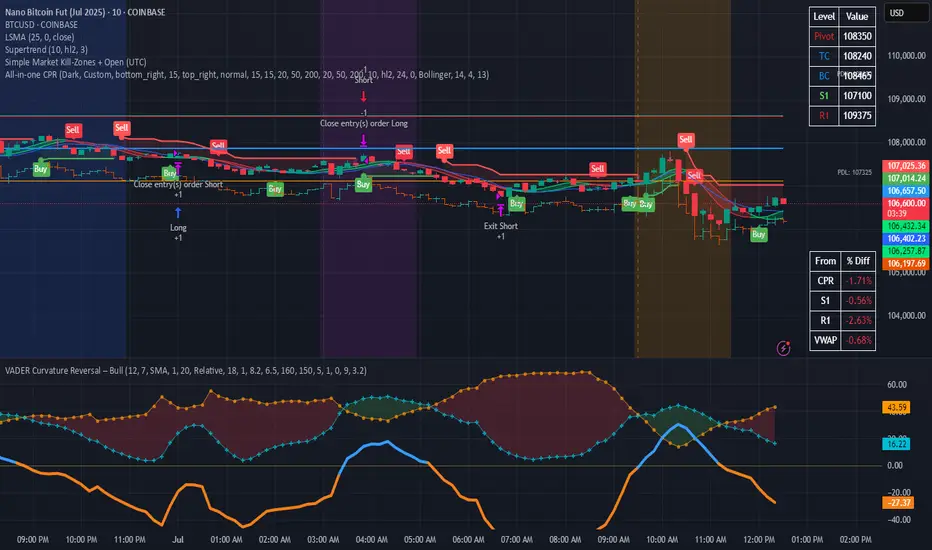
Simple Market Kill-Zones + Open (UTC)What it does
This Pine v6 indicator highlights the “kill-zones” around the big session opens—Asian (23:00–03:00 UTC), London (07:00–09:00 UTC) and New York (13:30–15:30 UTC)—by reading each bar’s actual UTC timestamp. It also draws dashed vertical lines at exactly 23:00, 07:00 and 13:30 UTC, so you never miss the liquidity ramps. Because it uses raw UTC hours/minutes, it stays accurate even when exchanges pause (e.g. Nano-BTC’s daily halt) or your chart’s display timezone changes.
Key Inputs
Show Asia/London/NY Kill Zone – toggle each shaded band on/off
Zone Colors – pick your own semi-transparent hues
Show Session-Open Lines – enable dashed verticals at the exact open times
Line Colors – customize the line opacity and style
How to use
Apply on your favorite timeframe (15 min–1 h is a sweet spot).
Toggle the zones you care about and pick readable colors.
Use the dashed lines as entry triggers or as visual bookmarks.
In your own Pine strategies, wrap order logic with the zone booleans to only trade when liquidity’s alive.
Avg daily rangeThe Average Daily Range (ADR) is a technical indicator that measures the average price movement of a financial instrument over a specific period.

ALIP FX Smart Scalper – Precision for 1-Min TradersALIP FX Smart Scalper – Precision for 1-Min Traders
Looking for a powerful and clean scalping tool built for the 1-minute chart?
This indicator is engineered for serious scalpers who demand high accuracy, zero repaint, and trend-aligned signals.
✅ Key Features:
🔹 Trend-based filtering (EMA logic)
🔹 RSI + ATR + Slope conditions
🔹 No repaint – signals appear only on closed candles
🔹 Buy & Sell alerts with label and audio
🔹 Works best on BTC, NAS100, Gold (1m/5m TF)
💡 Why It Works:
The ALIP FX Smart Scalper ignores weak noise signals and only highlights clean trend-following opportunities.
Perfect for traders who want fast decisions with logic, not luck.
📌 Live test it now on TradingView
🔗
📥 More tools & education: t.me
🔻 Powered by: ALIP FX
"Success Elevated. Trade Smarter."
#ALIPFX #ScalpingIndicator #NoRepaint #TradingTools #SmartScalper #BTCUSD #NASDAQ100 #Gold

Bollinger Band + RSI Strategy ScannerVrushaNilansh Indicator for 15min. Trading Based on Bollinger Bands+RSI

KosATRWhat this Pine Script does:
✅ This indicator displays daily ATR (Average True Range) information on any chart timeframe (minutes, hours, etc.), ensuring the calculations are based strictly on daily price data.
Displayed Information in the Table:
The script creates a table in the bottom-left corner of the chart that shows:
ATR — A custom, filtered version of the daily ATR that excludes abnormal price bars (extremely large or small daily ranges).
% — The percentage of the ATR that today's price movement (Open to Close) has covered so far.
Level — A manually defined fixed level, set through the script's input.
Level + ATR — The sum of the daily ATR and your defined level, useful for setting price targets or alerts.
Key Features:
Uses request.security() to ensure all calculations (high, low, open, close) are taken from the daily timeframe, even when you're viewing lower or higher timeframes.
Implements a filtering method to calculate an "adaptive ATR," ignoring price ranges that are too large or too small (outliers), making the ATR value more stable and realistic.
Displays a live, easy-to-read table directly on the chart for quick reference during trading.
Summary:
This script provides traders with reliable, daily-based ATR data, helping assess current price movement strength relative to historical daily volatility. It's especially useful for intraday traders who want constant awareness of daily ATR levels, regardless of their current chart timeframe.

RSI-BBGun-v6.1RSI BB Gun – Operator's Guide
“Eyes on target. Wait for the right moment. Then strike.”
________________________________________
🎯 Mission Objective
RSI BB Gun identifies extreme market conditions using RSI and Bollinger Bands, then overlays trend and volatility intelligence so you know when the setup is real.
The ❌ is your target acquisition signal—price just moved from an extreme zone back into play. Now you’ve got a clean radar lock.
________________________________________
📡 How to Operate
🟣 Step 1: Watch for the ❌'s (Black X = RSI & Bollinger Band Extremes Encountered)
• The Purple X means price and RSI are both stretched—and just snapped back into range.
• The target is now in the cross hairs and potentially ready for engagement.
🟥 Step 2: Confirm the Trend
• The thick ribbon tells you if the trend is with you:
o 🟢 Green = Uptrend. Focus on long setups.
o 🔴 Red = Downtrend. Focus on puts or short plays.
• Align with trend. Only engage when the field favors your position.
🔺 Step 3: Evaluate Signal Context
• Green Triangles = price just crossed below lower Bollinger Band (oversold).
• Red Triangles = price crossed above upper Band (overbought).
• Horizontal Lines Disappeared = The bar after the green or red horizontal line disappears means its time. We patiently wait for this as it means the momentum may be changing.
• These are your early indicators—they scout the setup on the GO / NO GO DECISION.
• ❌ + triangle + trend = clean shot.
________________________________________
☁️ Avoid These Situations
• ❌ in a choppy/no-trend zone = false alarm. Don’t engage.
• Repeated black ❌s without a purple ❌confirmation = low conviction. Let it go.
________________________________________
________________________________________
🪖 Operator's Mindset
“You don’t chase trades. You stalk them. When the ❌ flashes, the system has found a target. What you do next is up to your discipline, your tools, and your plan.”
________________________________________
Note: This is a free version. Upcoming paid version includes multi-timeframes working together. Multiple strategies. Volatility meter. Make money and master the BB Gun so that you can elevate to the Snipers weapon.
🔒 Want More Firepower?
Upgraded version coming soon. Unlocks next-gen targeting tools:
• Multi-timeframe RSI intelligence in a live dashboard
• Precision-timed combo signals based on layered volatility + RSI logic
• Advanced trend filters, trade zone overlays, and sniper-level entry indicators
• Ideal for swing traders and options strategists who want clarity under pressure
💥 Budget-friendly. No subscription. Upgrade when you're ready to go Pro.
Tip: Make 4+ trades mastering this setup. Then use a small portion of the trades to gain more features. Always be in a position you cannot lose.
🆚 Why This Beats Standard RSI/BB Tools
Mission Feature Basic Indicators RSI Ribbon Lite
Trend Confirmation ❌ ✅ Ribbon Overlay
Multi-Timeframe Awareness ❌ ✅ 5-Timeframe RSI Grid
Volatility Confirmation ❌ ✅ Weighted ATR Scoring
Combo Signal Alerts ❌ ✅ ❌ Reentry Combo Alerts
TradingView Alerts ❌ ✅ Built-In Radar Ping
#rsi #bb #bollingerbands #hull ma #trend

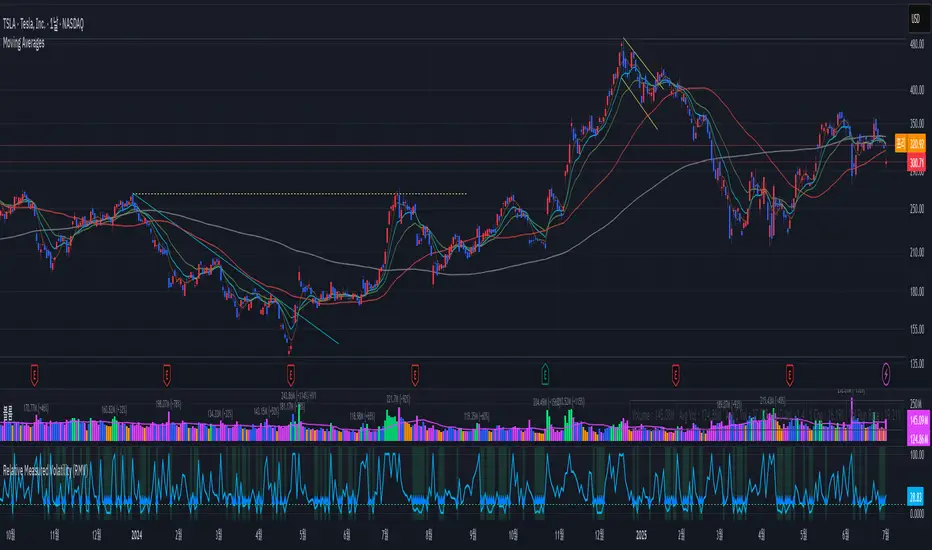
Relative Measured Volatility (RMV)RMV • Volume-Sensitive Consolidation Indicator
A lightweight Pine Script that highlights true low-volatility, low-volume bars in a single squeeze measure.
What it does
Calculates each bar’s raw High-Low range.
Down-weights bars where volume is below its 30-day average, emphasizing genuine quiet periods.
Normalizes the result over the prior 15 bars (excluding the current bar), scaling from 0 (tightest) to 100 (most volatile).
Draws the series as a step plot, shades true “tight” bars below the user threshold, and marks sustained squeezes with a small arrow.
Key inputs
Lookback (bars): Number of bars to use for normalization (default 15).
Tight Threshold: RMV value under which a bar is considered squeezed (default 15).
Volume SMA Period: Period for the volume moving average benchmark (default 30).
How it works
Raw range: barRange = high - low
Volume ratio: volRatio = min(volume / sma(volume,30), 1)
Weighted range: vwRange = barRange * volRatio
Rolling min/max (prior 15 bars): exclude today so a new low immediately registers a 0.
Normalize: rmv = clamp(100 * (vwRange - min) / (max - min), 0, 100)
Visualization & signals
Step line for exact bar-by-bar values.
Shaded background when RMV < threshold.
Consecutive-bar filter ensures arrows only appear when tightness lasts at least two bars, cutting noise.
Why use it
Quickly spot consolidation zones that combine narrow price action with genuine dry volume—ideal for swing entries ahead of breakouts.
Shavarie's Sniper LineShavarie’s Sniper Line is a precision confirmation tool built for high-quality entries — not noisy signals.
It activates only when all 3 conditions agree:
🔁 Momentum bend detection
💧 Money Flow Index (MFI) pressure
🔺 Delta volume strength (emulated from price/volume flow)
When all conditions align, the Sniper Line shifts to:
+1 for potential buy zone
-1 for potential sell zone
0 when neutral — no action
Best used in combination with supply/demand zones, Heikin Ashi, or larger trend structures. Built for traders who value patience, precision, and massive R:R setups.

SQZMOM Breakout Strategy📌 SQZMOM Breakout Strategy – Optimized for 15-Minute Intraday Trading
SQZMOM Breakout Strategy is a momentum and volatility-based algorithmic trading system, primarily built around the Squeeze Momentum (SQZMOM) indicator. It is specifically optimized for 15-minute timeframes to exploit intraday breakouts and trend continuations.
📊 Key Features:
✅ Breakout signals based on the Squeeze Momentum indicator
✅ Trend filter using 200-period WMA (visual only, not affecting entries)
✅ RSI filter to avoid trades in overbought/oversold zones
✅ Volume and ATR filters to confirm breakout quality
✅ Position sizing dynamically scales from 5% to 20% based on signal strength
✅ Trailing Stop Loss based on user-adjustable ATR multiple (default: 2.0 ATR)
✅ No fixed Take Profit: trades ride the trend using trailing stops
⚙️ Configurable Inputs:
Bollinger Band & Keltner Channel parameters
RSI thresholds (fixed at 40 to avoid early entries against momentum)
Trailing Stop distance defined by ATR Multiplier for Trailing Stop
All parameters are user-tunable for further optimization
🟢 When Does It Enter a Trade?
Long Entry:
SQZMOM fires bullish breakout + momentum increases + price above WMA200 + sufficient volume & ATR + RSI > 40
Short Entry:
SQZMOM fires bearish breakout + momentum decreases + price below WMA200 + sufficient volume & ATR + RSI < 40
Signal entries are deferred until all filters (especially RSI) align — no crossover logic is used
🎯 Trade Management:
Position Sizing: Adjusted according to momentum strength (val), from 5% to 20%
Exit Strategy: Trailing Stop only, no hard TP — lets profits run
TP/SL logic: Trailing SL moves dynamically with price, distance = ATR × multiplier
📚 Scientific & Practical Foundations:
The model is inspired by John Carter’s “TTM Squeeze” principle: volatility contraction followed by explosive momentum
Position sizing and ATR-based trailing logic follow Ernie Chan’s adaptive risk framework in Algorithmic Trading (2013)
RSI as a trend-quality gate is consistent with classic momentum confirmation rules

TICK ±1200 Intrabar MarkerMarks +1100 and -1200 NYSE TICK readings on any chart. Useful for TICK fades without having to look at the actual USI:TICK chart.

RAHA - Roni's Adjusted Hybrid AverageRoni's Hybrid Moving Average Oscillator
Each value in the series is weighted inversely to its distance from the mean, meaning that outliers have less impact.
The indicator reduces distortions caused by extreme movements.
More suitable for cases such as volatile stocks.
מתנד הממוצע ההיברידי של רוני
כל ערך בסדרה מקבל משקל הפוך למרחקו מהממוצע כלומר חריגים משפיעים פחות.
האינדיקטור מצמצם עיוותים שנגרמים על ידי תנועות קיצוניות.
מתאים יותר למקרים כמו מניות תנודתיות.

Price × Volume TableIt creates a table showing:
1- Daily Close × Daily Volume
2- Current Close × Current Volume
3- Close × Highest Volume (last 360 candles)


Z-Score + Momentum Strategy (Filtered)✅ What the script does:
Calculates the Z-Score of price with EMA smoothing.
Calculates Momentum as the difference between the current price and the price n bars ago.
Generates signals:
Buy: When the Z-Score is rising and relatively positive, and momentum is increasing.
Sell: When the Z-Score is falling, and momentum is decreasing.
Plots BUY and SELL labels on the candles.
Provides alerts that can be activated from the TradingView settings.
Displays Z-Score and Momentum in the lower pane of the chart.
🎯 How to use the script:
Copy the code into the Pine Editor on TradingView.
Click "Add to Chart".
Enable alerts using the alertcondition settings.
You can modify the following parameters:
Z-Score period: length
Momentum lookback period: momentumLength
Z-Score entry threshold: threshold

SymFlex Band - MAD, RSI, ATRSymFlex Band-No2.
Adaptive band indicator using MAD, RSI and ATR – for flexible volatility & momentum analysis.
SymFlex Band is a flexible, multi-source band indicator that combines three dynamic metrics:
✅ MAD Band – Median Absolute Deviation-based range band
✅ RSI Momentum Band – Adaptive envelope using RSI deviation and trend bias
✅ ATR Band – Classic Average True Range-based volatility band
📌 Features
- Selectable band types (individually toggled)
- Configurable moving average for center line (EMA, SMA, TEMA, DEMA, Zero-lag variants)
- Dynamic distance and breakout tracking
- Automatic nearest band detection
- Real-time correlation table between bands
This tool helps identify price location relative to statistically adaptive bands, making it easier to detect breakout conditions, mean-reversion zones, and trend-following opportunities.
🚫 Note: This version is an indicator only. Strategy logic and entry triggers have been removed for publication clarity.

Mean Amplitude (300 candles)Displays the average candle amplitude (volatility) as % over a selected period. Useful for gauging market activity compression or expansion.

Intra-bar Close/Open Gap [YuL]Just checking one idea: look at gaps between close and open bars on lower timeframe to try to estimate how much slippage exists there that may be a result of buying or selling pressure.
Perhaps it only useful in real time to see if situation of the current bar is changing.
Open to ideas and suggestions.

ATRWhat the Indicator Shows:
A compact table with four cells is displayed in the bottom-left corner of the chart:
| ATR | % | Level | Lvl+ATR |
Explanation of the Columns:
ATR — The averaged daily range (volatility) calculated with filtering of abnormal bars (extremely large or small daily candles are ignored).
% — The percentage of the daily ATR that the price has already covered today (the difference between the daily Open and Close relative to ATR).
Level — A custom user-defined level set through the indicator settings.
Lvl+ATR — The sum of the daily ATR and the user-defined level. This can be used, for example, as a target or stop-loss reference.
Color Highlighting of the "%" Cell:
The background color of the "%" ATR cell changes depending on the value:
✅ If the value is less than 10% — the cell is green (market is calm, small movement).
➖ If the value is between 10% and 50% — no highlighting (average movement, no signal).
🟡 If the value is between 50% and 70% — the cell is yellow (movement is increasing, be alert).
🔴 If the value is above 70% — the cell is red (the market is actively moving, high volatility).
Key Features:
✔ All ATR calculations and percentage progress are performed strictly based on daily data, regardless of the chart's current timeframe.
✔ The indicator is ideal for intraday traders who want to monitor daily volatility levels.
✔ The table always displays up-to-date information for quick decision-making.
✔ Filtering of abnormal bars makes ATR more stable and objective.
What is Adaptive ATR in this Indicator:
Instead of the classic ATR, which simply averages the true range, this indicator uses a custom algorithm:
✅ It analyzes daily bars over the past 100 days.
✅ Calculates the range High - Low for each bar.
✅ If the bar's range deviates too much from the average (more than 1.8 times higher or lower), the bar is considered abnormal and ignored.
✅ Only "normal" bars are included in the calculation.
✅ The average range of these normal bars is the adaptive ATR.
Detailed Algorithm of the getAdaptiveATR() Function:
The function takes the number of bars to include in the calculation (for example, 5):
The average of the last 5 normal bars is calculated.
pinescript
Копировать
Редактировать
adaptiveATR = getAdaptiveATR(5)
Step-by-Step Process:
An empty array ranges is created to store the ranges.
Daily bars with indices from 1 to 100 are iterated over.
For each bar:
🔹 The daily High and Low with the required offset are loaded via request.security().
🔹 The range High - Low is calculated.
🔹 The temporary average range of the current array is calculated.
🔹 The bar is checked for abnormality (too large or too small).
🔹 If the bar is normal or it's the first bar — its range is added to the array.
Once the array accumulates the required number of bars (count), their average is calculated — this is the adaptive ATR.
If it's not possible to accumulate the required number of bars — na is returned.
Что показывает индикатор:
На графике внизу слева отображается компактная таблица из четырех ячеек:
ATR % Уровень Ур+ATR
Пояснения к столбцам:
ATR — усреднённый дневной диапазон (волатильность), рассчитанный с фильтрацией аномальных баров (слишком большие или маленькие дневные свечи игнорируются).
% — процент дневного ATR, который уже "прошла" цена на текущий день (разница между открытием и закрытием относительно ATR).
Уровень — пользовательский уровень, который задаётся вручную через настройки индикатора.
Ур+ATR — сумма уровня и дневного ATR. Может использоваться, например, как ориентир для целей или стопов.
Цветовая подсветка ячейки "%":
Цвет фона ячейки с процентом ATR меняется в зависимости от значения:
✅ Если значение меньше 10% — ячейка зелёная (рынок пока спокоен, маленькое движение).
➖ Если значение от 10% до 50% — фон не подсвечивается (среднее движение, нет сигнала).
🟡 Если значение от 50% до 70% — ячейка жёлтая (движение усиливается, повышенное внимание).
🔴 Если значение выше 70% — ячейка красная (рынок активно движется, высокая волатильность).
Особенности работы:
✔ Все расчёты ATR и процентного прохождения производятся исключительно по дневным данным, независимо от текущего таймфрейма графика.
✔ Индикатор подходит для трейдеров, которые торгуют внутри дня, но хотят ориентироваться на дневные уровни волатильности.
✔ В таблице всегда отображается актуальная информация для принятия быстрых торговых решений.
✔ Фильтрация аномальных баров делает ATR более устойчивым и объективным.
Что такое адаптивный ATR в этом индикаторе
Вместо классического ATR, который просто усредняет истинный диапазон, здесь используется собственный алгоритм:
✅ Он берет дневные бары за последние 100 дней.
✅ Для каждого из них рассчитывает диапазон High - Low.
✅ Если диапазон бара слишком сильно отличается от среднего (более чем в 1.8 раза больше или меньше), бар считается аномальным и игнорируется.
✅ Только нормальные бары попадают в расчёт.
✅ В итоге считается среднее из диапазонов этих нормальных баров — это и есть адаптивный ATR.
Подробный алгоритм функции getAdaptiveATR()
Функция принимает количество баров для расчёта (например, 5):
Считается 5 последних нормальных баров
pinescript
Копировать
Редактировать
adaptiveATR = getAdaptiveATR(5)
Пошагово:
Создаётся пустой массив ranges для хранения диапазонов.
Перебираются дневные бары с индексами от 1 до 100.
Для каждого бара:
🔹 Через request.security() подгружаются дневные High и Low с нужным смещением.
🔹 Считается диапазон High - Low.
🔹 Считается временное среднее диапазона по текущему массиву.
🔹 Проверяется, не является ли бар аномальным (слишком большой или маленький).
🔹 Если бар нормальный или это самый первый бар — его диапазон добавляется в массив.
Как только массив набирает заданное количество баров (count), берётся их среднее значение — это и есть адаптивный ATR.
Если не удалось набрать нужное количество баров — возвращается na.
