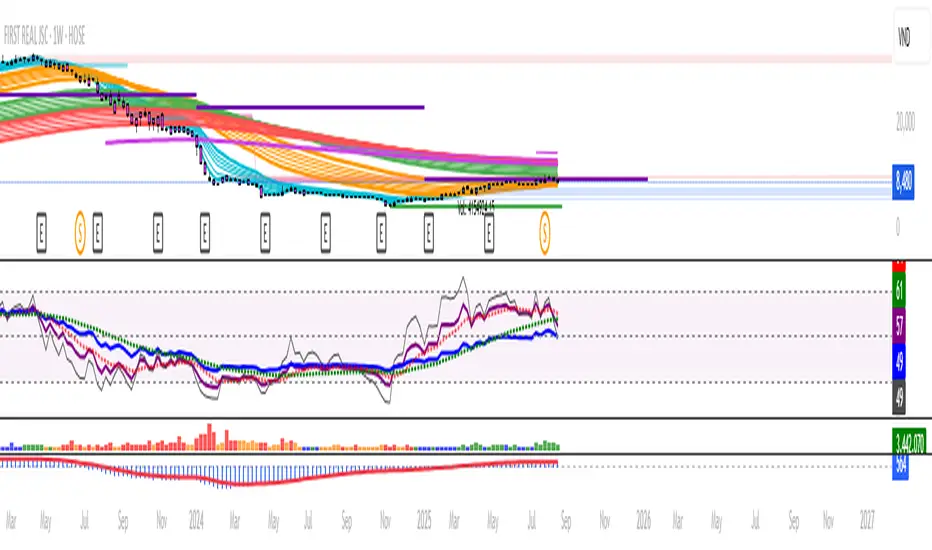
MACD Volume S2 By Gammaprod>> How to use this indicator :
1. Set your teadingview theme to dark theme.
2. My indicator is valid for forex, stock and but more valid for crypto.
3. Use three timeframe for more validation (choose between those, that fit to your trading style) :
- Timeframe 1m, 5m, and 15m for Scalping
- Timeframe 30m, 1h and 4h for Intraday
- Timeframe 4h, 1D and 1W for Swing Trading
4 . Always use THREE INDICATORS FROM GAMMAPROD, those three indicators is back to back each other, by the way, I only made those three indicators only (for now) :
- Trendlines Boll Ichi Crypto by Gammaprod
- Stoch RSI Divs Zone Crypto by Gammaprod
- MACD Volume Crypto by Gammaprod
>> How to setting :
1. Trendlines Boll Ichi Crypto by Gammaprod
A. Support and Resistence
- Well if you familiar with this indicator you can add it, but recommended for Timeframe 30m or more
B. Trendlines Primary or Trendlines Secondary
- Timeframe 1m you DON'T NEED Trendlines Primary or Trendlines Secondary
- Timeframe 5m you DON'T NEED Trendlines Secondary, but you CAN ADD Trendlines Primary if you fell it helpful (for me, it is helpful to find where the candles start or the end trend or a consolidation or where the candles will surpass a resistance or a support).
- Timeframe 15m you DON'T NEED Trendlines Secondary, DEFENITELY add Trendlines Primary it will help to find where the candles stop or a consolidation or where the candles will surpass a resistance or a support).
- Timeframe 30m or more, DEFENITELY NEED BOTH Trendlines Primary and Secondary Trendlines, it will help to find where the candle stop or consolidation or where the candle will surpass a resistance or support).
C. Bolinger, Ichimoku Cloud and Lagging Span
- Please DON'T CHANGE IT at all, it's really helpful to know when and where to make an entry decesion or a trend or a consolidation, if you don't understand how to read it, you better to learn it first (on "how to read" section and "How to OPEN position" the section below)
2. Stoch RSI Divs Zone Crypto by Gammaprod (DON'T CHANGE IT)
3. MACD Volume Crypto by Gammaprod (DON'T CHANGE IT)
>> How to read :
1. Sell or Buy Priority :
A. Buy Priority
- Color background on macd and stoch rsi is pink or purple sell is the priority, (if you're not sure to buy, just wait until the best moment to sell)
B. Buy Priority
- Color background on macd and stoch rsi Teal or light green buy is the priority, (if you're not sure to sell, just wait until the best moment to buy)
C. Indecision / Golden Moment
- Color background on stoch rsi yellow is indecision / golden moment of reversal pattern (wait until it formed background only on Stoch RSI), please becareful at this moment.
2. Trend / Consolidation :
A. BULLISH trend
- When Stoch RSI and MACD have teal or light green background that's means BULLISH trend, better to confirm by the candle is above green cloud and lagging span (red line) is also above the candle.
B. BEARISH trend
- When Stoch RSI and MACD have the Pink or purple background that's means BEARISH trend, better to confirm by the candle is above purple cloud and lagging span (red line) is also below the candle.
C. CONSOLIDATION
- When Stoch RSI have the mix background that's means CONSOLIDATION, better to confirm by the candle is in or near to green / purple cloud and lagging span (red line) is also on the candle.
3. Special Mark
A. Ideal Bullish :
- Near line 20 and green / teal background = When Stoch RSI have the char R / H on lime color label, that's means divergence or hidden divergence for buy position, if you not see this label that's means just a standard confirmation for buy
B. Not an Ideal Bullish :
- Near line 80 and green / teal background = if this happens make sure you know what happen, it could be a false signal or bullish continual pattern
C. Ideal Bearish :
- Near line 80 and pink / purple background = When Stoch RSI have the char R / H on lime color label, that's means divergence or hidden divergence for buy position, if you not see this label that's means just a standard confirmation for sell position.
D. Not an Ideal Bearish:
- Near line 20 and pink / purple background = if this happens make sure you know what happen, it could be a false signal or bearish continual pattern
E. The Beginning of Reversal (from BEARISH to BULLISH) :
- When Stoch RSI line shaping GREEN position is near 20.
- MACD lines still PINK, position lines is UNDER the HISTOGRAM, but the HISTOGRAM start to SHAPE FALL PINK (light pink) and the BACKGROUND still PINK / PURPLE.
- Position CANDLES NEAR BLUE line, NEAR PURPLE CLOUD, and lagging span (red line) STILL ON the area candle. (it used to be confirmed with the golden moment).
F. The Beginning of Reversal (from BULLISH to BEARISH) :
- When Stoch RSI line shaping PINK position is near 80.
- MACD lines still GREEN, position lines is ABOVE the HISTOGRAM, but the HISTOGRAM start to SHAPE FALL GREEN (light green) and the BACKGROUND still TEAL / GREEN.
- Position CANDLES NEAR WHITE line, NEAR TEAL CLOUD, and lagging span (red line) STILL ON the area candle. (it used to be confirmed with the golden moment).
G. False Signals, or It could be a Golden Moment (better to see it on TF 15 or bigger):
- Near line 20 or 80 and yellow background = When Stoch RSI have the char R / H on color label, that's means divergence or hidden divergence for buy / sell position, if you not see this label that's means just a standard confirmation for buy / sell depends on where the Stoch RSI line if near 20 that's means buy, near 80 means sell
>> How to OPEN position:
A. Bullish
1. Trendlines Boll Ichi Crypto by Gammaprod
- The candles above the green cloud.
- Lagging span (red line) above the candles.
- then open buy near yellow line (the first option) / blue line (the second option) (always confirm the position with two other indicators below).
2. Stoch RSI Divs Zone Crypto by Gammaprod
- Teal or Green background.
- The lines is shaping green.
- Better if on the bottom (at a range 20).
3. MACD Volume Crypto by Gammaprod
- Teal or Green background.
- The lines is shaped or shaping green.
- Better if at the green histogram.
B. Bearish
1. Trendlines Boll Ichi Crypto by Gammaprod
- The candles below the purple cloud.
- Lagging span (red line) below the candles.
- then open buy near yellow line (the first option) / white line (the second option) (always confirm the position with two other indicators below).
2. Stoch RSI Divs Zone Crypto by Gammaprod
- Pink or purple background.
- The lines are shaping pink.
- Better if the line on the top (at a range 80).
3. MACD Volume Crypto by Gammaprod
- Pink or purple background.
- The lines are shaped or shaping green.
- Better if at the pink histogram.
C. Consolidation
1. Trendlines Boll Ichi Crypto by Gammaprod
- The candles on the cloud (green or purple).
- Lagging span (red line) on the candles.
- then open buy near the white or blue line (always confirm the position with two other indicators below).
2. Stoch RSI Divs Zone Crypto by Gammaprod
- Mix background specially on a timeframe 15m or more.
- The line move fast up and down.
- Better if on the bottom or the top of the lines (at a range 20 or 80).
3. MACD Volume Crypto by Gammaprod
- Changing the background.
- The line is near the middle line.
- Have small Histogram.
>> The secret ingridient is comparing the timeframe :
The example scalping (Timeframe 1m, 5m and 15m)
- TF 1m is for making an open position.
- TF 5m is for making a judgement of the trend market.
- TF 15m is to confirm that judgement from TF 5m, be careful if it not similar then it used to be a consolidation or the beginning of the reversal.
There's a lot a way to open the position than above information that i gave it to you, but consider there are a limit char on this column, I hope it will help your trading and make a more profit on it.
Cari dalam skrip untuk "trendline"
Stoch RSI, Div, Zone S3 by Gammaprod>> How to use this indicator :
1. Set your teadingview theme to dark theme.
2. My indicator is valid for forex, stock and but more valid for crypto.
3. Use three timeframe for more validation (choose between those, that fit to your trading style) :
- Timeframe 1m, 5m, and 15m for Scalping
- Timeframe 30m, 1h and 4h for Intraday
- Timeframe 4h, 1D and 1W for Swing Trading
4 . Always use THREE INDICATORS FROM GAMMAPROD, those three indicators is back to back each other, by the way, I only made those three indicators only (for now) :
- Trendlines Boll Ichi Crypto by Gammaprod
- Stoch RSI Divs Zone Crypto by Gammaprod
- MACD Volume Crypto by Gammaprod
>> How to setting :
1. Trendlines Boll Ichi Crypto by Gammaprod
A. Support and Resistence
- Well if you familiar with this indicator you can add it, but recommended for Timeframe 30m or more
B. Trendlines Primary or Trendlines Secondary
- Timeframe 1m you DON'T NEED Trendlines Primary or Trendlines Secondary
- Timeframe 5m you DON'T NEED Trendlines Secondary, but you CAN ADD Trendlines Primary if you fell it helpful (for me, it is helpful to find where the candles start or the end trend or a consolidation or where the candles will surpass a resistance or a support).
- Timeframe 15m you DON'T NEED Trendlines Secondary, DEFENITELY add Trendlines Primary it will help to find where the candles stop or a consolidation or where the candles will surpass a resistance or a support).
- Timeframe 30m or more, DEFENITELY NEED BOTH Trendlines Primary and Secondary Trendlines, it will help to find where the candle stop or consolidation or where the candle will surpass a resistance or support).
C. Bolinger, Ichimoku Cloud and Lagging Span
- Please DON'T CHANGE IT at all, it's really helpful to know when and where to make an entry decesion or a trend or a consolidation, if you don't understand how to read it, you better to learn it first (on "how to read" section and "How to OPEN position" the section below)
2. Stoch RSI Divs Zone Crypto by Gammaprod (DON'T CHANGE IT)
3. MACD Volume Crypto by Gammaprod (DON'T CHANGE IT)
>> How to read :
1. Sell or Buy Priority :
A. Buy Priority
- Color background on macd and stoch rsi is pink or purple sell is the priority, (if you're not sure to buy, just wait until the best moment to sell)
B. Buy Priority
- Color background on macd and stoch rsi Teal or light green buy is the priority, (if you're not sure to sell, just wait until the best moment to buy)
C. Indecision / Golden Moment
- Color background on stoch rsi yellow is indecision / golden moment of reversal pattern (wait until it formed background only on Stoch RSI), please becareful at this moment.
2. Trend / Consolidation :
A. BULLISH trend
- When Stoch RSI and MACD have teal or light green background that's means BULLISH trend, better to confirm by the candle is above green cloud and lagging span (red line) is also above the candle.
B. BEARISH trend
- When Stoch RSI and MACD have the Pink or purple background that's means BEARISH trend, better to confirm by the candle is above purple cloud and lagging span (red line) is also below the candle.
C. CONSOLIDATION
- When Stoch RSI have the mix background that's means CONSOLIDATION, better to confirm by the candle is in or near to green / purple cloud and lagging span (red line) is also on the candle.
3. Special Mark
A. Ideal Bullish :
- Near line 20 and green / teal background = When Stoch RSI have the char R / H on lime color label, that's means divergence or hidden divergence for buy position, if you not see this label that's means just a standard confirmation for buy
B. Not an Ideal Bullish :
- Near line 80 and green / teal background = if this happens make sure you know what happen, it could be a false signal or bullish continual pattern
C. Ideal Bearish :
- Near line 80 and pink / purple background = When Stoch RSI have the char R / H on lime color label, that's means divergence or hidden divergence for buy position, if you not see this label that's means just a standard confirmation for sell position.
D. Not an Ideal Bearish:
- Near line 20 and pink / purple background = if this happens make sure you know what happen, it could be a false signal or bearish continual pattern
E. The Beginning of Reversal (from BEARISH to BULLISH) :
- When Stoch RSI line shaping GREEN position is near 20.
- MACD lines still PINK, position lines is UNDER the HISTOGRAM, but the HISTOGRAM start to SHAPE FALL PINK (light pink) and the BACKGROUND still PINK / PURPLE.
- Position CANDLES NEAR BLUE line, NEAR PURPLE CLOUD, and lagging span (red line) STILL ON the area candle. (it used to be confirmed with the golden moment).
F. The Beginning of Reversal (from BULLISH to BEARISH) :
- When Stoch RSI line shaping PINK position is near 80.
- MACD lines still GREEN, position lines is ABOVE the HISTOGRAM, but the HISTOGRAM start to SHAPE FALL GREEN (light green) and the BACKGROUND still TEAL / GREEN.
- Position CANDLES NEAR WHITE line, NEAR TEAL CLOUD, and lagging span (red line) STILL ON the area candle. (it used to be confirmed with the golden moment).
G. False Signals, or It could be a Golden Moment (better to see it on TF 15 or bigger):
- Near line 20 or 80 and yellow background = When Stoch RSI have the char R / H on color label, that's means divergence or hidden divergence for buy / sell position, if you not see this label that's means just a standard confirmation for buy / sell depends on where the Stoch RSI line if near 20 that's means buy, near 80 means sell
>> How to OPEN position:
A. Bullish
1. Trendlines Boll Ichi Crypto by Gammaprod
- The candles above the green cloud.
- Lagging span (red line) above the candles.
- then open buy near yellow line (the first option) / blue line (the second option) (always confirm the position with two other indicators below).
2. Stoch RSI Divs Zone Crypto by Gammaprod
- Teal or Green background.
- The lines is shaping green.
- Better if on the bottom (at a range 20).
3. MACD Volume Crypto by Gammaprod
- Teal or Green background.
- The lines is shaped or shaping green.
- Better if at the green histogram.
B. Bearish
1. Trendlines Boll Ichi Crypto by Gammaprod
- The candles below the purple cloud.
- Lagging span (red line) below the candles.
- then open buy near yellow line (the first option) / white line (the second option) (always confirm the position with two other indicators below).
2. Stoch RSI Divs Zone Crypto by Gammaprod
- Pink or purple background.
- The lines are shaping pink.
- Better if the line on the top (at a range 80).
3. MACD Volume Crypto by Gammaprod
- Pink or purple background.
- The lines are shaped or shaping green.
- Better if at the pink histogram.
C. Consolidation
1. Trendlines Boll Ichi Crypto by Gammaprod
- The candles on the cloud (green or purple).
- Lagging span (red line) on the candles.
- then open buy near the white or blue line (always confirm the position with two other indicators below).
2. Stoch RSI Divs Zone Crypto by Gammaprod
- Mix background specially on a timeframe 15m or more.
- The line move fast up and down.
- Better if on the bottom or the top of the lines (at a range 20 or 80).
3. MACD Volume Crypto by Gammaprod
- Changing the background.
- The line is near the middle line.
- Have small Histogram.
>> The secret ingridient is comparing the timeframe :
The example scalping (Timeframe 1m, 5m and 15m)
- TF 1m is for making an open position.
- TF 5m is for making a judgement of the trend market.
- TF 15m is to confirm that judgement from TF 5m, be careful if it not similar then it used to be a consolidation or the beginning of the reversal.
There's a lot a way to open the position than above information that i gave it to you, but consider there are a limit char on this column, I hope it will help your trading and make a more profit on it.
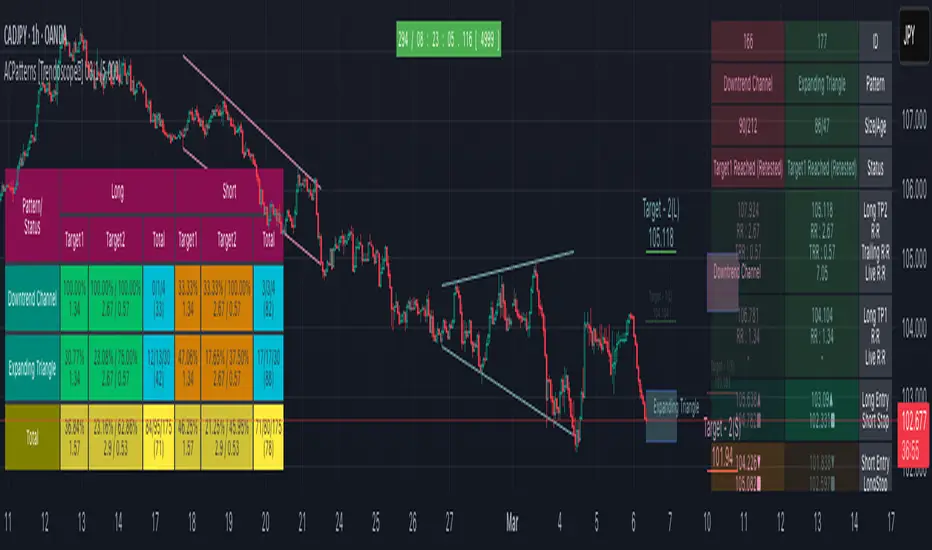
Auto Chart Patterns - Ultimate [Trendoscope]Here is an attempt to gather and present stats and probabilities of different chart patterns. Here, we challenge few traditional biases such as rising wedge is bearish, falling wedge is bullish etc. All the chart patterns identified in this script are bi-directional. Meaning they offer opportunities to trade in either direction.
This indicator is built on the base of two free scripts
๐ฏ Wedge-and-Flag-Finder-Multi-zigzag
๐ฏ Trendline-Pairs-Deep-Search
๐ฒ Following are the major highlights/updates in the present script
โถ Uses the similar deep search algorithm for finding patterns. Pattern identification logic has been optimised to provide more accurate patterns.
โถ Provides suggestion on how to trade these patterns - along with entry, stop and target suggestions.
โถ Advanced options available in setting such as 'Safe Repaint' - which enables repaint only when trade has not started.
โถ Option to run algorithm within specified time window
โถ Comprehensive stats on historical patterns which include win ratio, risk reward, trailing win ratio and trailing risk reward.
โถ Open Trades Stats widget which can help tracking trades easily.
โถ Fully customisable alerts - which can be used to plugin into bots.
๐ฒ Chart Patterns Included
โถ Channel - Uptrend, Downtrend, Ranging
โถ Triangle - Expanding, Contracting
โถ Rising Wedge - Expanding, Contracting
โถ Falling Wedge - Expanding, Contracting
If unable to determine the type and yet pivots are inline to form two trend lines, then it goes to category - Indeterminate
๐ฒ Indicator Components
Below is a quick snapshot of indicator components.
Now, lets look at some of the individual components:
โถOpen trade stats helps recognise trades in motion.
โถ Closed trade stats can either be shown with minimal stats or fully detailed stats.
๐ฒ Settings
โถ Generic Settings
โถ Zigzag and pattern selection
โถ Channel Settings
โถ Risk/Reward and Stats/Display Settings
๐ฒ Key Features
โฌค Safe Repaint :
This option allows redrawing pattern only if trade has not been taken. This increases accuracy of pattern detection. Example of impact of safe repaint is shows as below:
โฌค Trade Reversal or Breakout of Channels :
This option is useful to handle channels of different size. If the distance between channel trendlines are huge, then it is more advantageous to trade reversals. If the distance between trendlines of channel is small, it is more rewarding to trade the breakouts.
Here is an example of how this setting impacts the trade suggestions.
โฌค Detailed Closed Trade Stats :
Closed Stats settings give users option to see in depth details such as risk reward and win ratios for past patterns along with numbers.
โฌค Fully Customisable Alerts :
Alerts are implemented using alert method. Hence, users will not see text box in alert window where they can set alert format. To overcome this challenge, the indicator offers customisation of alerts through settings.
In the settings window, you notice below options for alerts
These settings allow users to enable/disable alerts for different status of patterns. The text box in the settings allows users to set customisable alert formats using specific placeholders.
Valid placeholders are:
{type} - Alert Type
{id} - Pattern id for which alert is generated
{ticker} - Ticker for which alert is generated
{timeframe} - Chart timeframe
{price} - Current close price
{pattern} - Name of the pattern
{longTrade} - Array containing stop, entry, target1 and target2 for long side of the trade for given pattern
{shortTrade} - Array containing stop, entry, target1 and target2 for short side of the trade for given pattern
{status} - Contains status of both long and short side of the trades as text
Default alert template set for all type of alerts is as below
{
"alert" : "{type}",
"id" : {id},
"ticker" : "{ticker}",
"timeframe" : "{timeframe}",
"price" : {price},
"pattern" : "{pattern}",
"long " : {longTrade},
"short " : {shortTrade},
"status" : "{status}"
}
An example alert looks like this:
If you just want to display pattern name and alert type, your alert message in the box should be something like this:
Type - {type}, Pattern - {pattern}
Will make a video on settings and usage when I get time :)
Skrip berbayar
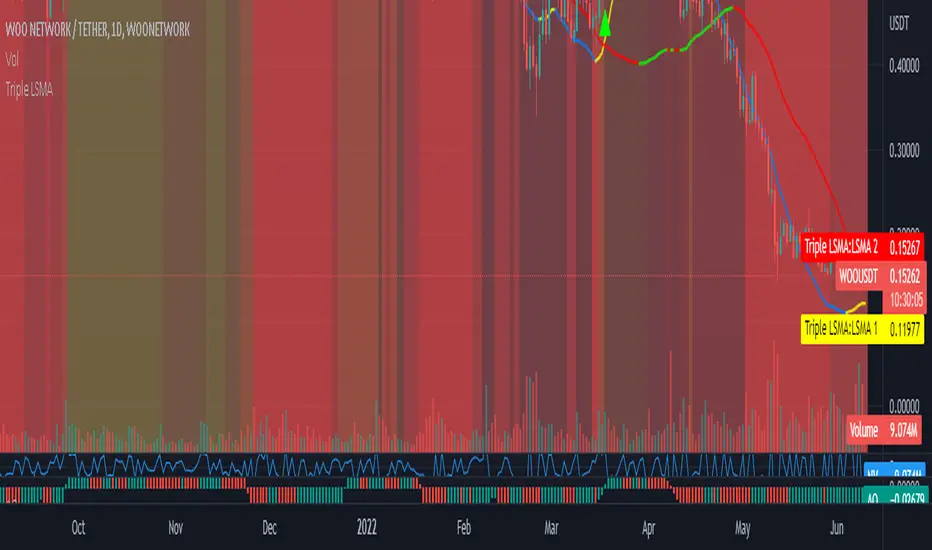
Triple Colored Least Squares Moving Average + Crossover AlertsThis script is forked from the โ Double Colored Least Squares Moving Average + Crossover Alerts โ from @IronKnightmare.
First release & notes : 2021-11-03.
Overview:
The Least Squares Moving Average is used mainly as a crossover signal to identify bullish or bearish trends. When a shorter duration line cross a longer one a trend can be identified. When multiple lines or the price action cross a longterm trend the confirmation can be further validated. Tradingview contains already some indicators with 1 or two LSMA trendlines that can be configured and toggled.
The original script that I forked had two LSMA lines that could be plotted with other valuable functions, I added a third for further confirmation as some trading systems will use three lines or some combination of those for validation.
Usage:
In inputs
- You will see LSMA 1, LSMA 2 & LSMA 3. The default values are 40, 100 & 400 representing the number of periods plotted by that line : fast, medium and slow changing trendlines will be plotted. The offset value and source are standard for most scripts.
In Style
- You can toggle LSMA 1, 2 or 3 and any combination of those. There are much more possibilities this way.
- For each LSMA, Color 0 & Color 1 are for coloring the slope of the trendline,
- Color 0 for rising slope,
- Color 1 for descending slope.
- The script will automatically color the rise or fall of the trendline accordingly. You can also set one identical color in both slopes for one unique color.
- The โ Long Crossover 1 on 2 โ is a signal for when the LSMA 1 cross over the LSMA 2, usually a shorter periods trendline, more volatile, climbing over the medium term one. A Signal will be traced on the chart at that crossing, you can configure this. The โShort Crossover 1 on 2โ is when the LSMA 1 cross under the LSMA 2, a signal will be traced on the chart accordingly.
- The Long Crossover 1 on 3 & Short Crossover 1 on 3 act on the same principle, although the crossing of the fast LSMA on the long / slow LSMA are used. Both can be toggled.
- The โ Background Coloring Line 1 : 0-Neutral, 1-Up, 2-Down โ is an optional background coloring for the LSMA1 line. This can provide additional information at a quick glance, especially if you combine the two other lines backgrounds, the partial transparency will compound.
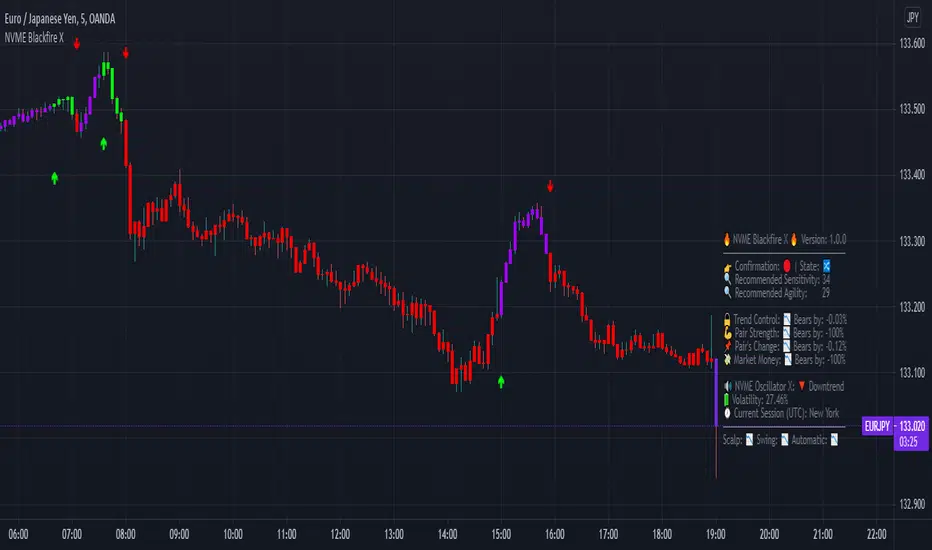
NVME Blackfire XNVME Blackfire X Indicator is a trend-confirmation indicator that includes Buy and Sell signals on the chart, Support & Resistance lines, Automatic Trendlines, Session Highs and Lows, Previous MTF Candle's Highs and Lows, Strategy Mode with Working Win/Loss Calculator, Built-In Position Size Calculator, Institutional Zones, Re-Entry Points and Filters, Customisable Market Dashboard and Alerts for Many Features.
The 2 main settings for the algorithm are 'Sensitivity' and 'Agility'. When you place Blackfire X onto your charts, you should be met automatically with the best settings we've found so far and don't worry if you are struggling to find settings because our system has an onboard system that provides you with an automatic "Best Settings" for the current pair that you are on. You can choose to enable this feature on the algorithm settings or simply see what is ideal on the dashboard too.
The 'Sensitivity' controls how quickly the algorithm responds to the market's trend changes. The higher the sensitivity, the less trades on the chart. The lower the sensitivity, the more trades you'll find on the chart.
The 'Agility' controls where the signals are placed within the trend change, a lower agility will give you signals closer to its reversal points and a higher agility will give you slower signals.
We also have the option to change the indicator to your trading style, there are four modes that heavily impacts the algorithm's calculations.
These are "default", "swing mode", "scalp mode", "strategy mode".
"Default" is our normal algorithm module that utilises the user's input to provide signals using a basic filtration system.
"Swing Mode" is our algorithm that has been modified to give signals that are more delayed for swing traders.
"Scalp Mode" is our algorithm that has been modified to give signals that are quick and fast for scalps.
"Strategy Mode" utilises our default mode but instead places the user in a mode where trades will only appear if a stop loss or a take profit area has been met by the price after the signal call.
Our third key option is our bar colour switches, there are multiple options such as "Cloud-Based", "Pivot Based", "S/R Based", "Change-Based" and "Two Colour Modes". NVME Blackfire X colours the candles in the direction of the trend and a green colour shows an uptrend, a purple colour shows an unconfirmed trend or often a ranging area and a red colour shows a downtrend.
We must let traders know that the signals should be used carefully and with a trader's strategy rather than following signals for the sake of it being printed there!
Since we want this algorithm to have necessary features and respond fast too, we have chosen only trend-following and analysis features that will be quick to use and easy to understand. We want this to be different from our Vanquisher X algorithm as that is a massive multi-tool full of features for traders to enjoy.
The first main feature is our 'Trend Cloud' system, it utilises two moving average plots that creates a cloud filling and with our algorithm you can customise both of the moving averages to any currently existing moving average in the PineScript Library.
The second feature is our 'Institutional Zones' system, which plots area of the market where the institutions have placed orders and these can be used as an extra support and resistance zone for trades. There is an input option that allows the user to get more or less zones and it is called "The Detection Strength", increasing this will show more zones whilst decreasing it will show less.
The third feature is our 'Automatic Trendlines' system, which utilises two input methods ('Trendline Period' and 'Trendline Detection Ratio'), the period controls how many bars of data to lookback to for the trend-lines and the detection ratio controls how many trend-lines are plotted onto the chart.
The fourth feature is our 'Session High and Lows' system, which plots the highest high and the lowest low of each session in the trading hours, these plots can be useful for breakout traders.
The fifth feature is our 'MTF Candle Info' system, which plots the candle's high and low or the candle's open and close for a timeframe and the previous candle of choice. This can also be used for breakout traders such as having a lower timeframe breakout for a higher timeframe plot.
The sixth feature is our 'Adaptive S/R Zones', which plots support and resistance zones into any market pair that are accurate points at which the market could react and reject from.
* Informative Market Dashboard *
Our simple panel on your chart displays the most relevant data from all of our features and calculations in real-time.
Confirmation
The confirmation simply tells the user what the previous signal was and this can be useful if the user may decide to have their signals turned off on the charts.
Market State
The market state informs the user the direction of the trend whether it be ranging, in an uptrend or downtrend, you'll see the emoji that corresponds to that.
Recommended Sensitivity
This feature will show the user what the recommended sensitivity is for the current pair that the user is on and the user may find this helpful if they don't know what settings to use.
Recommended Agility
This feature will show the user what the recommended agility is for the current pair that the user is on and the user may find this helpful if they don't know what settings to use.
Trend Control
The trend control feature calculates data using the user set bars back input and it determines all the factors within the trend to give you an informative response, an uptrend will have "Bulls by: " + percentage of control and a downtrend will have "Bears by" + percentage of control.
Pair Strength
The pair strength is measures the control of bulls or bears in the form of the market strength and it will give the same response as the trend control but the percentage will be based on the buying or selling pressure.
Pair's Change
The pairs change measures the change in price from point A to point B, if the change is greater than 0%, the dashboard will inform you that Bulls are in control, and if not the dashboard will inform you that Bears are in control.
Market Money
The market money measures the amount of volume and money that is going into the current asset and if the net change is greater than 0%, bulls will be in control, if not then bears are giving the market their money.
NVME Oscillator X
This is our very own oscillator that has been integrated into our dashboard, allowing the user to see the trend of our other indicator without having to fill their charts up with more noise. If the oscillator is in a downtrend then the dashboard will state that its in a downtrend and if it is in an uptrend then it will show an uptrend text.
Volatility
This feature measures the amount of volatility in any pair and provides user with the percentage value so they can see whether or not the market is extremely volatile at the current time.
Current Session
This feature will tell the user what session they are currently on such as London, Europe, New York, Asia, Australia.
FIBS S/R IndicatorHello,
I've decided to publish a new script. The previous version of this script was removed by admins for breaking community rules.
So I present to you the Fibonacci Support / Resistance.
1. How does it work
Ratio plots
I first take the input of pivot look back and search for pivots high and low.
And then it takes a second look back to search highest high and lowest low to establish the top bottom range.
Then using the top and bottom I plot ratios provided as input. Defaults to most relevant 5 ratios I've found (Fibonacci):
Ratio 0 = 0 - can't be changed
Ratio 1 = 0.5
Ratio 2 = 0.618
Ratio 3 = 1
Ratio 4 = 1.618
Ratio 5 = 2.618
Any changes done to these ratios should be in order, otherwise conditions could get messed up. So R1 needs to the lowest and R5 the highest.
Also the same ratios are used in reverse as negative ratios.
There is a option to plot all ratios but gets really confusing for me but maybe for you it works. By default there are certain conditions set so that as we go up new resistance ratio get displayed and as we go down we see new resistance plots.
Trendlines
I've also added some automatic trendline plots with breakout warning labels based on the pivots high and low. Start and end for trendlines can be changed via inputs.
Labels can be deactivated via input. On a older version the trendlines and labels where not removed from the chart but I felt like there was to much information.
Overcooked/Undercooked
I've also added some fills and background colors that indicate if the price action is over R5 or under Negative R5 ratios. This usually indicates some "overcooking" or "undecooking".
I've notices that after "crossunder"/"crossover" top bottom ratios it goes in consolidation or it dumps. So then I plot a bgcolor to signal that.
2. How to use it
Using plot lines we can determine where we have support and resistance. I found that the best way to use the default ratios values is on the 1H chart. Very good for trading on crypto because of current situation in the market where there is a lot of new people entering the space and volatility and sentiment make swings respect the Fibonacci ratios.
3. Examples
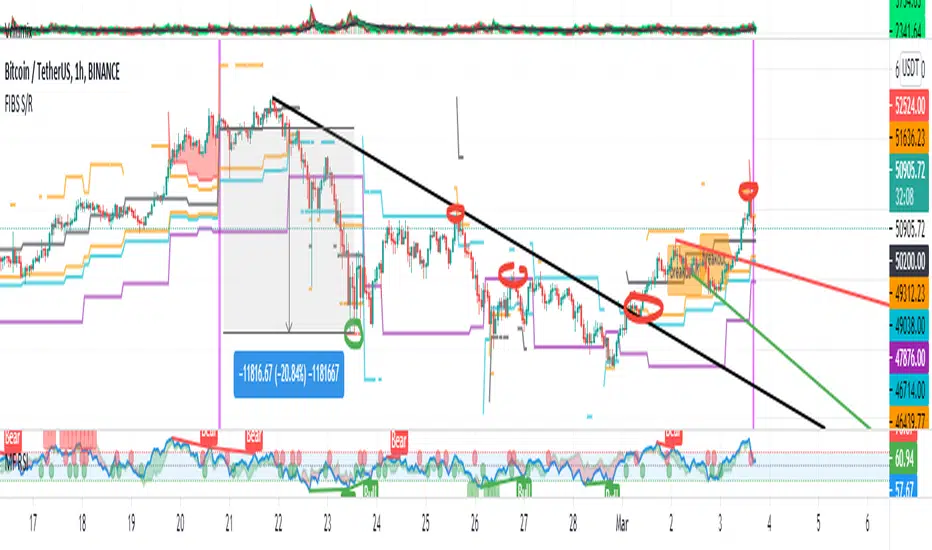
For instance lets look at BINANCE:BTCUSDT .
On the left we see that the price action between 20 and 21 February was "overcooked". So after we got the signal that we "crossunder" the R5 the signal was triggered and we got a small red candle followed by a small dip and after that we got a small bounce and a dump.
If we also look at MF-RSI we can also see we got multiple bear divs.
Lets entertain the idea that we went short at ~57.1k as soon as we get signaled and it starts dumping.
Where does it stop ?
We can see it went all the way down to Negative R5 ratio. Normally that should signal "undercooking" but this was not triggered as it did not close under it (signaled in green).
We can also see that previous support now becomes resistance (signaled in red).
If we take a look at BINANCE:ETHUSDT , we do see that the "undercooking" was triggered here.
I will be publishing a more detailed Idea with examples of using this on the BINANCE:BTCUSDT chart in combination with Volume and other technical analysis.
Use with caution, this is not 100% signal indicator as the markets do what they want. But by using this in combination with other indicators like MF-RSI, EMAs and regular patterns we can get some targets for Support/Resistance.
I'm trying to create a strategy based on this indicator but I'm not getting very good results. Best results were on the 15 min chart with gross profits around ~50%.
Please try to play around with the inputs and let me know if you find something interesting, maybe I can incorporate new features in the indicator.
You can find the MF-RSI indicator here
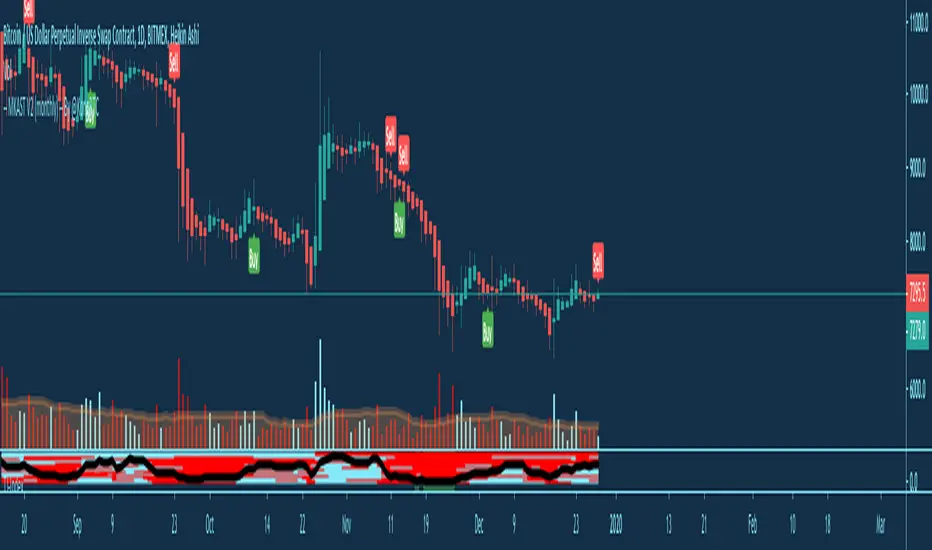
MKAST V2 (monthly)PLEASE READ THE ENTIRE POST BEFORE PURCHASING & USING THE MKAST Algorithm. Saves you and me some time in emails and messages. :)
This is the NEW MONTHLY ACCESS Version of the MKAST
The MKAST Buy Sell Algorithm is a very specific strategy, cut down to its roots and made perfect for the volatile crypto market.โจ
Many Algorithms focus only on one aspect, one side, one specific rule.โจ As you know, this is not how life, the market or anything else works.โจ
MKAST combines many different aspects at the same time, scans multiple other Algorithms and comes to a conclusion based on over 1350 lines of code.
It is based on Divergences, Elliott Waves , Ichimoku , MACD , MACD Histogram, RSI , Stoch , CCI , Momentum, OBV, DIOSC, VWMACD, CMF and multiple EMAs.โจ
Every single aspect is weighted into the decision before giving out an indication.
Most buy/sell Algorithms FAIL because they try to apply the same strategy to every single chart, which
are as individual as humans.โจ
To conquer this problem, MKAST has a wide range of settings and variables which can be easily
modified.
To make it a true strategy, MKAST has as well settings for Take Profit Points, Multiple Entries and Stop
Losses. Everything with an Alert Feature of course.
I know from experience that many people take one Algorithm and are simply too LAZY to add multiple Algorithms to make a rational choice.
โจ
The result of that is that they lose money, by following blatantly only one Algorithm.
MKAST has additional 9 Indicators, perfect for the crypto market, which can be turned on and off.
Manual
MKAST Signals Settings
โShow Signals?โ - On/Off to show the Buy/Sell Signals.โจ
โAggressivenessโ - Increase to make the signals less aggressive and decrease to make them more aggressive.
โShow Custom Signals?โ - On/Off to show custom MKAST Signals as chosen in the settings below.
โCustom Buy/Sell Aggressivenessโ - Choose a custom Aggressiveness for each buy and sell signal individually.
โTJ-Index Requirement For Buy/Sellโ - If the TJ-Index is below the given number, it will show the signal in grey, this also applies for normal signals. Buy 0 and Sell 15 shows all signals in their original colour again.โจ
โDonโt show signals that donโt meet index requirement?โ - Checked, it will completely not show signals which would be โgreyโ as in the explanation above.
โChange Backgroundcolour if index is at 15 or 0?โ - Checked, changes the colour of the chart if the index is at 15 or 0 points
MKAST Panel Settings
โShow Info Panel?โ - Shows Info Panel on the chart.โจ
โMove Info Panel UP by %โ - Moves Info Panel up/down.
โMove Info Panel Left/Right โ - Moves Info Panel Left/Right.โจ โShow BitMEX Panel?โ - Shows BitMEX Panel on the chart.
โMove BitMEX Panel by % โ - Moves BitMEX Panel up/down.โจ โMove BitMEX Panel Left/Rightโ - Moves BitMEX Panel Left/Right. โSignal Sourceโ - Choose source of candle open/close for Equity calculation.โจ
โLeverage Used?โ - Select the used Leverage for your strategy and Equity calculation.
โFees Per Trade in % โ - Deducts these fees after each trade from Equity calculation.โจ
โRound Current Profit Price?โ - Rounds the number on the Panel. โTrading Periods โ - Choose a trading Period which will be used to calculate Period Equity.โจ
โShow separations of each Trading Period?โ - Show separations on the chart of each Trading Period.
The very new feature on Tradingview and obviously now as well on MKAST are Information Panels.
I have chosen to add an Info Panel and a BitMEX Price Panel into MKAST, to make live and even
backtesting easier.
With only one blink of an eye the user is able to see ALL relevant information, without having to go
through various ways of checking and using other tools.
The Info Panel:โจ
The first row shows the current profit. This is calculated since the signal initiation and the current candle close. Followed by a single number, which represents the current TJ-Index, removing the need of having to add the actual TJ-Index Oscillator on the chart.โจ
โจ
The second row shows the current position and its status. This was added on request of many users wanting to know if their position is โabout to changeโ or not. The status shows the users if the position is โendangeredโ or โokayโ.โจ
โจ
Followed by the โbacktesting toolโ already included inside the Panel. No need for complex oscillators with a hard reading for backtesting. With this one and simple panel, you see the Period Equity for the period chosen previously in the settings. This calculates all profits made inside that period and re-sets when the period ends. Right next to it, the Total Equity calculating ALL profits since the beginning of the chart.โจ
โจ
Right below, you see the information about the last long and short position which have been open. This helps with the evaluation and documentation of the last trade.โจ
The BitMEX Panel:โจ
A convenient panel which shows all BitMEX contracts and their LIVE prices. The need for opening each chart goes away, the quality and experience of trading increases.
MKAST custom Signals are one of the notorious possibilities for ADVANCED strategies with MKAST.โจ Users who requested these features and use them frequently are the ones, having already a very unique trading strategy and they use these very custom signals as confluence or for multiple entry trades.
These custom signals and their settings can be mostly ignored by the majority of traders who are using this Algorithm.
The idea behind the grey signals has its roots in the idea of the TJ-Index. The TJ-Index being 15 Algorithms and conditions possible showing a bullish or bearish interpretation. The index counts the Algorithms which are showing a bullish interpretation.
Like that we can make sure that signals are shown in the original colour, are only those who have an additional confluence with the TJ-Index, not letting the user buy, if at least the majority is not bullish , and not letting the user sell, if at least the majority is bearish .
The custom buy and sell aggressiveness lets the user customise the MKAST algorithm even more.โจ
Either the users wants to see how signals are changing on a different (slightly lower or higher) aggressiveness, being able to expect a change on their own settings. OR seeing that some signals of the same sort are a little out of place and is able to move these to a different aggressiveness, increasing the profitability even more.โจ
Needless to say, custom signals are NOT a part of the Info Panel.
MKAST Label & Trendline Settings
โShow Labels?โ - On/Off to show Labels above each signal, with the percentage gain or loss, calculated from the last signal to the new signal.โจ
โShow Trendlines?โ - On/Off to show automatic Trendlines following Gainzy Lines.
โLookback Lengthโ - Choose a length that the automatic trendiness use for calculation. Comparable to Aggressiveness.
โWicks//Bodiesโ - Change between trendiness connecting from wick to wick or from body to body.
โBlack lines// Coloured linesโ - Change between simply black lines or changing colour lines.โจ
โFilter Trendlines?โ - On/Off to show all trendiness or just resistance decreasing and support increasing ones.
โLimit Extensions Of The Lines?โ - This value increases by how much the trendiness are being extended. 0 = endless extension, otherwise 100 = maximum custom extension.MKAST Strategy โTake Profit 1โ - On/Off to show TP1 points.โจ
โTake Profit After %โ - Set the percentage after which TP1 is active.
โTake Profit 2 โ - On/Off to show TP2 points.โจ
โTake Profit 2 After %โ - Set the percentage after which TP1 is
active.
โTake Profit 3โ - On/Off to show TP3 points.โจ
โTake Profit 3 After %โ - Set the percentage after which TP1 is active.
โSecond Entryโ - On/Off to show Second Entry points.โจ โSecond Entry After %โ - Set the percentage after which Second Entry is active.
โThird Entryโ - On/Off to show Third Entry points.โจ
โThird Entry After %โ - Set the percentage after which Third Entry is active.
โStop Lossโ - On/Off to show Stop Loss points.โจ
โStop Loss After %โ - Set the percentage after which Stop Loss is active.
MKAST Strategy
To make the life of the MKAST user even easier, I have added all adjustable Take Profit Points, Multiple entry points and Stop Loss points.
I have never seen a sustainable and reliable trading strategy without TPs, Multiple entry and especially without a stop loss. Everything in the usual and fully customisable MKAST style.
Simply choose how many Take Profit points you would like to have and choose the percentage after which you would like to see the Take Profit point appear on the chart and notify you to take profits.
Are you a Trader who likes Multiple Entries? Also no problem with MKAST. Select how many additional entries you would like to have and after how many percent you would like them to appear on the chart and remind you of adding to the position.
What would a Strategy be without a Stop Loss? Same settings apply here as on the TPs and MEs .
All of the settings are able to take fractions of a number as well. This enables users to even use all of the strategy settings for scalping or FX pairs, where high leverage and the smallest of moves are used for trading.
Needless to say, all of these settings work on RENKO and Heikin Ashi as well. These might need adjustment, since the calculation is different, yet there is nothing standing in the way of it anymore.
Crypto Modified Indicators
โShow Divergences?โ - On/Off to show Divergences on the Chart based on the data of 10 different Algorithms.โจ
โShow Oversold/bought?โ - On/Off to change the colour of the chart in Oversold/bought conditions.
โOversold/bought value?โ - Choose a value for which the chart is Oversold/bought.โจ
โShow Fibonacci Levels?โ - On/Off to show automatic Fibonacci Levels.
โFibonacci Lookback Lenghtโ - This value states how many candles from right now are taken into account to paint the Fibonacci Levels.
โFibonacci Custom Periodโ - Choose a custom Timeframe that should be used to paint the Fibonacci Levels.โจ
โ2nd-7th Fibonacci Levelโ - Enter a value for the Fibonacci Levels you would like to use and see on the chart.โจ
โPlot 1.618 Level?โ - On/Off for the Fibonacci extension level.
Crypto Modified Indicators
โShow Bands?โ - On/Off to show the TJ-Bands on the chart.โจ โBands Lengthโ - Choose a value for the TJ-Bands Lenghtโจ
โShow Show EMA 1-3?โ - On/Off to show the EMAs 1-3 on the chart.โจ
โEMA Lenght 1-3โ - Choose a value for the first to third EMA Lenght
โShow Ichimoku? โ - On/Off to show Ichimoku on the chart.โจ โShow Tenkin?โ - On/Off to show Tenkin on the chart. โTenkinโ - Set the lenght of the Tenkin.โจ
โShow Kijun?โ - On/Off to show Kijun on the chart.
โKijunโ - Set the lenght of the Kijun.โจ
โShow Senkou?โ - On/Off to show the Senkou on the chart. โSenkouโ - Set the lenght of the Senkou.โจ
โDisplacementโ - Set the value of the Displacement.
โShow Chikou Span?โ - On/Off to show the Chikou Span on the chart.
Crypto Custom Indicators
In the picture above, you see the first pair of Crypto Custom Indicators. The oversold and overbought conditions are highlighted.โจ
Bullish and Bearish divergences are also plotted on the chart.
This is personally my favourite combination of Indicators and MKAST settings. It shows nicely
everything one needs to know and makes it easier to decide wether to follow a signal or not.
We here as well a perfect example of the Automatic Fibonacci Lines (Lookback 50, Timeframe 1D).โจ It shows all significant levels, which we can see being respected.
Orange = 23.6%, Green = 38.2%, Red = 50%, Yellow = 61.8%, Blue = 78.6%, White = 0%;100%
In this picture above, we observe the perfect ensemble of MKAST and an EMA strategy, especially modified for crypto markets.
Here, as by default, we have the EMAs at 21, 90 and 200. These have shown to be very significant moving support and resistance points in the crypto market.
In this picture above, I lowered the timeframe to show the highly significant levels of the Ichimoku . It has not the โusual valuesโ. These here have been modified for the volatile crypto market and set as default.
An incredibly powerful tool for anyone who is ready to step up their trading game. It is a huge part of the MKAST back end and the strategy behind it.
MKAST Custom Alerts
1
MKAST without any doubt has Custom Alerts for all Signals that it is painting on the chart.
One can even choose to receive custom notifications for Take Profit points, Multiple Entry points and
the Stop Loss points.
The signals appear on the chart DURING the candle, not at the end of the candle. Therefore, the
alerts do this as well. These appear during the candle.
Here we can see all of the possible Alerts that can be chosen to be displayed. In total it is 14 different custom alerts, based on what the trader is looking for and how he is trading.
Personally, I have 10-15 coins that I trade the most and for these I have custom notifications, mostly though only the MKAST Buy/Sell and Stop Loss Signals.
To activate Alerts for MKAST, โจ
1) Go to the โALERTโ icon on the top tool bar of your Tradingview.โจ
2) Select โCONDITIONโ as โโMKASTโโโจ
3) Then choose ONE condition from the list of conditions.โจ
4) On โOPTIONSโ you can set how many times it appears, I have โOnce per Barโ.โจ
4.1) If you want to make sure that the signal is truly there and not just a condition for a second during the candle, choose โONCE PER BAR CLOSEโ.โจ
5) โExpiration Timeโ sets the time until the alert expires. PRO users have no expiration for alerts.โจ 6) โAlert Actionsโ give you a row of choices what happens and how you want to be notified.โจ
7) โMessageโ is the message that you receive inside the notification.
Thank you, Kong
MKAST V2 (lifetime)PLEASE READ THE ENTIRE POST BEFORE PURCHASING & USING THE MKAST Algorithm. Saves you and me some time in emails and messages. :)
This is the NEW LIFETIME ACCESS Version of the MKAST
The MKAST Buy Sell Algorithm is a very specific strategy, cut down to its roots and made perfect for the volatile crypto market.โจ
Many Algorithms focus only on one aspect, one side, one specific rule.โจ As you know, this is not how life, the market or anything else works.โจ
MKAST combines many different aspects at the same time, scans multiple other Algorithms and comes to a conclusion based on over 1350 lines of code.
It is based on Divergences, Elliott Waves, Ichimoku, MACD, MACD Histogram, RSI, Stoch, CCI, Momentum, OBV, DIOSC, VWMACD, CMF and multiple EMAs.โจ
Every single aspect is weighted into the decision before giving out an indication.
Most buy/sell Algorithms FAIL because they try to apply the same strategy to every single chart, which
are as individual as humans.โจ
To conquer this problem, MKAST has a wide range of settings and variables which can be easily
modified.
To make it a true strategy, MKAST has as well settings for Take Profit Points, Multiple Entries and Stop
Losses. Everything with an Alert Feature of course.
I know from experience that many people take one Algorithm and are simply too LAZY to add multiple Algorithms to make a rational choice.
โจ
The result of that is that they lose money, by following blatantly only one Algorithm.
MKAST has additional 9 Indicators, perfect for the crypto market, which can be turned on and off.
Manual
MKAST Signals Settings
โShow Signals?โ - On/Off to show the Buy/Sell Signals.โจ
โAggressivenessโ - Increase to make the signals less aggressive and decrease to make them more aggressive.
โShow Custom Signals?โ - On/Off to show custom MKAST Signals as chosen in the settings below.
โCustom Buy/Sell Aggressivenessโ - Choose a custom Aggressiveness for each buy and sell signal individually.
โTJ-Index Requirement For Buy/Sellโ - If the TJ-Index is below the given number, it will show the signal in grey, this also applies for normal signals. Buy 0 and Sell 15 shows all signals in their original colour again.โจ
โDonโt show signals that donโt meet index requirement?โ - Checked, it will completely not show signals which would be โgreyโ as in the explanation above.
โChange Backgroundcolour if index is at 15 or 0?โ - Checked, changes the colour of the chart if the index is at 15 or 0 points
MKAST Panel Settings
โShow Info Panel?โ - Shows Info Panel on the chart.โจ
โMove Info Panel UP by %โ - Moves Info Panel up/down.
โMove Info Panel Left/Right โ - Moves Info Panel Left/Right.โจ โShow BitMEX Panel?โ - Shows BitMEX Panel on the chart.
โMove BitMEX Panel by % โ - Moves BitMEX Panel up/down.โจ โMove BitMEX Panel Left/Rightโ - Moves BitMEX Panel Left/Right. โSignal Sourceโ - Choose source of candle open/close for Equity calculation.โจ
โLeverage Used?โ - Select the used Leverage for your strategy and Equity calculation.
โFees Per Trade in % โ - Deducts these fees after each trade from Equity calculation.โจ
โRound Current Profit Price?โ - Rounds the number on the Panel. โTrading Periods โ - Choose a trading Period which will be used to calculate Period Equity.โจ
โShow separations of each Trading Period?โ - Show separations on the chart of each Trading Period.
The very new feature on Tradingview and obviously now as well on MKAST are Information Panels.
I have chosen to add an Info Panel and a BitMEX Price Panel into MKAST, to make live and even
backtesting easier.
With only one blink of an eye the user is able to see ALL relevant information, without having to go
through various ways of checking and using other tools.
The Info Panel:โจ
The first row shows the current profit. This is calculated since the signal initiation and the current candle close. Followed by a single number, which represents the current TJ-Index, removing the need of having to add the actual TJ-Index Oscillator on the chart.โจ
โจ
The second row shows the current position and its status. This was added on request of many users wanting to know if their position is โabout to changeโ or not. The status shows the users if the position is โendangeredโ or โokayโ.โจ
โจ
Followed by the โbacktesting toolโ already included inside the Panel. No need for complex oscillators with a hard reading for backtesting. With this one and simple panel, you see the Period Equity for the period chosen previously in the settings. This calculates all profits made inside that period and re-sets when the period ends. Right next to it, the Total Equity calculating ALL profits since the beginning of the chart.โจ
โจ
Right below, you see the information about the last long and short position which have been open. This helps with the evaluation and documentation of the last trade.โจ
The BitMEX Panel:โจ
A convenient panel which shows all BitMEX contracts and their LIVE prices. The need for opening each chart goes away, the quality and experience of trading increases.
MKAST custom Signals are one of the notorious possibilities for ADVANCED strategies with MKAST.โจ Users who requested these features and use them frequently are the ones, having already a very unique trading strategy and they use these very custom signals as confluence or for multiple entry trades.
These custom signals and their settings can be mostly ignored by the majority of traders who are using this Algorithm.
The idea behind the grey signals has its roots in the idea of the TJ-Index. The TJ-Index being 15 Algorithms and conditions possible showing a bullish or bearish interpretation. The index counts the Algorithms which are showing a bullish interpretation.
Like that we can make sure that signals are shown in the original colour, are only those who have an additional confluence with the TJ-Index, not letting the user buy, if at least the majority is not bullish, and not letting the user sell, if at least the majority is bearish.
The custom buy and sell aggressiveness lets the user customise the MKAST algorithm even more.โจ
Either the users wants to see how signals are changing on a different (slightly lower or higher) aggressiveness, being able to expect a change on their own settings. OR seeing that some signals of the same sort are a little out of place and is able to move these to a different aggressiveness, increasing the profitability even more.โจ
Needless to say, custom signals are NOT a part of the Info Panel.
MKAST Label & Trendline Settings
โShow Labels?โ - On/Off to show Labels above each signal, with the percentage gain or loss, calculated from the last signal to the new signal.โจ
โShow Trendlines?โ - On/Off to show automatic Trendlines following Gainzy Lines.
โLookback Lengthโ - Choose a length that the automatic trendiness use for calculation. Comparable to Aggressiveness.
โWicks//Bodiesโ - Change between trendiness connecting from wick to wick or from body to body.
โBlack lines// Coloured linesโ - Change between simply black lines or changing colour lines.โจ
โFilter Trendlines?โ - On/Off to show all trendiness or just resistance decreasing and support increasing ones.
โLimit Extensions Of The Lines?โ - This value increases by how much the trendiness are being extended. 0 = endless extension, otherwise 100 = maximum custom extension.MKAST Strategy โTake Profit 1โ - On/Off to show TP1 points.โจ
โTake Profit After %โ - Set the percentage after which TP1 is active.
โTake Profit 2 โ - On/Off to show TP2 points.โจ
โTake Profit 2 After %โ - Set the percentage after which TP1 is
active.
โTake Profit 3โ - On/Off to show TP3 points.โจ
โTake Profit 3 After %โ - Set the percentage after which TP1 is active.
โSecond Entryโ - On/Off to show Second Entry points.โจ โSecond Entry After %โ - Set the percentage after which Second Entry is active.
โThird Entryโ - On/Off to show Third Entry points.โจ
โThird Entry After %โ - Set the percentage after which Third Entry is active.
โStop Lossโ - On/Off to show Stop Loss points.โจ
โStop Loss After %โ - Set the percentage after which Stop Loss is active.
MKAST Strategy
To make the life of the MKAST user even easier, I have added all adjustable Take Profit Points, Multiple entry points and Stop Loss points.
I have never seen a sustainable and reliable trading strategy without TPs, Multiple entry and especially without a stop loss. Everything in the usual and fully customisable MKAST style.
Simply choose how many Take Profit points you would like to have and choose the percentage after which you would like to see the Take Profit point appear on the chart and notify you to take profits.
Are you a Trader who likes Multiple Entries? Also no problem with MKAST. Select how many additional entries you would like to have and after how many percent you would like them to appear on the chart and remind you of adding to the position.
What would a Strategy be without a Stop Loss? Same settings apply here as on the TPs and MEs.
All of the settings are able to take fractions of a number as well. This enables users to even use all of the strategy settings for scalping or FX pairs, where high leverage and the smallest of moves are used for trading.
Needless to say, all of these settings work on RENKO and Heikin Ashi as well. These might need adjustment, since the calculation is different, yet there is nothing standing in the way of it anymore.
Crypto Modified Indicators
โShow Divergences?โ - On/Off to show Divergences on the Chart based on the data of 10 different Algorithms.โจ
โShow Oversold/bought?โ - On/Off to change the colour of the chart in Oversold/bought conditions.
โOversold/bought value?โ - Choose a value for which the chart is Oversold/bought.โจ
โShow Fibonacci Levels?โ - On/Off to show automatic Fibonacci Levels.
โFibonacci Lookback Lenghtโ - This value states how many candles from right now are taken into account to paint the Fibonacci Levels.
โFibonacci Custom Periodโ - Choose a custom Timeframe that should be used to paint the Fibonacci Levels.โจ
โ2nd-7th Fibonacci Levelโ - Enter a value for the Fibonacci Levels you would like to use and see on the chart.โจ
โPlot 1.618 Level?โ - On/Off for the Fibonacci extension level.
Crypto Modified Indicators
โShow Bands?โ - On/Off to show the TJ-Bands on the chart.โจ โBands Lengthโ - Choose a value for the TJ-Bands Lenghtโจ
โShow Show EMA 1-3?โ - On/Off to show the EMAs 1-3 on the chart.โจ
โEMA Lenght 1-3โ - Choose a value for the first to third EMA Lenght
โShow Ichimoku? โ - On/Off to show Ichimoku on the chart.โจ โShow Tenkin?โ - On/Off to show Tenkin on the chart. โTenkinโ - Set the lenght of the Tenkin.โจ
โShow Kijun?โ - On/Off to show Kijun on the chart.
โKijunโ - Set the lenght of the Kijun.โจ
โShow Senkou?โ - On/Off to show the Senkou on the chart. โSenkouโ - Set the lenght of the Senkou.โจ
โDisplacementโ - Set the value of the Displacement.
โShow Chikou Span?โ - On/Off to show the Chikou Span on the chart.
Crypto Custom Indicators
In the picture above, you see the first pair of Crypto Custom Indicators. The oversold and overbought conditions are highlighted.โจ
Bullish and Bearish divergences are also plotted on the chart.
This is personally my favourite combination of Indicators and MKAST settings. It shows nicely
everything one needs to know and makes it easier to decide wether to follow a signal or not.
We here as well a perfect example of the Automatic Fibonacci Lines (Lookback 50, Timeframe 1D).โจ It shows all significant levels, which we can see being respected.
Orange = 23.6%, Green = 38.2%, Red = 50%, Yellow = 61.8%, Blue = 78.6%, White = 0%;100%
In this picture above, we observe the perfect ensemble of MKAST and an EMA strategy, especially modified for crypto markets.
Here, as by default, we have the EMAs at 21, 90 and 200. These have shown to be very significant moving support and resistance points in the crypto market.
In this picture above, I lowered the timeframe to show the highly significant levels of the Ichimoku. It has not the โusual valuesโ. These here have been modified for the volatile crypto market and set as default.
An incredibly powerful tool for anyone who is ready to step up their trading game. It is a huge part of the MKAST back end and the strategy behind it.
MKAST Custom Alerts
1
MKAST without any doubt has Custom Alerts for all Signals that it is painting on the chart.
One can even choose to receive custom notifications for Take Profit points, Multiple Entry points and
the Stop Loss points.
The signals appear on the chart DURING the candle, not at the end of the candle. Therefore, the
alerts do this as well. These appear during the candle.
Here we can see all of the possible Alerts that can be chosen to be displayed. In total it is 14 different custom alerts, based on what the trader is looking for and how he is trading.
Personally, I have 10-15 coins that I trade the most and for these I have custom notifications, mostly though only the MKAST Buy/Sell and Stop Loss Signals.
To activate Alerts for MKAST, โจ
1) Go to the โALERTโ icon on the top tool bar of your Tradingview.โจ
2) Select โCONDITIONโ as โโMKASTโโโจ
3) Then choose ONE condition from the list of conditions.โจ
4) On โOPTIONSโ you can set how many times it appears, I have โOnce per Barโ.โจ
4.1) If you want to make sure that the signal is truly there and not just a condition for a second during the candle, choose โONCE PER BAR CLOSEโ.โจ
5) โExpiration Timeโ sets the time until the alert expires. PRO users have no expiration for alerts.โจ 6) โAlert Actionsโ give you a row of choices what happens and how you want to be notified.โจ
7) โMessageโ is the message that you receive inside the notification.
Thank you, Kong
๐ก GOLD 4H HUD v12 โ Time-Safe Nuclear Edition๐ก GOLD 4H HUD v12 โ Time-Safe Nuclear Edition
A fullโscale Smart Money Concepts (SMC) analytics engine designed exclusively for XAUUSD on the 4-Hour timeframe.
This script combines market structure, liquidity, displacement, order blocks, imbalance, volume profile, SMT divergence, and institutional behavior modeling into a single unified HUD.
Built with a time-safe architecture, all structural elements (OB/FVG/Sweep) are stored by timestamp to minimize repainting and preserve event integrity.
๐ Core Features (12 Modules + Full HUD)
1 โ Market Structure Engine
Automatically detects:
HH / HL / LH / LL
BOS (Break of Structure)
MSS (Market Structure Shift)
CHOCH (Change of Character)
Real swing pivots & trend state
2 โ Sweep Engine (Liquidity Grab Detection)
Identifies institutional liquidity grabs:
Break + reclaim of highs/lows
ATR-filtered invalidation
Displacement-backed sweeps
3 โ Time-Safe FVG Engine
Detects Bullish/Bearish Fair Value Gaps
ATR-tolerant FVG logic
Automatic right-extension
Auto-delete when filled or invalid
4 โ Time-Safe Order Block Engine
Demand & Supply OB detection
Strength classification (Weak vs Strong)
FVG-overlap confirmation
Timestamp-locked (non-repainting)
5 โ Volume Profile Engine (HVN / LVN / POC)
Real-time micro-profile:
High Volume Node (HVN)
Low Volume Node (LVN)
Point of Control (POC)
6 โ SMT Engine (Gold vs DXY Divergence)
Smart Money Divergence built-in:
Bullish SMT
Bearish SMT
Directional confirmation with zero lag
7 โ Displacement Engine
Measures institutional impulse:
Body-based impulse detection
Multi-leg continuation signals
FVG continuation moves
Generates displacement score
8 โ Premium / Discount Model
Auto-classifies price into:
Discount (Buy zone)
Premium (Sell zone)
9 โ SMC Trend Engine (Score-Based)
Combines 10+ factors:
Structure
FVG
OB power
Displacement
POC positioning
SMT conditions
Outputs:
BULL / BEAR / RANGE
Full scoring system
10 โ Institutional Imbalance Model (IMB Engine)
Combines:
PD zones
Sweep direction
Displacement
SMT
OB strength
CHOCH/MSS
A complete institutional bias filter.
11 โ Entry Engine (Signal Fusion Model)
Entry conditions fuse:
Sweep
CHOCH
Displacement
OB strength
FVG alignment
SMT confirmation
Also outputs:
Suggested SL/TP
Entry score
12 โ Trendline Engine
Auto-draws:
HL โ HL bullish trendlines
LH โ LH bearish trendlines
+ Full Nuclear HUD
Displays:
Market structure
Trend direction
SMT / CHOCH / MSS
FVG / OB zones
HVN / LVN / POC
Liquidity strength
Entry model
Liquidity Magnet direction
SL/TP map
A complete institutional dashboard in one place.
โ Usage Requirement
This script is designed ONLY for the 4H timeframe.
โจ Summary
GOLD 4H HUD v12 โ Time-Safe Nuclear Edition
is not just an indicator.
It is a full institutional-grade SMC analysis system, built specifically for Gold.
If you trade XAUUSD on the 4H timeframe โ
this is your complete market intelligence HUD
Guppy EMA Promax V 2.1 [NMTUAN] TradingView Indicator: A Comprehensive Market Analysis Tool
Authored by NMTUAN, this all-in-one indicator is designed to provide traders with a holistic and actionable view of the market. Instead of relying on a dozen different tools, this single indicator consolidates the most crucial aspects of technical analysis to help you make more informed and confident trading decisions.
Key Features:
Smart Money Concepts (SMC) Levels: Our indicator automatically identifies key support and resistance levels based on the principles of Smart Money Concepts. This helps you spot where institutions and large players are likely to enter or exit the market, giving you a strategic edge.
Trend and Trendline Analysis: Gain a clear understanding of the market's direction with integrated trend identification and automated trendlines. This feature helps you quickly visualize the prevailing market momentum and potential areas of interest.
Volatility and Volume Insights: We've included Average True Range (ATR) to measure market volatility and Volume analysis to confirm the strength of price movements. These two metrics are essential for validating potential breakouts and reversals.
Indicator: Volatility Candle Based ๐ Volatility Candle-Based Indicator (Pine Script v6)
This custom TradingView indicator is designed for futures traders who want to analyze volatility, candle patterns, and support/resistance zones within specific market hours. It overlays price charts and provides visual signals that help determine potential momentum shifts, trend continuations, or reversals.
๐ง Core Features
โฐ Futures Time Filter
The indicator activates only during specific trading hours, customized per futures contract (e.g., NQ, ES, GC).
Time is adjusted to the New York (EST) timezone.
This ensures the logic only runs during relevant futures market sessions.
๐น Contract-Specific Multipliers
Applies custom point multipliers for futures contracts (e.g., GC = 30, ES = 24).
Supports three types of multipliers:
Trailing Stop
Trailing Plot Stop
Stop Loss
Ensures accurate backtesting and risk modeling for each contract.
๐ Trendline Support & Resistance
Uses pivot high/low logic to dynamically plot:
Central pivot zones
Step-like support/resistance lines
These trendlines update based on price behavior and can indicate bullish or bearish control.
๐ Candle Momentum Analysis
Evaluates each candle's:
Body-to-range ratio (e.g., Marubozu, Doji)
Shadow dominance (upper/lower wicks)
Detects important reversal or continuation patterns such as:
Bullish/Bearish Inside Candles
Doji Star formations
Uses a custom moving average to confirm directional bias.
๐ฏ๏ธ Plotter Candle Signals
Identifies BullishPlotter and BearishPlotter candles:
Highlights candles likely to signal upcoming momentum.
Also accounts for neutral signals when no clear bias is detected.
Tracks the high/low of recent signal candles for reference.
๐ Visual Elements (not shown in snippet but implied by logic)
Signal arrows, dashed current levels, and filled support/resistance zones can be plotted to provide real-time feedback.
These are useful for both manual trading and strategy development.
๐ฏ Use Case
Perfect for intraday or short-term futures traders on instruments like:
๐ก Gold (GC), ๐ Silver (SI)
๐ Nasdaq (NQ/MNQ), S&P 500 (ES/MES)
This script provides both structural context (trendlines, pivots) and price action signals (candle formations, momentum shifts), helping traders align their decisions with the underlying market flow.
The Traders Support & Resistance LevelsThis script automatically detects pivot-based support and resistance levels and draws dynamic trendlines based on recent price action.
๐น Support & Resistance Levels
Pivot points are calculated using customizable left/right bar logic. A pivot high (or low) is confirmed when leftBars candles to the left and rightBars candles to the right are lower (or higher).
Triangles are plotted when a level is confirmed:
๐ป ๐ก Yellow Down Triangle = Confirmed Resistance
๐บ ๐ฃ Purple Up Triangle = Confirmed Support
Lines are drawn at confirmed levels.
If enough lines are confirmed, the oldest one is converted into a zone using a thick, semi-transparent line.
๐น Trendline Logic
Trendlines are drawn between the last two support points (for uptrend) and last two resistance points (for downtrend).
The slope and price relationship determine trend strength, visualized by color:
Condition Color Meaning
Uptrend + Price Above + Steep ๐จ Yellow Strong Uptrend
Uptrend + Price Above ๐ท Blue Weak Uptrend
Downtrend + Price Below + Steep ๐ Fuchsia Strong Downtrend
Downtrend + Price Below ๐ฃ Purple Weak Downtrend
Otherwise โช๏ธ Gray Neutral / No Trend
โ๏ธ Customizable Inputs
leftBars, rightBars: Adjust sensitivity of pivot detection
previewBars: Show early "draft" lines before confirmation
volumeThresh: Reserved for future enhancements
TrendSync Pro (SMC)๐ TrendSync Pro (SMC) โ Advanced Trend-Following Strategy with HTF Alignment
Created by Shubham Singh
๐ Strategy Overview
TrendSync Pro (SMC) is a precision-based smart trend-following strategy inspired by Smart Money Concepts (SMC). It combines: Real-time pivot-based trendline detection
Higher Time Frame (HTF) filtering to align trades with dominant trend
Risk management via adjustable Stop Loss (SL) and Take Profit (TP)
Directional control โ trade only bullish, bearish, or both setups
Realistic backtesting using commissions and slippage
Pre-optimized profiles for scalpers, intraday, swing, and long-term traders
๐ง How It Works:
๐ง Strategy Settings Image:
beeimg.com
The strategy dynamically identifies trend direction by using swing high/low pivots. When a new pivot forms: It draws a trendline from the last significant pivot
Detects whether the trend is up (based on pivot lows) or down (based on pivot highs)
Waits for price to break above/below the trendline
Confirms with HTF price direction (HTF close > previous HTF close = bullish)
Only then it triggers a long or short trade
It exits either at TP, SL, or a manual trendline break
๐ ๏ธ Adjustable Parameters:
Trend Period: Length for pivot detection (affects sensitivity of trendlines)
HTF Timeframe: Aligns lower timeframe entries with higher timeframe direction
SL% and TP%: Customize your risk-reward profile
Commission & Slippage: Make backtests more realistic
Trade Direction: Choose to trade: Long only, Short only, or Both
๐๏ธ Trade Direction Control:
In settings, you can choose: Bullish Only: Executes only long entries
Bearish Only: Executes only short entries
Both: Executes both long and short entries when conditions are met
This allows you to align trades with your own market bias or external analysis.
๐ Entry Logic: Long Entry:
โโข Price crosses above trendline
โโข HTF is bullish (HTF close > previous close)
โโข Latest pivot is a low (trend is considered up)
Short Entry:
โโข Price crosses below trendline
โโข HTF is bearish (HTF close < previous close)
โโข Latest pivot is a high (trend is considered down)
๐ Exit Logic: Hit Take Profit or Stop Loss
Manual trendline invalidation: If price crosses opposite of the trend direction
โฐ Best Timeframes & Recommended Settings:
Scalping (1m to 5m):
โHTF = 15m | Trend Period = 7
โSL = 0.5% | TP = 1% to 2%
Intraday (15m to 30m):
โHTF = 1H | Trend Period = 10โ14
โSL = 0.75% | TP = 2% to 3%
6 Hour Trading (30m to 1H):
โHTF = 4H | Trend Period = 20
โSL = 1% | TP = 4% to 6%
Swing Trading (4H to 1D):
โHTF = 1D | Trend Period = 35
โSL = 2% | TP = 8% to 12%
Long-Term Investing (1D+):
โHTF = 1W | Trend Period = 50
โSL = 3% | TP = 15%+
Note: These are recommended base settings. Adjust based on volatility, asset class, or personal trading style.
๐ธ Testing Note:
beeimg.com
TradingView limits test length to 20k bars (~40 trades on smaller timeframes). To show long-term results: Test on higher timeframes (e.g., 1H, 4H, 1D)
Share images of backtest result in description
Host longer test result screenshots on Imgur or any public drive
๐ Asset Behavior Insight:
This strategy works on multiple assets, including BTC, ETH, etc.
Performance varies by trend strength:
Sometimes BTC performs better than ETH
Other times ETH gives better results
Thatโs normal as both assets follow different volatility and trend behavior
Itโs a trend-following setup. Longer and clearer the trend โ better the results.
โ
Best Practices: Avoid ranging markets
Use proper SL/TP for each timeframe
Use directional filter if you already have a directional bias
Always forward test before going live
โ ๏ธ Trading Disclaimer:
This script is for educational and backtesting purposes only. Trading involves risk. Always use risk management and never invest more than you can afford to lose.
EQS by SiriusProtected Script Description: "EQS by Sirius"
This indicator is protected and published as invite-only due to its original multi-timeframe structure, advanced visual logic, and proprietary handling of liquidity zones and equal high/low detection. The complexity of its designโfeaturing adaptive time-based plotting, contextual tooltips, and dynamic zone trackingโreflects a level of custom development intended for professional use, necessitating source protection.
Purpose and Core Logic
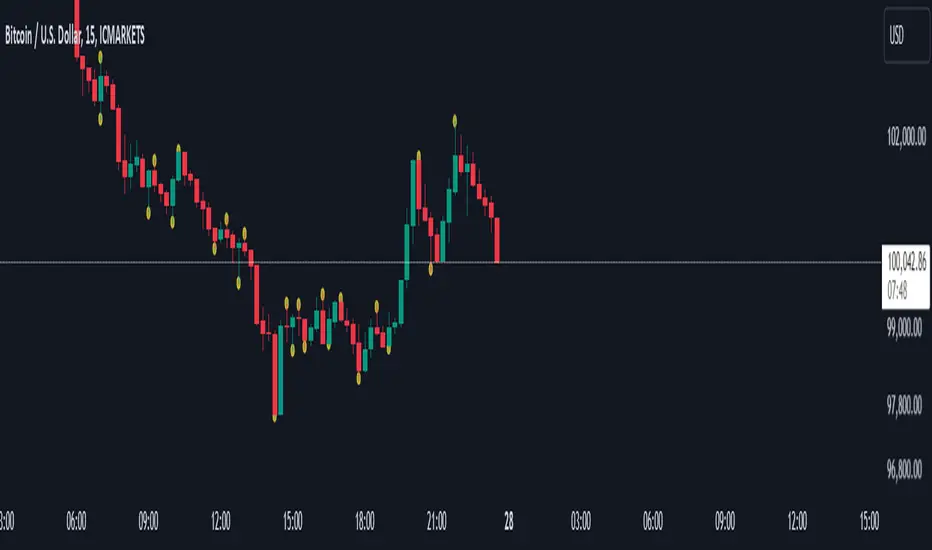
โEQS by Siriusโ is designed to detect and visualize Equal Highs and Equal Lows (EQS) across multiple timeframes. These levels are commonly interpreted as potential liquidity zones or key market structures, often used by traders for identifying breakout traps, stop hunts, or reversal points. The script applies a precision-based algorithm to identify these EQS levels, providing users with visual cues to support decision-making in various market contexts.
The detection logic is based on comparing the difference between two successive highs (or lows) relative to the high-low range of the bars, allowing the user to fine-tune sensitivity via a precision parameter. When valid EQS conditions are met, horizontal lines are drawn at the detected price level, accompanied by optional shadow trendlines to represent liquidity channels.
Visual Outputs and Features
The indicator provides a rich and customizable visual environment, including:
Multi-Timeframe EQS Detection: Configurable from 1-minute to 4-hour timeframes with automatic sequencing.
Zone Highlighting: Optional background shading for designated date intervals.
Dynamic Shadow Mode: Projects angled trendlines representing potential liquidity zones based on EQS formations.
Touch Counters: Real-time counting of price interactions with plotted EQS levels.
Tooltips: Each label includes a timestamp and price breakdown to provide contextual clarity.
Line Customization: Adjustable color, width, and transparency for each EQS type and its shadow projections.
Auto-zoom Scaling: Adapts visual density based on the active chartโs timeframe.
Visibility Filters: Adjustable proximity thresholds ensure only relevant lines are displayed based on current price action.
How to Use in Trading
Traders can use this tool to:
Identify liquidity targets where price may reverse or accelerate due to stop hunts or breakout traps.
Analyze multi-timeframe confluence by comparing EQS zones from higher timeframes with local market structure.
Monitor touch counts to assess the strength or weakening of support/resistance levels.
Visualize trendline-based liquidity zones using the โshadow modeโ to infer possible manipulation or price magnet areas.
Integrate with existing strategies for entry/exit timing, particularly in breakout and mean-reversion models.
Due to the high level of customizability and visual control, the script is suitable for discretionary traders, smart money concept practitioners, and those seeking to combine structural analysis with liquidity mapping.
Valid Pullbacks Tradinghub 3This script helps identify valid pullbacks. Based on the marked pullbacks, it can draw both internal and external structure trendlines.
A pullback is marked with a small triangle above or below the candle that created the local high or low.
A new local high is marked with a red triangle above the candle if at least one subsequent candle has a low lower than the low of the candle that created the new local high.
A new local low is marked with a green triangle below the candle if at least one subsequent candle has a high higher than the high of the candle that created the new local low.
Based on the marked local highs and lows, the internal structure trendline is created by simply connecting all highs and lows with a line.
The external structure is drawn in a similar way, but only highs and lows that have broken the previous structure are connected. This helps focus on important pivots and better understand the market structure.
Quantitative Breakout Bands (AIBitcoinTrend)Quantitative Breakout Bands (AIBitcoinTrend) is an advanced indicator designed to adapt to dynamic market conditions by utilizing a Kalman filter for real-time data analysis and trend detection. This innovative tool empowers traders to identify price breakouts, evaluate trends, and refine their trading strategies with precision.
๐ฝ What Are Quantitative Breakout Bands, and Why Are They Unique?
Quantitative Breakout Bands combine advanced filtering techniques (Kalman Filters) with statistical measures such as mean absolute error (MAE) to create adaptive price bands. These bands adjust to market conditions dynamically, providing insights into volatility, trend strength, and breakout opportunities.
What sets this indicator apart is its ability to incorporate both position (price) and velocity (rate of price change) into its calculations, making it highly responsive yet smooth. This dual consideration ensures traders get reliable signals without excessive lag or noise.
๐ฝ The Math Behind the Indicator
๐พ Kalman Filter Estimation:
At the core of the indicator is the Kalman Filter, a recursive algorithm used to predict the next state of a system based on past observations. It incorporates two primary elements:
State Prediction: The indicator predicts future price (position) and velocity based on previous values.
Error Covariance Adjustment: The process and measurement noise parameters refine the prediction's accuracy by balancing smoothness and responsiveness.
๐พ Breakout Bands Calculation:
The breakout bands are derived from the mean absolute error (MAE) of price deviations relative to the filtered trendline:
float upperBand = kalmanPrice + bandMultiplier * mae
float lowerBand = kalmanPrice - bandMultiplier * mae
The multiplier allows traders to adjust the sensitivity of the bands to market volatility.
๐พ Slope-Based Trend Detection:
A weighted slope calculation measures the gradient of the filtered price over a configurable window. This slope determines whether the market is trending bullish, bearish, or neutral.
๐พ Trailing Stop Mechanism:
The trailing stop employs the Average True Range (ATR) to calculate dynamic stop levels. This ensures positions are protected during volatile moves while minimizing premature exits.
๐ฝ How It Adapts to Price Movements
Dynamic Noise Calibration: By adjusting process and measurement noise inputs, the indicator balances smoothness (to reduce noise) with responsiveness (to adapt to sharp price changes).
Trend Responsiveness: The Kalman Filter ensures that trend changes are quickly identified, while the slope calculation adds confirmation.
Volatility Sensitivity: The MAE-based bands expand and contract in response to changes in market volatility, making them ideal for breakout detection.
๐ฝ How Traders Can Use the Indicator
๐พ Breakout Detection:
Bullish Breakouts: When the price moves above the upper band, it signals a potential upward breakout.
Bearish Breakouts: When the price moves below the lower band, it signals a potential downward breakout.
The trailing stop feature offers a dynamic way to lock in profits or minimize losses during trending moves.
๐พ Trend Confirmation:
The color-coded Kalman line and slope provide visual cues:
Bullish Trend: Positive slope, green line.
Bearish Trend: Negative slope, red line.
๐ฝ Why Itโs Useful for Traders
Dynamic and Adaptive: The indicator adjusts to changing market conditions, ensuring relevance across timeframes and asset classes.
Noise Reduction: The Kalman Filter smooths price data, eliminating false signals caused by short-term noise.
Comprehensive Insights: By combining breakout detection, trend analysis, and risk management, it offers a holistic trading tool.
๐ฝ Indicator Settings
Process Noise (Position & Velocity): Adjusts filter responsiveness to price changes.
Measurement Noise: Defines expected price noise for smoother trend detection.
Slope Window: Configures the lookback for slope calculation.
Lookback Period for MAE: Defines the sensitivity of the bands to volatility.
Band Multiplier: Controls the band width.
ATR Multiplier: Adjusts the sensitivity of the trailing stop.
Line Width: Customizes the appearance of the trailing stop line.
Disclaimer: This indicator is designed for educational purposes and does not constitute financial advice. Please consult a qualified financial advisor before making investment decisions.
tabbys star [Algo Seeker]Tabbys Star Mission:
Identifying key supply and demand areas for entries, identifying trends for holding positions, and locating potential re-entry or exit points is incredibly useful for traders and investors. This algorithm is designed to simplify these critical processes by providing actionable and intuitive tools directly on the chart.
๐ข Supply & Demand Zones (S&D)
The algorithm identifies key entry points by creating supply and demand blocks that automatically expand across the chart. These blocks remain active until invalidated, helping traders maintain awareness of significant price levels. When a new pivot point is identified, the algorithm generates a new supply or demand block that starts expanding from that pivot. This functionality enables traders to monitor evolving zones while referencing older ones, which might still act as weaker pivot points. These areas are incredibly unique and useful for traders, as they dynamically adapt to price action and provide clear visual cues for decision-making.
๐ข Continuation and Exit Signals
The algorithm also highlights areas for potential re-entries or exits. When the price moves beyond a supply or demand block, arrows are displayed to signal that this area may now be optimal for re-entering a trade or exiting a position.
Separating this logic from supply and demand zones offers significant flexibility for traders. For example, those who wish to hold positions initiated at an order block can confidently wait for these signals before taking profits. Similarly, traders who missed the initial opportunity at an order block can use these signals to evaluate new trade opportunities. This feature is incredibly useful for adapting to evolving market conditions.
๐ฉ Important Note
Arrow/triangle signals are not definitive indicators of upward or downward movement; they serve as calls to attention. These signals should be analyzed in conjunction with supply and demand zones.
For example, if a signal suggests bullish movement but the price falls below the current supply or demand zone, the signal was merely a call to attention. In such cases, it may indicate the need to set a stop loss or even consider a bearish trade below the zone.
Signals should be viewed as one of several factors to consider and should never be traded on in isolation.
๐ข Trendlines for Additional Confluence
In addition to supply and demand zones, the algorithm generates trendlines to help traders better visualize market trends. These trend lines are drawn from pivot points within the supply and demand blocks, providing an additional layer of confluence. For traders who rely on trendline breaks to make decisions, this feature enhances the overall analysis and adds value to the trading strategy.
๐ข Candle Color Coding
To further enhance clarity, the algorithm color-codes candles based on their position relative to the most recent order block:
Bullish: When the price is above the most recent order block.
Neutral: When the price is within the order block.
Bearish: When the price is below the order block.
This color-coding offers a unique and useful visual representation of the current market sentiment, allowing traders to assess price action at a glance.
Settings Overview
๐ขCalculation Strength
This setting allows the user to choose how strict the algorithm should be when calculating data. The Standard option generates more entry and exit signals because the calculations are more lenient.. The Restrictive option uses stricter calculations, resulting in fewer signals for entries and exits.
๐ขUse Current Bar:
If checked, the conditions will act on the current bar (real-time updates). If unchecked, the conditions will act after the bar closes. For a non-repainting indicator, leave this unchecked.
๐ขSession Type:
Both:
Includes market and after-market hours.
RTH:
Regular trading hours only.
๐ขMax Trend Lines:
"1": No trend lines will be shown.
"2" or higher: Displays trend lines based on pivot points.
๐ขBar Color:
Allows selection of candle colors based on the parameters discussed above.
๐ขSignal Colors:
As described earlier.
๐ขAlerts
For when a signal is created.
Conclusion
This tool is designed to hopefully assist investors and traders by:
Identifying key supply and demand areas for entries.
Highlighting trends for holding positions.
Pinpointing potential re-entry or exit points.
Valid Pullbacks and Trend by kpt. GonzoThis script helps identify valid pullbacks. Based on the marked pullbacks, it can draw both internal and external structure trendlines.
A pullback is marked with a small triangle above or below the candle that created the local high or low.
A new local high is marked with a red triangle above the candle if at least one subsequent candle has a low lower than the low of the candle that created the new local high.
A new local low is marked with a green triangle below the candle if at least one subsequent candle has a high higher than the high of the candle that created the new local low.
Based on the marked local highs and lows, the internal structure trendline is created by simply connecting all highs and lows with a line.
The external structure is drawn in a similar way, but only highs and lows that have broken the previous structure are connected. This helps focus on important pivots and better understand the market structure.
Trend CCITrend CCI (TCCI) Indicator
Description:
The Trend CCI (TCCI) indicator is a unique combination of the Commodity Channel Index (CCI) and the Average True Range (ATR), designed to identify trends and market reversals with a refined sensitivity to price volatility. The indicator plots the CCI, adjusted by an ATR filter, and color-codes the trendline to signal uptrends and downtrends.
How It Works:
This indicator uses the CCI to measure price momentum and an ATR-based filter to smooth out market noise, making it easier to detect significant shifts in the market trend. Key parameters such as the ATR Period, ATR Multiplier, and CCI Period have been carefully chosen to optimize the indicator's performance:
1. ATR Period (default: 18)
The ATR Period determines the number of periods used to calculate the **Average True Range**, which reflects market volatility. In this case, an **ATR Period of 18** has been selected for several reasons:
Balance between responsiveness and noise reduction : A period of 18 strikes a balance between being responsive to recent price movements and filtering out minor fluctuations. Shorter ATR periods might be too reactive, creating false signals, while longer periods might miss shorter-term trends.
Adaptable to various market conditions : An 18-period ATR is suitable for both intraday and swing trading strategies, making it versatile across different time frames.
Standard industry practice : Many traders use ATR settings between 14 and 20 periods as a convention for detecting reliable volatility levels.
2. ATR Multiplier (default: 1.5)
The ATR Multiplier is applied to the ATR value to define how sensitive the indicator is to volatility. In this case, a multiplier of 1.5 has been chosen:
Avoiding whipsaws in low volatility markets: By setting the multiplier to 1.5, the indicator filters out smaller, less significant price movements, reducing the likelihood of whipsaw signals (i.e., false trend reversals during periods of low volatility).
Optimizing signal accuracy: A moderate multiplier like 1.5 ensures that the indicator only generates signals when the price moves a significant distance from the average range. Higher multipliers (e.g., 2.0) may ignore valid opportunities, while lower multipliers (e.g., 1.0) might create too many signals.
Enhancing trend clarity : The multiplierโs role in widening the range allows the indicator to respond more clearly during periods of strong trends, reducing signal noise and false positives.
3. CCI Period (default: 63)
The CCI Period defines the number of periods used to calculate the Commodity Channel Index. A 63-period CCI is selected based on the following considerations:
Smoothing the momentum calculation: A longer period, such as 63, is used to smooth out the CCI and reduce the effects of short-term price fluctuations. This period captures longer-term momentum, making it ideal for identifying more significant market trends.
-Filtering out short-term noise: While shorter CCI periods (e.g., 14 or 20) may be more reactive, they tend to produce more signals, some of which may be false. A 63-period CCI focuses on stronger and more sustained price movements, providing fewer but higher-quality signals.
Adapted to intermediate trading: A 63-period CCI aligns well with traders looking for medium-term trend-following strategies, striking a balance between long-term trend identification and responsiveness to significant price shifts.
How to Use:
Green Area: When the trendline turns green, it signals that the CCI is positive, reflecting upward momentum. This can be interpreted as a buy signal, indicating the potential for long positions or continuing bullish trades.
Red Area: When the trendline turns red, it signals that the CCI is negative, reflecting downward momentum. This can be interpreted as a sell signal, indicating potential short positions or bearish trades.
ATR Filter: The ATR helps reduce false signals by ignoring minor price movements. Traders can adjust the ATR Multiplier to make the indicator more or less sensitive based on market conditions. A lower multiplier (e.g., 1.2) may increase signal frequency, while a higher multiplier (e.g., 2.0) reduces it.
Originality:
The Trend CCI (TCCI) stands out due to its combination of the CCI and ATR. While many indicators simply plot raw CCI values, this script enhances the CCIโs effectiveness by incorporating an ATR-based volatility filter. This ensures that only significant trends trigger signals, making it a more reliable tool in volatile markets. The choice of the ATR period, multiplier, and CCI period ensures a refined balance between trend detection and noise reduction, distinguishing it as a powerful trend-following indicator.
Additionally, the visual aspectโusing color-coded trendlines that dynamically shift between green and redโsimplifies the interpretation of market trends, offering traders a clear and immediate understanding of trend direction and momentum strength.
Final Recommendations:
Use in Trending Markets The TCCI is most effective in trending markets, where its signals align with broader market momentum. In sideways or low-volatility markets, consider adjusting the ATR multiplier or using other complementary indicators to confirm the signals.
Risk Management: Always integrate robust risk management practices, such as using stop-loss orders and position sizing, to protect against sudden market reversals or periods of heightened volatility.
Adjust for Volatility: Consider the volatility of the asset being traded. In highly volatile assets, a higher ATR multiplier (e.g., 2.0) may be necessary to filter out noise, while in more stable assets, a lower multiplier (e.g., 1.2) might generate earlier signals.
By using the Trend CCI (TCCI) indicator with a deeper understanding of its key parameters, traders can better identify trends, reduce noise, and improve their overall decision-making in the markets.
Good Profits!
[DarkTrader] Intersection Level & PredictionLinear Regression Function Reference by @RicardoSantos :
The Intersection Level Calculation process identifies critical price levels where significant market reactions are expected. It starts by analyzing historical price action and technical indicators to pinpoint key support and resistance levels.
Price Forecast Min represents the predicted lowest price level that the asset might reach, while Price Forecast Max indicates the anticipated highest price level. These projections are calculated using statistical methods and historical price patterns, allowing traders to anticipate potential support and resistance zones. By providing these forecasts, traders can better manage their risk and set more informed entry and exit points based on projected price movements.
Example Of Prediction (Before & After)
Predicting Future Price Movements :
Once the intersection levels are identified, the indicator uses various predictive models to forecast what price might do next when it approaches these levels. Hereโs a breakdown of how it achieves this :
Price Reaction Analysis: The indicator assesses how price has historically reacted to similar intersection levels. For instance, if price has reversed from a certain support level multiple times, the indicator can predict a potential reversal or bounce when price approaches that level again.
Trend Continuation or Reversal: It examines the strength of the current trend by analyzing momentum indicators, volume, and the angle or direction of trendlines. Based on this, it can predict whether price is likely to break through an intersection level, signaling trend continuation, or bounce off it, indicating a potential reversal.
Confluence of Factors: The prediction mechanism becomes more accurate when multiple factors converge at the same intersection level. For example, if a trendline, moving average, and support zone all intersect at the same price point, the indicator predicts a stronger likelihood of significant price movement.
Market Volatility and Momentum: The indicator also considers current market volatility and momentum in its prediction. For example, if price approaches an intersection level with high momentum, it might predict a breakout, whereas low momentum might suggest consolidation or a weaker price reaction.
In this indicator, I utilize Linear Regression to forecast price movements by analyzing historical data trends. Linear Regression involves fitting a straight line to past price data, enabling me to model and project future price levels based on identified trends. This method calculates a trend line that best represents the historical price behavior, providing a foundation for predicting future price points. By extending this trend line, I can estimate where prices might move, incorporating a range to account for potential deviations. This approach helps in identifying both minimum and maximum forecasted prices, offering valuable insights into potential market directions.
RSI Candle (Tommy)This indicator is the open(free) version of TTT_Crack_RSI_Ver_2.1.0 we have published a while ago.
Hello dear traders from all over the world!
It has been a while since our team started concentrating on the technical indicators that apply sources not only on the closed price but also on the high/low prices of the candlestick to overcome the limitations of existing indicators. As mentioned repeatedly before, most of widely adapted indicators in technical chart these days are generated only with the closed prices, not taking in consideration of the wicks or tails of the candlesticks. This crucially leads to a rapid decrease in the reliability especially in current financial market, where ignoring other portions within a candlestick structure and putting weights just on candle body often causes fatal trading outcome. Since phenomenons such as wide price fluctuation and non-ideal price momentum occur more frequently compared to the old days when TA used to perfectly work just as the images in a textbook, sourcing OHLC (Open, High, Low, Closed) prices from a candle structure is becoming more essential and practical.
Such revolutionary perceptions and insights could be easily acquired: by just adding high/low prices of the candlesticks when computing technical indicators, many more meaningful signals were observed. One of the popular indicators we have recently attempted to reflect this very idea was RSI (Relative Strength Index) that was published by the name of โRSI Cloudโ months ago. As shown below, this groundbreaking index was to be comprehended as a band or a cloud rather than a single line. In fact, many unexpected methodologies, techniques, and insights were discovered through countless applications as our team went through series of experiments and back/forward tests. The results were quite shocking: Little did we know that drawing trendlines, parallel channels, and previous highs/lows etc. just like we do on the regular candlestick chart would also work decisively. Not only divergences were efficiently captured, but โSR Flipโ techniques also functioned as well.
Anyway, validation and verification process has been successful, ensuring that taking all of the candlestick into an account within the indicators provides much more meaningful signals than the indicators with โclosed sourceโ, the default setting. During thousands of our trials, we questioned to ourselves: If we are going to transform candlestick structure into an equation utilizing all of the prices, why donโt we just express the index with the same format, as another candlestick? The initial intention of the clouds or bands were to adapt the tails of the candle and to smooth them out. And this radical idea changed the whole game. By applying this candlestick format insights, even more significant signals were brought up on to the surface that surprised all of us.
Without a doubt, just like the cloud version, the candlestick version even works better when applying trendlines, pivots, channels, divergences and SR Flips, etc. As we were studying behaviors of the RSI candlestick indicator, a determinant and significant signal was detected that can be usefully referred to traders and this core element is why this update extremely so innovative. We spotted that the emergence of consecutive tails could be a valuable signal that could be weighted. Especially when the tails appeared in sequence in overbought and oversold zone, a strong preference of trend reversal was observed. It was only matter of time to search for the proper parameters and values that fits the market!
And here we are, presenting our newest indicator, โTTT_Crack_RSI_2.1.0โ Just like the previous version, it catches regular and hidden divergences automatically and furthermore, we made it to detect appearance of sequential candle wicks in overbought/sold zone (70 and 30 as default) signaling some possibility of trend reversal. The default setting for the consecutive wick counting (Wick Count) is 4, meaning if candle wicks are formed (Top tail in the overbought zone and bottom tail in the oversold zone) four times in a row, a triangle will appear signaling potential trend reversal. As tradersโ preferences, the settings can be customized. โWick Lengthโ setting let users to decide the minimum size of the wick that are to be considered as the proper criteria of candlestick wick. If one wishes to only imply candle wick that are longer than certain length, he or she can increase the โWick Lengthโ value. We recommend 30~40 for this parameter value. Moreover, if one wants the minimum number of consecutive wicks to that are to be counted to be greater or less, he or she can put in the minimum counting number value at โWick Countโ. For example, if more conservative trader wishes to consider minimum number of consecutive wicks as 6, then the logic will signal only if the wicks appear 6 times in a row in overbought/sold zone. Overbought and oversold zone can also be modified in the settings just like the regular RSI indicator.
How to effectively use this indicator to search for a decent entry point? First of all, do not just enter position only because a single signal has been appeared. The most reliable and strong entry sign would be when the trendline/channel breaks below/above at the overbought/sold zone and at the same time, consecutive wicks and divergence signals appear as well. If all of those signals have been observed, aim for the spot when RSI escape the overbought/sold zone. That would be a proper time to enter a position. As we emphasized many times, it is very reckless to make trading decisions only with technical indicator. It might defer a little bit depending on tradersโ tendency, but indicators are to be considered as a side tool to identify macro level trends and signals of possible trend reversal. Always remember, traders that rely on TA must look for the confluent zone and thus the more technical factors that overlap price-wise and time-wise, the more reliability can be given.
If you wish to try our work, please comment below or send message to this account.
Thank you very much.
๋ณธ ์งํ๋ ์์ ์
๋ก๋ฉํ๋ TTT_Crack_RSI_Ver_2.1.0์ ๋ฌด๋ฃ ๋ฒ์ ์
๋๋ค.
์๋
ํ์ธ์ ํธ๋ ์ด๋ ์ฌ๋ฌ๋ถ. ํ ๋ฏธ ํธ๋ ์ด๋ฉ ํ์ ํ ๋ฏธ์
๋๋ค.
์ต๊ทผ ์ ํฌ ๊ฐ๋ฐํ์ ์บ๋ค์ฐจํธ์ ์ข
๊ฐ๋ง์ผ๋ก ์ฐ์ถ๋๋ ๊ธฐ์ ์ ์งํ๋ค์ ํ๊ณ์ ์ ๊ทน๋ณตํ๊ณ ์ ์บ๋ค ๊ณ /์ ๊ฐ๊น์ง ์ ์ฉ์ ์์ผ โ์์ฆ ์ฅ์ ๋ ๋ง๋โ ์งํ๋ค์ ๋ง๋ค๊ธฐ ์ํด ๋ง์ ๋
ธ๋ ฅ์ ํด์์ต๋๋ค. ์ ํฌ ์์ฅ ๋ถ์/์ํฉ, ๊ฐ์์๋ฃ, ๊ทธ๋ฆฌ๊ณ ์งํ ๊ฐ๋ฐ ๋ฌธ์์์ ๋๋์ด ์ธ๊ธ ๋๋ ธ๋ฏ, ๊ทผ๋ ๋ง์ ํธ๋ ์ด๋ ๋ถ๋ค์๊ฒ ๋๋ฆฌ ์ฌ์ฉ๋๊ณ ์๋ ๋๋ถ๋ถ์ ์งํ๋ค์ ์บ๋ค์ ์ข
๊ฐ๋ง ๊ณ ๋ คํ๋ ๊ฒฝ์ฐ๊ฐ ๋ง์ต๋๋ค. ๋น์์์ ์ด๊ณ ๋ ๋์ผ๋ก ๋ณด๊ณ ๋ ๋ฏฟ๊ธฐ์ง ์์ ๊ฐ๊ฒฉ ๋ชจ๋ฉํ
๋ฐ ๋ณ๋์ฑ์ด ๋๋ฌดํ๋ ์์ฆ 21์ธ๊ธฐ ๊ธ์ต์์ฅ์์๋ ์์ ์ฒ๋ผ ๊ต๊ณผ์์๋ ๋ณผ ๋ฒํ ๋ปํ๊ณ ์์ธก ๊ฐ๋ฅํ ํจํด ๋ฐ ํ๊ตญ๋ค์ ์ฐพ์๋ณด๊ธฐ ํ๋ค์ด์ก์ต๋๋ค. ์ด๋ ๊ฒ ๊ธ๋ณํ๋ ์ต๊ทผ ์์ฅ ์ฑํฅ ์ ๊ธฐ์ ์ ๋ถ์์ ์บ๋ค ๊ผฌ๋ฆฌ๋ฅผ ๋ฐฐ์ ํ๊ณ ๋ชธํต๋ง ๊ณ ๋ คํ๊ธฐ์๋ ๋๋ฌด ์น๋ช
์ ์ธ ๋ฆฌ์คํฌ๊ฐ ๋ค๋ฐ๋ผ์ค๊ธฐ ๋ง๋ จ์
๋๋ค.
์ด๋ฐ ๊ถ๊ทน์ ์ธ ๋ชฉํ๋ก ๊ฐ๋ฐ์ ์ฐฉ์ํ ์ ํฌ ํ์ ์บ๋ค์ OHLC(์, ๊ณ , ์ , ์ข
๊ฐ)๋ฅผ ์งํ์ ๋ดํฌ์์ผ ๋ ์ ์๋ฏธํ ์ ํธ๋ค์ ๋์ถํ ์ ์๋ค๋ ์ด๋ก ์ ๊ฒ์ฆํ์๊ณ ์ด๋ฅผ ๋ฐ์ํด ๋ช ๋ฌ ์ "RSI ํด๋ผ์ฐ๋"๋ฅผ ํธ๋ ์ด๋ฉ๋ทฐ์ ์ถ์ํ ๋ฐ ์์ต๋๋ค. ์๋์ ๋งํฌ(์ด๋ฏธ์ง)์์ ์์ฌํ๋ ๋ฐ์ ๊ฐ์ด RSI ์ญ์ ์ฃผ๊ฐ๋ฅผ ํ๋์ ๋ผ์ธ์ด ์๋ ๊ตฌ์กฐ๋ก ํด์ํ์ฌ ๋ฐด๋๋ ํด๋ผ์ฐ๋ ํํ๋ก ํํํด๋ณด๋ ์ค์ ๋ก ๋ ๋์ ์ค์ฉ์ฑ๊ณผ ํ์ฉ์ฑ์ ์
์ฆํ ์ ์์์ต๋๋ค. ๋ํ ์๋ง์ ์คํ๊ณผ ๋ฐฑ/ํฌ์๋ ํ
์คํ
์ ๊ฑฐ์น๋ฉด์ ์ฌ์ ์ ์ ํ ์์์น ๋ชปํ ๋ฐฉ๋ฒ๋ก ๋ฐ ๊ธฐ๋ฒ๋ค์ ์์ฉ์ํฌ ์ ์๋ค๋ ์ฌ์ค๊น์ง ๋ฐํ๋์ต๋๋ค. ์ผ๋ฐ ์บ๋ค ์ฐจํธ์ฒ๋ผ ์ถ์ธ์ , ํํ์ฑ๋, ํผ๋ด, ๊ทธ๋ฆฌ๊ณ ์ ๋งค๋ฌผ๋ ๋ฑ์ ์๋๋ฒ์ ์ ์ฉ์ํฌ ์ ์์๋ฟ๋๋ฌ ์บ๋ค์ ์ข
๊ฐ๊ฐ ์๋ ๊ณ /์ ๊ฐ๋ฅผ ํ์ฉํด๋ณด๋ ๋ ํจ๊ณผ์ ์ธ ์ผ๋ฐ/ํ๋ ๋ค์ด๋ฒ์ ์ค ์๊ทธ๋์ ์ฐพ์๋ผ ์ ์์์ต๋๋ค. ๊ฒ๋ค๊ฐ SR Flip (์ง์ง์ ์ ํญ์ด ๋ซ๋ฆฌ๋ฉด ๋ฐ๋๋ ํ์) ์ด๋ก ๋ง์ ์ ๋จนํ๋ ํ์์ ์ธ์งํ ์ ํฌ๋ ๊ฐ๋ฐ ๋ฐฉํฅ์ ์ด์ชฝ์ผ๋ก ๋ ๊น๊ณ ์ธ๋ฐํ๊ฒ ๋ฐ์ ์ํค๋ ์ชฝ์ผ๋ก ์ก์์ต๋๋ค.
์ฌ๋ฌ ์ํ์ฐฉ์ค๋ฅผ ํตํด ์ด๊ฒ์ ๊ฒ ๋ ๋งํ ๊ฑด ๋ค ์๋ํด๋ณด๋ ์์ค, ์ ํฌ๋ ์ด๋ ๋ ๋ฌธ๋ ์ด๋ฐ ์ง๋ฌธ์ ๋์ง๊ฒ ๋ฉ๋๋ค. โ์ด์ฐจํผ ์ด์ ์บ๋ค์ OHLC ๊ฐ์ ์งํํ ์ํค๋ ๊ฑฐ ์ฐจ๋ผ๋ฆฌ ์งํ๋ง์ ๋์ผํ๊ฒ ์บ๋คํ์ํค๋ ๊ฒ ๋ซ์ง ์์๊น?โ ๊ฒฐ๊ณผ๋ ๋งค์ฐ ์ถฉ๊ฒฉ์ ์ด๋ฉด์๋ ๋์์ ์ ํฌ์๊ฒ ํํ๊ฐ์ ์๊ฒจ์คฌ์ต๋๋ค. ๊ณฐ๊ณฐ์ด ์๊ฐํด๋ณด๋ ํด๋ผ์ฐ๋/๋ฐด๋ ํํ์ ์งํ๋ ์ ์ฉ์ํจ ์บ๋ค์ ๊ณ /์ ๊ฐ๋ฅผ ์ผ๋ จ์ Smoothing out ํ๋ก์ธ์ฑ ์์
์ ์
ํ ๊ฑฐ๊ณ ๊ทธ๋ด ๋ฐ์ ์คํ๋ ค ๋์ผํ ์บ๋ค ํํ๋ก ํํํด๋ฒ๋ฆฌ๋ฉด ๋ ์ง๊ด์ ์ธ ๊ฒฝํฅ์ฑ๊ณผ ๊ท์น์ฑ์ ํ์
ํ ์ ์์ ๊ฑฐ๋ ์ ํฌ์ ์์์ ์ ์คํ์ต๋๋ค. ํด๋ผ์ฐ๋/๋ฐด๋ ์งํ ํ์์ ๋ชจ๋ ์ฐจ๋ณ์ฑ๊ณผ ์ฅ์ ์ ๊ทธ๋๋ก ์ ์งํ๊ณ ์ฌ์ง์ด ๋ ์ ์๋ฏธํ ์ ํธ๋ค์ ํฌ์ฐฉํ ์ ์์์ต๋๋ค.
ํด๋น ์ฐ์ถ๋ฌผ์ ์ถ์ธ์ , ํํ์ฑ๋, ํผ๋ด, ์ ๋งค๋ฌผ๋, ๊ทธ๋ฆฌ๊ณ SR FLIP๊ณผ ๊ฐ์ ์๋๋ฒ๊ณผ ๋ค์ด๋ฒ์ ์ค ์๊ทธ๋ ๋ฑ์ ๋ ์ธ๋ฐํ๊ณ ํจ์จ์ ์ผ๋ก ์ ์ฉ์ํฌ ์ ์๋ ๊ฑด ๋ฌผ๋ก ์ด๊ณ , ๊ทธ ์ธ ์ ํฌ๋ ๋ ํ๊ฐ์ง ๊ฒฐ์ ์ ์ด๊ณ ํ๊ธฐ์ ์ธ ์๊ทธ๋์ ํ์งํ์ต๋๋ค. ์ฌ์ค ์ด ๋ถ๋ถ์ด ์ด๋ฒ ์
๋ฐ์ดํธ์ ๊ฐ์ฅ ํต์ฌ ์์๋ผ๊ณ ๋ณผ ์ ์์ต๋๋ค. ์บ๋ค์คํฑํ๋ RSI ์งํ์ ๊ฒฝํฅ์ฑ ๋ฐ ๊ท์น์ฑ ๊ณ ์ฐฐ ๊ณผ์ ์ค ์บ๋ค ๊ผฌ๋ฆฌ๊ฐ ์ฐ์์ ์ผ๋ก ์ถํํ๋ ํ์์ ์ฌ์์น ์์ ๊ธฐ์ด์ ๊ฐ์งํ ์ ํฌ ํ์ ์ ๋ง ์๋ฆ์ด ๋์ ์ ๋๋ก ์ฉ์ดํ ์ถ์ธ ์ ํ ์๊ทธ๋์ ๋ฐ๊ฒฌํ์ต๋๋ค. ๋ฐ๋ก ๊ณผ๋งค๋ ๊ตฌ๊ฐ์์๋ ์๋๊ผฌ๋ฆฌ, ๊ณผ๋งค์ ๊ตฌ๊ฐ์์๋ ์๊ผฌ๋ฆฌ๊ฐ ์ฐ๋ฌ์ ๋์ฌ ๊ฒฝ์ฐ ์๋นํ ๋์ ํ๋ฅ ๋ก ๋ณ๊ณก์ ์ด ์ถํํ๊ณ ์ถ์ธ๊ฐ ์ ํ๋๋ ๊ฒฝํฅ์ฑ์ ๊ฐ์ค์น๋ฅผ ๋ถ์ฌํด ์ด์ ์ต์ ํ๋ ํ๋ผ๋ฏธํฐ ๋ฐ ์ค์ ๊ฐ๋ค์ ์ฐพ์ ๋ก์งํ ์์ผ๋ดค์ต๋๋ค. ๊ฒฐ๊ณผ๋ ์์ฃผ ๋ง์กฑ์ค๋ฌ์ ์ต๋๋ค.
์ด๋ฆํ์ฌ ์ ํฌ์ ์ต์ ์งํ์ธ "TTT_Crack_RSI_2.1.0"๋ฅผ ์ฌ๋ฌ๋ถ๊ป ์๊ฐ ๋๋ฆฝ๋๋ค. ์ด์ ๋ฒ์ ์ธ โRSI Cloudโ์ ๋ง์ฐฌ๊ฐ์ง๋ก, ์ข
๊ฐ๊ฐ ์๋ ๊ณ /์ ๊ฐ์ ์ผ๋ฐ/ํ๋ ๋ค์ด๋ฒ์ ์ค ์๊ทธ๋์ ์์์ ํฌ์ฐฉํด์ฃผ๊ณ , ๋ ๋์๊ฐ ๊ณผ๋งค๋งค ๊ตฌ๊ฐ(๊ธฐ๋ณธ ๊ฐ์ 30/70์ด๋ฉฐ ์ค์ ๋ณ๊ฒฝ ๊ฐ๋ฅ)์์ RSI ์บ๋ค ๊ผฌ๋ฆฌ์ ์ฐ์์ฑ์ ์๋์ผ๋ก ๊ฐ์งํด ํ์(์ผ๊ฐํ)๋ฅผ ํด์ฃผ๊ฒ ๋ ๋ง๋ค์์ต๋๋ค. ๊ณผ๋งค๋งค ๊ตฌ๊ฐ์์ ์ฐ์ด์ด ์ถํํ๋ ์บ๋ค ๊ผฌ๋ฆฌ ์นด์ดํ
์ ์ต์ ๊ฐ์ 4์ผ๋ก ๋ํดํธ ๊ฐ ์ค์ ์ ํด ๋จ์ต๋๋ค. ๋ ๋ณด์์ /๊ณต๊ฒฉ์ ์ผ๋ก ์ ๊ทผํ๊ณ ์ถ์ผ์ ๋ถ๋ค์, ์ฆ ์ต์ ์นด์ดํ
๊ฐ์ 4์ด ์๋ ๋ค๋ฅธ ๊ฐ์ผ๋ก ๋ณ๊ฒฝํ๊ณ ์ถ์ผ์ ๋ถ๋ค์ ์ค์ ์ ๋ค์ด๊ฐ์
์ โWick Countโ ํญ๋ชฉ์ ์ํ๋ ๊ฐ์ ๊ธฐ์ฌํ์๋ฉด ๋ฉ๋๋ค.
์บ๋ค ๊ผฌ๋ฆฌ๋ผ๋ ๊ฒ ์ด๋ป๊ฒ ๋ณด๋ฉด ์๋์ ์ด๊ณ ์ฃผ๊ด์ ์ธ ๊ฐ๋
์ผ ์ ์์ต๋๋ค. ์บ๋ค๊ผฌ๋ฆฌ๊ฐ ์กฐ๊ธ๋ง ๋์๋ ์๋ฏธ ๋ถ์ฌ๋ฅผ ํ ์ ์๋๊ฐ ํ๋ฉด ํน์ ์ด์ ๊ธธ์ด ์๋๋ฉด ์๋ฏธ ๋ถ์ฌ๋ฅผ ํ์ง ์์ ์ ์์ต๋๋ค. ์ ํฌ๋ ์ ์ ๋ค์๊ฒ ์ต๋ํ ๋์ ์ ๋์ฑ์ ์ ๊ณตํ๊ณ ์ ๋ณธ ๋ฉ์ปค๋์ฆ์ด ์ ์ํ๋ ์บ๋ค ๊ผฌ๋ฆฌ ๊ธธ์ด๋ฅผ ๋ณ๊ฒฝํ ์ ์๋๋ก ๋ง๋ค์ด ๋จ์ต๋๋ค. โWick Lengthโ ์ค์ ๊ฐ์ ํตํด ํด๋น ๋ก์ง์ด ๊ฐ์ฃผํ๋ ์ต์ ์บ๋ค๊ผฌ๋ฆฌ ๊ธธ์ด๋ฅผ ์ ํ ์ ์์ต๋๋ค. ๊ธฐ๋ณธ ์ค์ ๊ฐ์ 30์ผ๋ก ๋์ด ์๊ณ , ๊ฒฝํ์ 30~40 ์ ๋๊ฐ ์ ๋นํ๋ค๊ณ ๋ณด๊ณ ์์ต๋๋ค.
๋ง์ง๋ง์ผ๋ก ํด๋น ์งํ๋ก ํจ๊ณผ์ ์ธ ์ง์
ํ์ ์ ์ฐพ๋ ๋ฒ์ ๊ฐ๋ตํ ์๋ ค๋๋ฆฌ๊ฒ ์ต๋๋ค. ์ฐ์ ์ ๋๋ก ์๋ฌด ์๊ทธ๋ ํ๋ ํญ ๋ด๋ค๊ณ ๋ฌด์กฐ๊ฑด ๋ฐ๋ก ์ง์
ํ๋ ๊ฑด ์ ๋ ์ผ๊ฐํด์ฃผ์ธ์. ๊ฐ๊ธ์ ์ด๋ฉด ๊ณผ๋งค๋งค ๊ตฌ๊ฐ์์ ์ถ์ธ์ /์ฑ๋ ์ดํ, ์ฐ์ ์บ๋ค ๊ผฌ๋ฆฌ ์ ํธ, ๊ทธ๋ฆฌ๊ณ ๋ค์ด๋ฒ์ ์ค๊ฐ ๋์์ ๋ด์ ์ํฉ์ ์์์ฃผ์ํ์๋ฉด ๋ฉ๋๋ค. ์ด๋ ๊ฒ ๋น๊ต์ ๋น์ทํ ์๊ฐ์ ์ ์๋ฏธํ ์ ํธ๋ค์ด ํฌ์ฐฉ๋์๋ค๋ฉด ๋ ๋ฐ๋ก ์ง์
ํ์ง ๋ง์๊ณ ์กฐ๊ธ ๋ ๊ธฐ๋ค๋ฆฌ์
จ๋ค๊ฐ ๊ณผ๋งค๋งค ๊ตฌ๊ฐ์ ๋ฒ์ด๋๋ ํ์ด๋ฐ์ ๋
ธ๋ฆฌ์๋ฉด ๋ฉ๋๋ค. ํญ์ ๊ฐ์กฐ๋๋ฆฌ์ง๋ง ๊ธฐ์ ์ ์งํ ํ๋๋ง ๊ฐ์ง๊ณ ํธ๋ ์ด๋ฉ ์์ฌ๊ฒฐ์ ์ ํ๋ ๊ฑด ์ ๋ง ๋ฌด๋ชจํ ํ์์
๋๋ค. ๊ฐ์ธ์ ๋งค๋งค์ฑํฅ ๋ง๋ค ๋ค๋ฅด๊ฒ ์ง๋ง ๊ธฐ์ ์ ์งํ๋ ํญ์ ํฐ ์ถ์ธ์ ๋ณ๊ณก ์ถํ ๊ฐ๋ฅ์ฑ์ ํ์
ํ๋๋ฐ ์ฐธ๊ณ ํ๋ ์ฉ๋๋ก ์ฌ์ฉ ํ์
์ผ์ง ๊ทธ๋ ์ง ์์ผ๋ฉด ์บ๋ค์ฐจํธ๋ ์์ ๊บผ๋ฒ๋ฆฌ๊ณ ์งํ๋ง ๋ณด๊ณ ๋งค๋งคํ๋ ๊ผด์ด ๋ฉ๋๋ค.
ATR TrendTL;DR - An average true range (ATR) based trend
ATR trend uses a (customizable) ATR calculation and highest high & lowest low prices to calculate the actual trend. Basically it determines the trend direction by using highest high & lowest low and calculates (depending on the determined direction) the ATR trend by using a ATR based calculation and comparison method.
The indicator will draw one trendline by default. It is also possible to draw a second trendline which shows a 'negative trend'. This trendline is calculated the same way the primary trendline is calculated but uses a negative (-1 by default) value for the ATR calculation. This trendline can be used to detect early trend changes and/or micro trends.
How to use:
Due to its ATR nature the ATR trend will show trend changes by changing the trendline direction. This means that when the price crosses the trendline it does not automatically mean a trend change. However using the 'negative trend' option ATR trend can show early trend changes and therefore good entry points.
Some notes:
- A (confirmed) trend change is shown by a changing color and/or moving trendline (up/down)
- Unlike other indicators the 'time period' value is not the primary adjustment setting. This value is only used to calculate highest high & lowest low values and has medium impact on trend calculation. The primary adjustment setting is 'ATR weight'
- Every settings has a tooltip with further explanation
- I added additional color coding which uses a different color when the trend attempts to change but the trend change isn't confirmed (yet)
- Default values work fine (at least in my back testing) but the recommendation is to adjust the settings (especially ATR weight) to your trading style
- You can further finetune this indicator by using custom moving average types for the ATR calculation (like linear regression or Hull moving average)
- Both trendlines can be used to determine future support and resistance zones
- ATR trend can be used as a stop loss finder
- Alerts are using buy/sell signals
- You can use fancy color filling ;)
Happy trading!
Daniel
BE_CustomFx_LibraryLibrary "BE_CustomFx_Library"
A handful collection of regular functions, Custom Tools & Utility Functions could be used in regular Scripts. hope these functions can be understood by a non programmer like me too.
G_TextValOfNumber(ValueToConvert, RequiredDecimalPlaces, BeginingChar, EndChar) Function to return the String Value of Number with decimal precision with the prefix and suffix characters provided
โโParameters:
โโโโ ValueToConvert : = Number to Convert
โโโโ RequiredDecimalPlaces : = No of Decimal values Required. supports to a max of 5 decimals else defaults to 2
โโโโ BeginingChar : = Prefix character which is needed.
โโโโ EndChar : = Suffix character which is needed.
โโReturns: Returns Out put with formated value of Given Number for the specified deicimal values with Prefix and suffix string
G_TradableValue(ValueToConvert, NeedCustomization, RequiredDecimalPlaces) Function to return the Tradable Value of Number
โโParameters:
โโโโ ValueToConvert : = Number to Convert
โโโโ NeedCustomization : = set to 1 if you want to customize the decimal percision values. default is No customization needed, which provides output equalent to round_to_mintick
โโโโ RequiredDecimalPlaces : = if NeedCustomization is set to 1 mention the decimal percision value required. max supported decimal is 5 else defaults to 2
โโReturns: Returns Out put with formated value of Given Number
G_TxtSizeForLables(SizeValue) Function to Get size Value for text values used in Lables
โโParameters:
โโโโ SizeValue : = auto, tiny, small, normal, large, huge. specify either of these values or default value Normal will be displayed as output
โโReturns: Returns Respective Text size
G_Reg_LineType(LineType) Function to Get Line Style Value for text values used in Lines
โโParameters:
โโโโ LineType : = 'solid (โ)', 'dotted (โ)', 'dashed (โ)', 'arrow left (โ)', 'arrow right (โ)', 'arrows both (โ)' or default line style 'dotted (โ)' will be the output
โโReturns: Returns Respective Line style
G_ShapeTypeForLables(ShapeType) Function to Get Shape Style Value for text values used in plot shapes
โโParameters:
โโโโ ShapeType : = 'XCross', 'Cross', 'Triangle Up', 'Triangle Down', 'Flag', 'Circle','Arrow Up', 'Arrow Down','Lable Up', 'Lable Down' or default shpae style Triangle Up will be the output
โโReturns: Returns Respective Shape style
G_Indicator_Val(string, float, int, int) Gets Output of the technical analyis indicator which has length Parameter. RSI, ATR, EMA, SMA, HMA, WMA, VWMA, 'CMO', 'MOM', 'ROC','VWAP'
โโParameters:
โโโโ string : IndicatorName to be specified
โโโโ float : SrcVal for the TA indicator default is close
โโโโ int : Length for the TA indicator
โโโโ int : DecimalValue optional to specify if required formatted output with decimal percision
โโReturns: Value with the given parameters
G_CandleInfo(string, bool, float, bool) function to get Candle Informarion such as both wicksize, top wick size , bottom wick size, full candle size and body size in default points
โโParameters:
โโโโ string : WhatCandleInfo, string input with either of these options "Wick" , "TWick" , "BWick" , "Candle", "Body" , "BearfbVal", "BullfbVal" , "CandleOpen" ,"CandleClose", "CandleHigh" , "CandleLow", "BodyPct"
โโโโ bool : RepaintingVersion, set to true if required data on the realtime bar else default is set to false
โโโโ float : FibValueOfCandle, set the fibo value to extract fibvalue of the candle else default is set to 38.2%
โโโโ bool : AccountforGaps, set to true if required data on considering the gap between previous and current bar else default is set to false
โโReturns: Returns Respective values for the candles
G_BullBearBarCount(int, int) Counts how many green & red bars have printed recently (ie. pullback count)
โโParameters:
โโโโ int : HowManyCandlesToCheck The lookback period to look back over
โโโโ int : BullBear The color of the bar to count (1 = Bull, -1 = Bear), Open = close candles are ignored
โโReturns: The bar count of how many candles have retraced over the given lookback with specific candles
BarToStartYourCalculation(Int) function to get candle co-ordinate in order to use it further for calculating your analysis work . "Heart full Thanks to 3 Pine motivators (LonesomeTheBlue, Myank & Sriki) who helped me cracking this logic"
โโParameters:
โโโโ Int : SelectedCandleNumber (default=450) How many candles you would need to anlysie in your script from the right.
โโReturns: A boolean - output is returned to say the starting point and continue to diplay true for the future candles
isHammer(float, bool, bool) Checks if the current bar is a hammer candle based on the given parameters
โโParameters:
โโโโ float : fib (default=0.382) The fib to base candle body on
โโโโ bool : colorMatch (default=false) Does the candle need to be green? (true/false)
โโโโ bool : NeedRepainting (default=false) Specify True if you need them to calculate on the realtime bars
โโReturns: A boolean - true if the current bar matches the requirements of a hammer candle
isStar(float, bool, bool) Checks if the current bar is a shooting star candle based on the given parameters
โโParameters:
โโโโ float : fib (default=0.382) The fib to base candle body on
โโโโ bool : colorMatch (default=false) Does the candle need to be red? (true/false)
โโโโ bool : NeedRepainting (default=false) Specify True if you need them to calculate on the realtime bars
โโReturns: A boolean - true if the current bar matches the requirements of a shooting star candle
isDoji(float, float, bool) Checks if the current bar is a doji candle based on the given parameters
โโParameters:
โโโโ float : _wickSize (default=1.5 times) The maximum allowed times can be top wick size compared to the bottom (and vice versa)
โโโโ float : _bodySize (default= 5 percent to be mentioned as 0.05) The maximum body size as a percentage compared to the entire candle size
โโโโ bool : NeedRepainting (default=false) Specify true if you need them to calculate on the realtime bars
โโReturns: A boolean - true if the current bar matches the requirements of a doji candle
isBullishEC(float, float, bool, bool) Checks if the current bar is a bullish engulfing candle
โโParameters:
โโโโ float : _allowance (default=0) How many POINTS to allow the open to be off by (useful for markets with micro gaps)
โโโโ float : _rejectionWickSize (default=disabled) The maximum rejection wick size compared to the body as a percentage
โโโโ bool : _engulfWick (default=false) Does the engulfing candle require the wick to be engulfed as well?
โโโโ bool : NeedRepainting (default=false) Specify True if you need them to calculate on the realtime bars
โโReturns: A boolean - true if the current bar matches the requirements of a bullish engulfing candle
isBearishEC(float, float, bool, bool) Checks if the current bar is a bearish engulfing candle
โโParameters:
โโโโ float : _allowance (default=0) How many POINTS to allow the open to be off by (useful for markets with micro gaps)
โโโโ float : _rejectionWickSize (default=disabled) The maximum rejection wick size compared to the body as a percentage
โโโโ bool : _engulfWick (default=false) Does the engulfing candle require the wick to be engulfed as well?
โโโโ bool : NeedRepainting (default=false) Specify True if you need them to calculate on the realtime bars
โโReturns: A boolean - true if the current bar matches the requirements of a bearish engulfing candle
Plot_TrendLineAtDegree(float, float, int, string, bool) helps you to plot the Trendlines based on the specified angle at the defined price to bar ratio
โโParameters:
โโโโ float : Degree (default=14) angle at which Trendline to be plot
โโโโ float : price2bar_ratio (default=1e-10) The maximum rejection wick size compared to the body as a percentage
โโโโ int : Bars2Plot (default=6) Does the engulfing candle require the wick to be engulfed as well?
โโโโ string : LineStyle = 'solid (โ)', 'dotted (โ)', 'dashed (โ)', 'arrow left (โ)', 'arrow right (โ)', 'arrows both (โ)' or default line style 'dotted (โ)' will be the output
โโโโ bool : PlotOnOpen_Close (default=false) Specify True if you need them to calculate on the Open\Close Values
โโReturns: plot the Trendlines based on the specified angle at the defined price to bar ratio